You can build a smart home that keeps working when the internet goes down, as long as three things stay inside your house: the hub that runs your automations, the radios that talk to your devices, and the devices themselves. In practice that means a local hub such as Home Assistant or Hubitat, devices that use Zigbee, Z-Wave or Matter, and a home router that stays powered. Your phone can still control everything over home Wi-Fi, so what you lose is remote access from outside and cloud voice assistants.
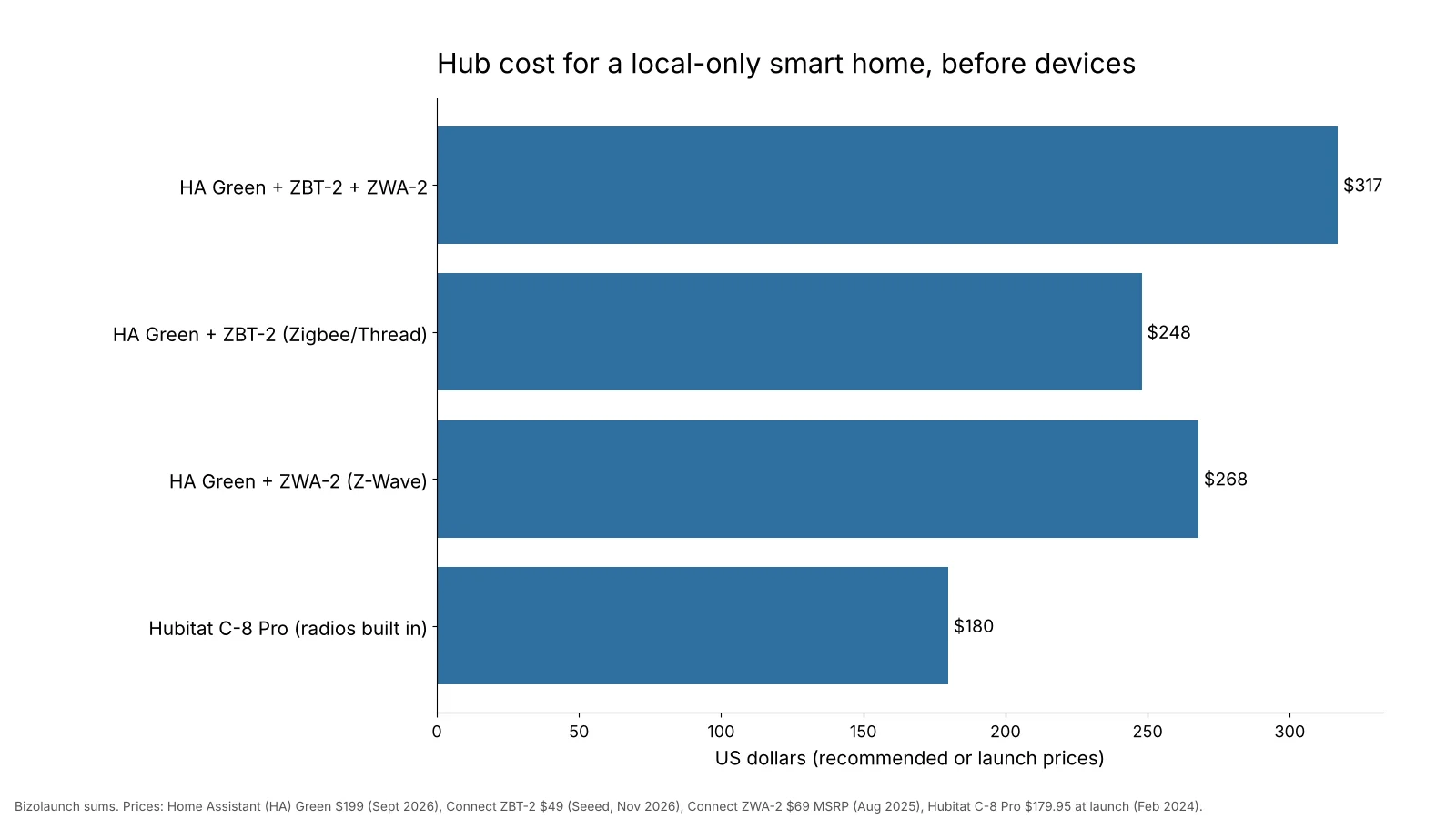
The hub hardware for a local-only setup costs about $180 to $317, by our sums from official and launch prices. This guide shows the two main routes, what each piece does, which devices to avoid, and a step-by-step plan for building one room at a time.

What Keeps Working When the Internet Is Down
An internet outage does not have to mean a dead smart home, because what keeps working depends on where each decision is made. If a motion sensor talks to a hub on your shelf, and that hub turns on a light, nothing ever leaves the house. If the same sensor reports to a company’s server first, the light waits for the internet.
| Function | Works offline with a local hub? | Why |
|---|---|---|
| Automations (motion turns on lights, schedules) | Yes | The hub runs the rules itself |
| Zigbee and Z-Wave devices | Yes | They talk straight to the hub’s radio |
| Matter devices | Yes | Matter products run locally and always allow local control |
| Phone app on home Wi-Fi | Yes | The phone reaches the hub over your local network |
| Control from outside the house | No | Remote access needs an internet link |
| Cloud voice assistants | No | Speech is processed on the company’s servers |
| Wi-Fi gadgets that only work through their maker’s cloud app | Usually no | The app talks to a server, not to the device |
The last row is where most first-time buyers get caught out. Many cheap Wi-Fi plugs and cameras look local because they sit on your network, but every command goes out to the cloud and back. Choosing the right radio standard avoids that problem from the start.
Zigbee, Z-Wave, Thread and Matter in Plain Terms
These four names cause more confusion than anything else in home automation, so it helps to sort them by the job each one does. Zigbee, Z-Wave and Thread are radio languages, while Matter is a shared set of rules that sits on top of Wi-Fi or Thread, so devices from different brands can work with the same controller.
- Zigbee: a low-power mesh radio on 2.4 GHz. Sensors, bulbs and plugs pass messages to each other, so coverage grows as you add mains-powered devices.
- Z-Wave: a mesh radio on sub-GHz frequencies, between 865 and 926 MHz depending on region, away from busy Wi-Fi. More than 4,500 Z-Wave devices are certified, and Z-Wave Long Range devices can link directly to the hub over long distances.
- Thread: a newer low-power mesh radio, also on 2.4 GHz, that carries Matter. It needs a Thread border router to connect to the rest of your network.
- Matter: the shared standard. A Matter device can join Home Assistant, Apple Home, Google Home or others, and it is controlled locally.
Z-Wave’s separate frequency band is a real plus in apartment blocks, where dozens of Wi-Fi networks crowd the 2.4 GHz band. Zigbee devices tend to be cheaper and come in more varieties, and Matter is the safest long-term bet for new devices, because many big brands now support it.
Route One: Home Assistant With Add-On Radios
Home Assistant is free, open-source home automation software that runs on a small box in your home. Its maker, Nabu Casa, sells a ready-made box called Home Assistant Green. The Green has a recommended price of $199 (€179 in Europe), a quad-core Rockchip RK3566 chip, 4 GB of RAM, 32 GB of storage and Gigabit Ethernet. The Green has no built-in Zigbee or Thread radio, so you add one by USB.
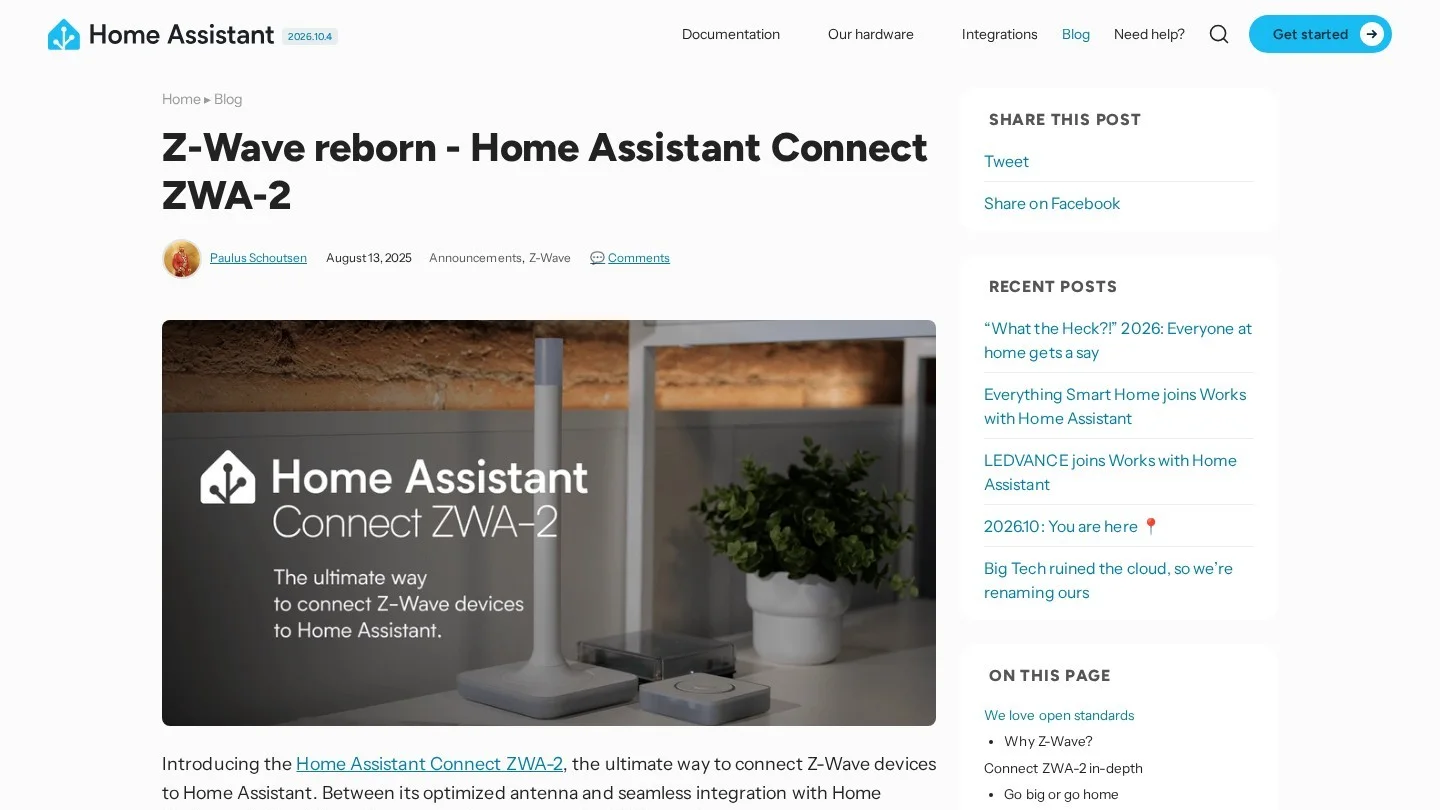
Two official adapters from the same company cover the radios. The Home Assistant Connect ZBT-2 handles Zigbee or Thread and sells for $49. It runs one protocol at a time; the makers chose not to run both at once because that mode was not stable. The Connect ZWA-2 adds Z-Wave and Z-Wave Long Range, with a recommended price of $69 at its August 13, 2025 launch. In the makers’ own testing, Long Range reached 1.5 km line of sight, though results vary by home.
The main strength of this route is reach, since Home Assistant works with a very wide range of brands, and it can act as a Matter controller and a Thread border router itself. The trade-off is learning time: it rewards people who enjoy tinkering, and it has more settings than a plug-and-play hub.
Route Two: Hubitat With Radios Built In
Hubitat Elevation is a hub built around running automations on the device. The C-8 Pro model, launched in February 2024, packs a Z-Wave 800 radio, a Zigbee 3.0 radio, Wi-Fi, Ethernet and Matter support into one box with two external antennas. Its launch price on Hubitat’s store was $179.95, with 2 GB of RAM, double the standard C-8.
Prices on Hubitat’s store have moved since that launch, and in April 2026 Hubitat’s own store had it at $149.95 against a $200 regular price, so check the current price before you buy. The appeal is simple: one box, no extra adapters, and a setup aimed at people who want a working system rather than a project. Because Zigbee and Z-Wave radios are both built in, you also avoid the USB extension cables and adapter placement that the Home Assistant route needs.
What a Local Hub Setup Costs
We added up the hub hardware for four common starting points. Devices such as bulbs, sensors and locks come on top and depend on how much of the house you automate.
| Setup | Parts | Hub cost | Radios covered |
|---|---|---|---|
| Full Home Assistant | Green $199 + ZBT-2 $49 + ZWA-2 $69 | $317 | Zigbee or Thread, plus Z-Wave |
| Home Assistant for Zigbee or Thread | Green $199 + ZBT-2 $49 | $248 | Zigbee or Thread |
| Home Assistant for Z-Wave | Green $199 + ZWA-2 $69 | $268 | Z-Wave and Z-Wave Long Range |
| Hubitat C-8 Pro | One hub | $179.95 at launch | Zigbee, Z-Wave, Matter |
Running costs are tiny compared with the hardware. Nabu Casa rates the Green at about 1.7 watts idle and 3 watts under load. Over a full year that adds up to 14.9 to 26.3 kWh, and at the US average residential price of 18.16 cents per kWh for January to June 2026, the hub costs about $2.70 to $4.77 a year to run. Neither hub needs a subscription for local use.
Step-by-Step Plan for an Offline Smart Home
Build in this order, and test each step with your internet cable unplugged before moving on. That one habit catches cloud-dependent devices before you buy more of them.
- Put the hub on wired Ethernet. Plug it into your router and give it a fixed address in the router settings, so your phone can always find it.
- Add the radios you need. Plug in a Zigbee, Thread or Z-Wave adapter on a short USB extension cable, so the radio sits away from the hub and other electronics.
- Start with mains-powered devices. Smart plugs and wired switches act as mesh repeaters, which strengthens the network for battery sensors you add later.
- Add sensors and build one automation. A motion-activated hallway light is a good first test, so unplug the internet and check that it still fires.
- Add Matter devices with care. Pairing uses Bluetooth from your phone, so stand near the device. Thread devices also need a border router nearby, which can be Home Assistant itself.
- Put the router and hub on backup power. A small uninterruptible power supply keeps local control alive through short power cuts.
A few network rules are worth following for Matter. IPv6 must be enabled on the local network, though no IPv6 internet service is needed. Matter devices should be on the same network segment as Home Assistant, and a simple, flat network works better than VLANs and multicast filtering.
Devices to Choose and Devices to Skip
For lights, plugs, sensors, locks and thermostats, look for “Zigbee,” “Z-Wave” or “Matter” on the box. Devices that carry these labels talk to your hub directly, without needing a cloud account. A Matter logo is the easiest signal for new buyers, because the standard requires local control.
Be careful with products that need their own app and account to work at all. Some brands also require an account to turn on Matter on their own branded hubs, so read the setup steps before you buy. Cameras are a special case: recording to a local video recorder keeps footage in the house, while cloud cameras stop recording remotely when the internet is down.
Some devices matter more than others when the internet fails, and a smart water leak detector that can close a valve on its own, without waiting for a server, is one of the best reasons to go local. The same goes for an energy monitor that stores data at home, such as IoTaWatt, which keeps its history when the connection drops.
A Starter Layout for a Two-Bedroom Apartment
It is easier to picture a local system with a real floor plan in mind, so this is how we would lay out a typical two-bedroom apartment using the steps above. The hub and router sit together in the living room, near the middle of the home, because a central position gives the radios the shortest path to every room.
The first purchases are two or three mains-powered devices spread across the apartment, such as a smart plug in each bedroom and a wired switch in the kitchen. These act as relay points for the mesh, so later battery devices in far corners have a strong path back to the hub. Only after that would we add door sensors, motion sensors and a leak sensor under the kitchen sink, each tested with the internet unplugged.
For an apartment in a crowded building, Z-Wave is worth a close look, because its sub-GHz band avoids the 2.4 GHz traffic from neighbors’ Wi-Fi networks. For a house with large gardens or a detached garage, Z-Wave Long Range devices can reach outbuildings that a normal mesh would struggle with. In both cases, adding a Matter device later is straightforward, because the same hub can act as the Matter controller without any change to the rest of the system.
Privacy and Security Gains From Keeping Control Local
A local smart home sends far less personal data out of the house than a cloud-based one. Motion events, door openings and light schedules stay on your hub instead of building up on a company’s servers. That also shrinks the number of accounts and passwords that could be leaked.
Keeping control local does not remove the need for basic security, though. Keep the hub’s software updated, use a strong password, and put smart devices on your main network only if you trust them. Many of the habits in our small business cybersecurity checklist apply at home too, from unique passwords to regular updates. If you later want remote access, choose an encrypted route offered by your hub rather than opening ports on your router.
Your Wi-Fi still matters, even offline, because your phone reaches the hub over it. A modern router helps in larger homes, and our explainer on what Wi-Fi 7 changes covers whether an upgrade is worth it. The idea of processing data close to where it is created is the same one behind edge computing in industry, just at the scale of one house.
Questions About Running a Smart Home Offline
Can a Smart Home Work Without Wi-Fi?
Zigbee, Z-Wave and Thread devices do not use Wi-Fi to talk to the hub, so automations keep running. You still need a local network for your phone to reach the hub, which can be your router with the internet cable unplugged.
Does Matter Need the Internet?
Matter devices always allow local control, without cloud services. Pairing happens over Bluetooth from your phone, and Thread devices need a local border router.
Does Home Assistant Work Offline?
Yes, because it runs on a box in your home, and Zigbee, Z-Wave and Matter devices connect to it locally. Cloud-only integrations and remote access stop until the connection returns.
Is Zigbee or Z-Wave Better for a Local Setup?
Both work locally. Z-Wave uses a quieter sub-GHz band and offers Long Range, while Zigbee devices are usually cheaper. Many homes use both, which the Hubitat C-8 Pro supports out of the box.
Hardware Pages and Docs Behind This Guide
- Official: Home Assistant Connect ZWA-2 launch post, Home Assistant Matter documentation, Seeed Studio ZBT-2 listing.
- Reports: CNX Software on ZBT-2 (November 2025), CNX Software on Hubitat C-8 Pro (February 2024), WindowsForum on Home Assistant Green (September 2026), Slickdeals post on Hubitat pricing (April 2026).
- Electricity price: EIA Electric Power Monthly, Table 5.3.