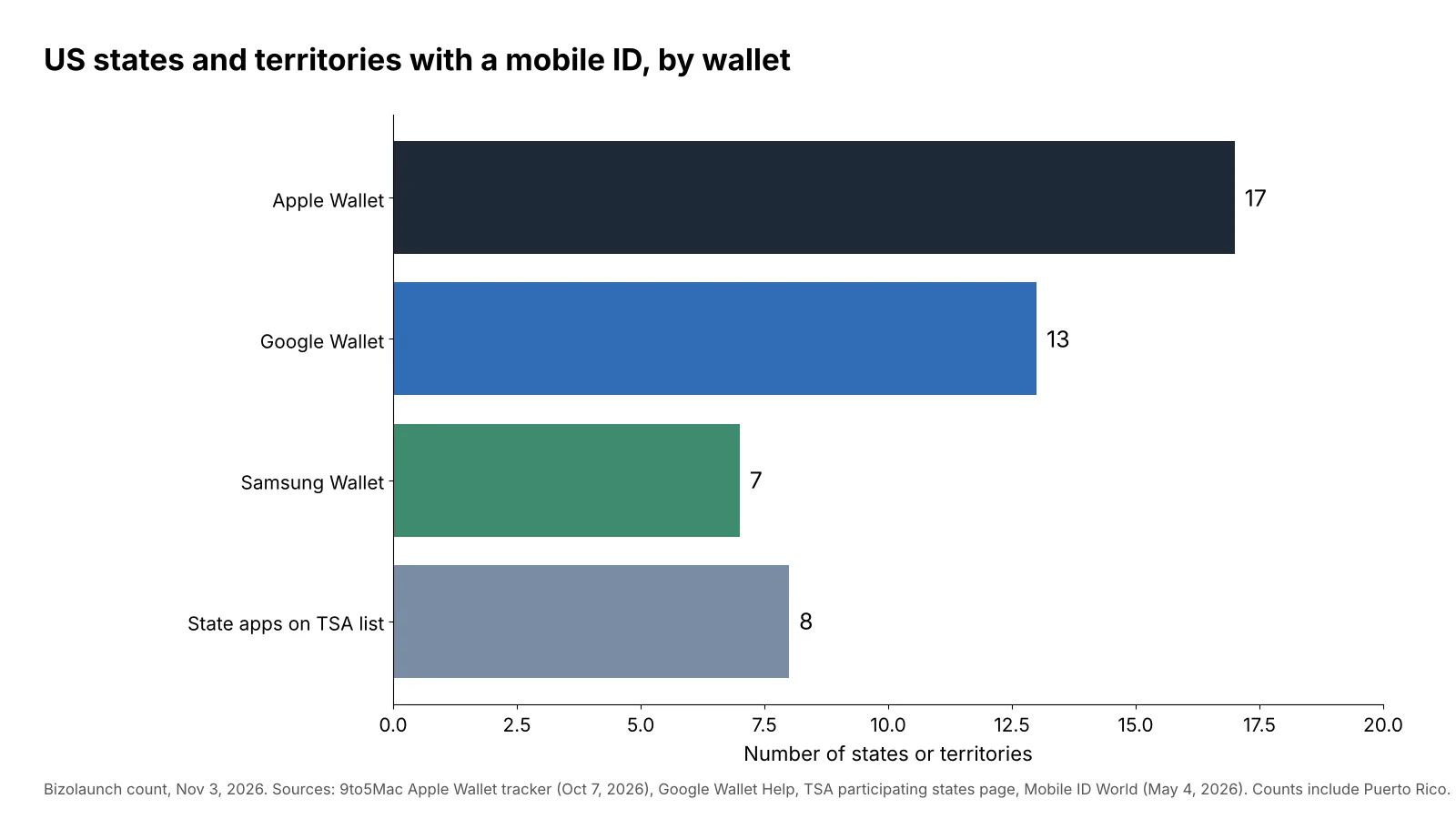
The best digital identity wallet in the USA is the one your state supports, and Apple Wallet works in the most states. Apple Wallet takes driver’s licenses or state IDs from 16 states plus Puerto Rico. Google Wallet covers 12 states plus Puerto Rico, Samsung Wallet covers seven states, and eight states run their own mobile ID apps that TSA accepts. If your state is not on any of those lists, a U.S. passport can now become a digital ID in Apple Wallet or Google Wallet for domestic flights.
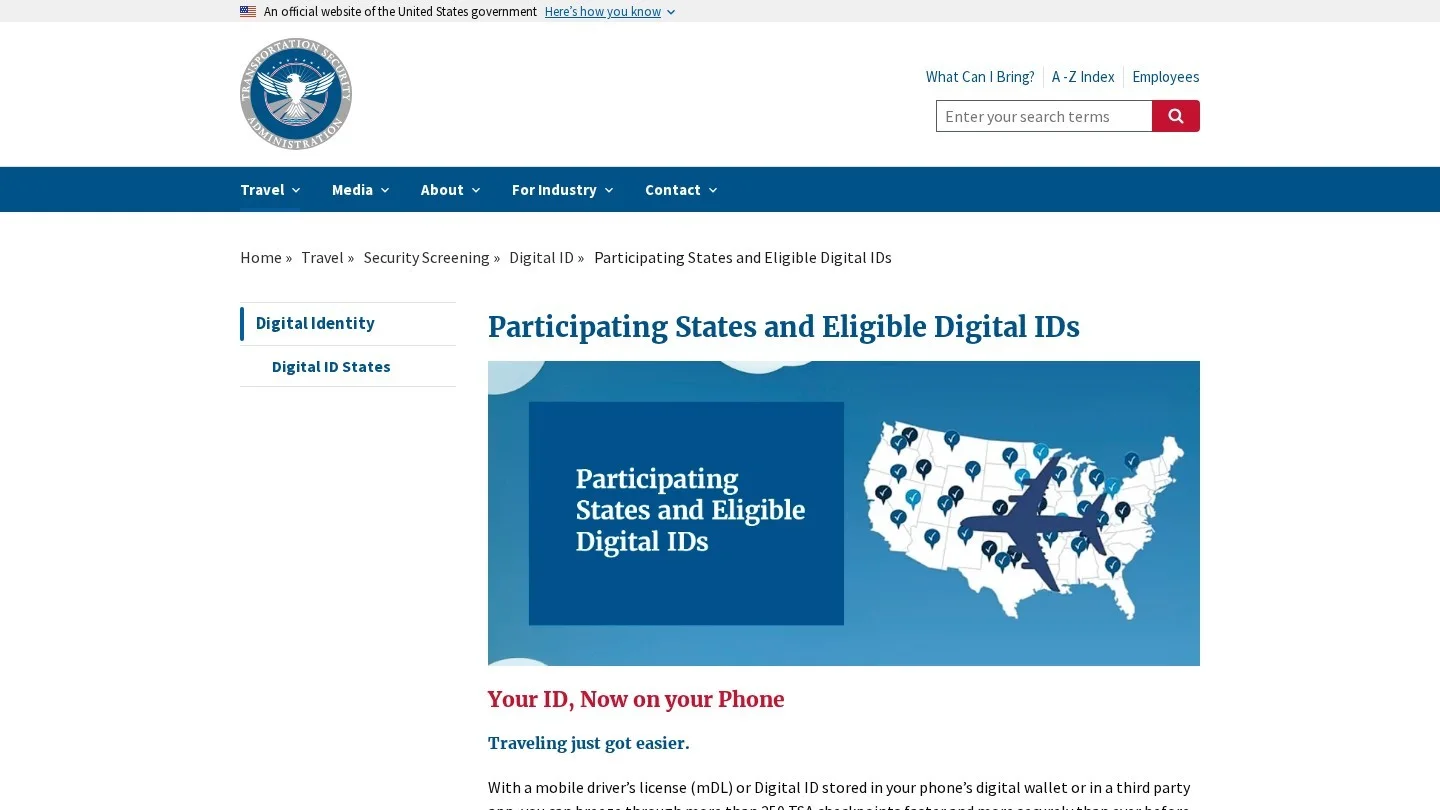
We lined up TSA’s list of participating states against each wallet’s supported states, one state at a time. The gaps matter, because a wallet can accept your license before TSA lists that pairing.
Mobile ID Coverage by Wallet
- Apple Wallet: 17 jurisdictions (16 states plus Puerto Rico), the widest reach in our count.
- Google Wallet: 13 jurisdictions (12 states plus Puerto Rico), plus an ID pass built from a U.S. passport.
- Samsung Wallet: seven states in our count, plus a separate Samsung ID with CLEAR that uses a passport.
- State apps on TSA’s list: Arkansas, California, Iowa, Louisiana, New York, Utah, Virginia and West Virginia.
- Carry the card anyway: TSA says travelers should always carry a physical, acceptable ID.

How a Mobile Driver’s License Works at the Airport
A mobile driver’s license, often shortened to mDL, is a digitally signed copy of your state ID that the DMV issues to your phone after you scan your card and take a selfie in the wallet app. Because the state signs the data, a reader can check that nobody edited your name, photo or birth date.
At a TSA checkpoint you do not hand over your phone; you tap it on the reader or scan a code, then approve the request with Face ID, a fingerprint or your PIN, and the reader shows the officer your photo and details. Samsung’s own page describes both methods, an NFC tap or a QR code shown in the app, and says a compatible TSA reader is required.
This is a different model from a photo of your license, because a screenshot proves nothing when anyone can edit an image. A signed credential can be checked by a machine, and the phone shares only what the reader asks for. Your physical card still matters, though, since an officer will ask for the plastic one if the reader is down or the lane does not take digital IDs.
The Federal Rule Behind TSA’s Acceptance
REAL ID enforcement began on May 7, 2025. Mobile IDs needed their own legal path, so TSA published a final rule in October 2024 that took effect on November 25, 2024. It lets states apply for a temporary waiver so their mDLs can keep working at checkpoints. When TSA announced the rule, 11 states and 27 airports were taking part. Mobile IDs now work at more than 250 checkpoints.
One detail trips people up. Only a REAL ID compliant digital ID is accepted at TSA checkpoints for domestic travel. If your card lacks the REAL ID star, the digital copy will not get you through security.
Our State-by-State Table of Digital ID Wallets
The last column shows what TSA lists for that state.
| State | Apple Wallet | Google Wallet | Samsung Wallet | State app | What TSA lists |
|---|---|---|---|---|---|
| Arizona | Yes | Yes | Yes | None listed | Apple, Google, Samsung |
| Arkansas | Yes (May 2026) | Yes | Not listed | Arkansas Mobile ID | State app only |
| California | Yes | Yes | Yes (May 2026) | CA DMV Wallet | State app, Apple, Google |
| Colorado | Yes | Yes | Yes | None listed | Apple, Google, Samsung |
| Georgia | Yes | Yes | Yes | None listed | Apple, Google, Samsung |
| Hawaii | Yes | No | No | None listed | Apple |
| Illinois | Yes (Nov 2025) | No | No | None listed | Not listed |
| Iowa | Yes | Yes | Yes | Iowa Mobile ID | State app, Apple, Google, Samsung |
| Louisiana | No | No | No | LA Wallet | State app |
| Maryland | Yes | Yes | Yes | None listed | Apple, Google, Samsung |
| Montana | Yes (Aug 2025) | Yes | No | None listed | Not listed |
| New Mexico | Yes | Yes | No | None listed | Apple, Google |
| New York | No | No | No | NY MiD | State app |
| North Dakota | Yes (Sep 2025) | Yes | No | None listed | Not listed |
| Ohio | Yes | Yes | No | None listed | Apple |
| Oklahoma | Yes (Sep 2026) | Yes | No | None listed | Not listed |
| Puerto Rico | Yes | Yes | No | None listed | Apple |
| Utah | No | No | No | GET Mobile | State app |
| Virginia | Yes (Aug 2026) | No | No | VA MiD | State app |
| West Virginia | Yes (Oct 2025) | Coming | Yes | WV MiD | State app, Samsung |
Two patterns jump out of the table. First, 20 jurisdictions offer some kind of mobile ID in our count, but only 16 of them appear on TSA’s list. Illinois, Montana, North Dakota and Oklahoma have wallet support but no TSA entry. Second, several states show more wallets than TSA lists. Arkansas residents can add a license to Apple or Google Wallet, yet TSA’s list names only the Arkansas Mobile ID app for that state.
Our advice is simple: before a trip, open TSA’s page and find your state and your wallet together, and if the pair is missing, plan to show your card even if the wallet took your license without complaint.
Apple Wallet: The Widest State Coverage
Apple was first to scale. Arizona went live in March 2022 and Maryland in May 2022. Since then Apple has added a steady run of states, with Virginia in August 2026 and Oklahoma in September 2026 the most recent. Utah, Kentucky, Connecticut and Mississippi have been reported as coming, with no firm dates. North Carolina plans its own NC Wallet app first, and Apple Wallet support is expected in early 2027.
Apple’s other big step is the Digital ID made from a U.S. passport. It arrived with iOS 26.1 in November 2025 and does not depend on your state. You need an iPhone 11 or later, an unexpired passport, an Apple Account with two-factor sign-in and Face ID or Touch ID turned on. Setup scans the passport photo page, reads its chip and asks for a selfie. You must be at least 13.
The passport Digital ID works for domestic flights at participating TSA checkpoints. It is not a digital passport and it will not get you across a border. For someone in New York, Louisiana or Utah, where Apple Wallet does not take the state license yet, it is the easiest way to keep a TSA-ready ID on an iPhone.
The trade-off is lock-in, since Apple’s ID lives on one iPhone and an optional Apple Watch, and switching phones means adding it again.
Google Wallet: Twelve States and a Passport ID Pass
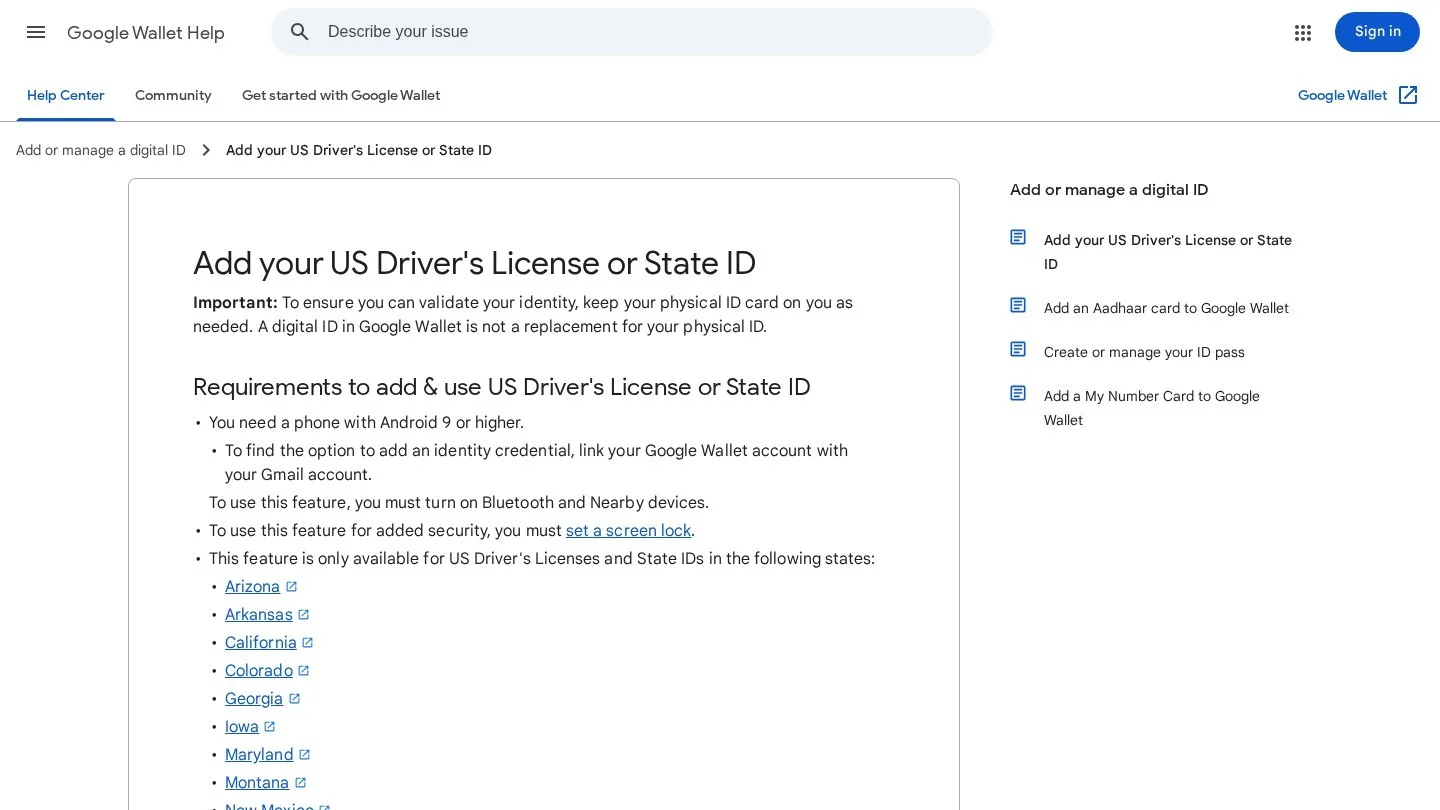
Google Wallet supports Arizona, Arkansas, California, Colorado, Georgia, Iowa, Maryland, Montana, New Mexico, North Dakota, Ohio, Oklahoma and Puerto Rico. Maryland went live in December 2022 and Oklahoma in October 2026, with West Virginia announced as next.
The requirements are light: you need Android 9 or later, a screen lock, Bluetooth and Nearby devices turned on, and a Google Wallet account linked to Gmail. Two rules surprise people. The ID can live on only one device at a time, and if your phone stays offline for more than 30 days in a row, the ID becomes unavailable until it reconnects.
TSA also accepts a U.S. passport ID pass in Google Wallet for domestic travel. That gives Android users the same escape hatch iPhone users have when their state is not supported.
Google also says some apps, such as car rental services, can accept the ID for identity and age checks. That use is growing, but it varies by company, so check the rental counter’s own rules.
Samsung Wallet: Strong in a Few States
Samsung partnered with IDEMIA for its first states, Arizona and Iowa. TSA now accepts Samsung Wallet for Arizona, Colorado, Georgia, Iowa, Maryland and West Virginia, and California added Samsung Wallet in spring 2026. Samsung does not publish a state list and tells users to check with their motor vehicle agency.
Samsung offers a second product that is easy to confuse with an mDL. Samsung ID with CLEAR uses a valid U.S. passport, and CLEAR+ is an optional paid upgrade. The mobile driver’s license, by contrast, is backed by your state card and is described as a companion to it, not a replacement.
If you own a Galaxy phone in Colorado or Maryland, Samsung Wallet and Google Wallet both work, so pick the one you already use for payments. If you live in West Virginia, Samsung is one of only two wallet options TSA lists, along with the state’s WV MiD app.
State Mobile ID Apps and When They Beat a Phone Wallet
Some states built their own apps before Apple and Google arrived. TSA accepts eight of them: Arkansas Mobile ID, CA DMV Wallet, Iowa Mobile ID, LA Wallet, NY MiD, Utah’s GET Mobile app, VA MiD and WV MiD.
State apps have two real advantages. They work on more phones because they are not tied to one wallet maker, and in New York, Louisiana and Utah they are the only state option on TSA’s list. California shows how popular they can be. The state’s program has 1.7 million active mobile credentials, with about 900,000 held in the DMV’s own app.
The drawback is reach outside the airport. A traffic stop, a bar or a pharmacy may or may not accept a state app, because acceptance at those places depends on state law and on the business, so the card in your pocket is still the safest proof of age.
Picking the Right Wallet for Your Situation
The ranking changes with your phone and your state, so we sorted the choice by situation rather than declaring one winner.
- iPhone owner in a supported state: Apple Wallet. It has the widest coverage and works on Apple Watch too.
- iPhone owner in New York, Louisiana or Utah: use the state app for in-state checks, and add the passport Digital ID for flights.
- Android owner on a non-Samsung phone: Google Wallet if your state is listed, otherwise the passport ID pass.
- Galaxy owner in Arizona, Colorado, Georgia, Iowa, Maryland or West Virginia: Samsung Wallet or Google Wallet. Choose the wallet that already holds your cards.
- Frequent flyer with no REAL ID: fix the card first. A digital copy of a non-REAL ID license will not pass TSA.
- Teen traveler: Apple’s passport Digital ID requires the holder to be at least 13, so younger children still need adult help at security.
If you fly often, a digital ID pairs well with other small comforts on the road. Our list of US airports with sleeping pods covers the long layovers where you will meet a TSA checkpoint more than once.

Privacy and Security Trade-Offs of Phone-Based IDs
A mobile ID can share less than a plastic card, which shows the clerk your address, your full birth date and your license number every time you hand it over. An mDL reader asks for specific fields, and the wallet shows you the request before you approve it. The mDL standard also lets a reader ask only if you are over a set age, instead of reading your birth date.
The phone also adds a lock. Google requires a screen lock, Samsung uses a fingerprint or PIN, and Apple’s Digital ID needs Face ID or Touch ID. Someone who steals the phone cannot easily present your ID without getting past that lock.
The risks are different, not gone, because an ID tied to an online account is only as safe as that account. Turn on two-factor sign-in, and be wary of messages that claim your “digital ID needs verification.” Those are a common lure, and our guide to phishing email examples shows how such messages are built. Stronger sign-in methods also help here, which is why our run of guides on passwordless authentication software spends time on passkeys, the same kind of phone-held key a wallet uses.
If you manage company phones, add mobile IDs to your device policy and staff guidance. Our small business cybersecurity checklist has a section on phone security that fits.
Adding a Driver’s License to Your Phone, Step by Step
The flow is similar in every wallet, and most of the work is scanning and waiting.
- Check eligibility: find your state and wallet on TSA’s page and on the wallet’s own help page.
- Update the phone: install the latest system update and wallet app.
- Turn on a screen lock and biometrics: the wallet will refuse to start without them.
- Scan the card: photograph the front and back in good light, without glare.
- Take the selfie check: the state compares a short selfie with your card photo before it issues the ID.
- Wait for the state: the wallet tells you when the DMV has approved the ID.
- Test before you fly: open the ID, check that the details match your card, and keep the card with you.
If the state turns the request down, rescan the card in better light and make sure the card is current. A card close to expiry is worth renewing before you try again.
How Biometric Checks in Wallets Connect to Payments
The same phone hardware that guards your ID also approves card payments. If you want to understand how a face scan becomes a payment approval, and why the odds of a stranger getting in are so low, our explainer on how biometric payment systems work runs the numbers from Apple’s published false-match rates.
Questions Travelers Ask About Digital IDs
Can I Use Apple Wallet or Google Wallet Instead of My Driver’s License at TSA?
Yes, at participating checkpoints, if your state and wallet are on TSA’s list and the ID is REAL ID compliant. TSA still asks travelers to carry a physical ID.
Which States Have a Digital Driver’s License in Apple Wallet?
Apple Wallet supports Arizona, Arkansas, California, Colorado, Georgia, Hawaii, Illinois, Iowa, Maryland, Montana, New Mexico, North Dakota, Ohio, Oklahoma, Virginia, West Virginia and Puerto Rico.
Is a Digital ID Accepted Everywhere a Card Is?
No. Acceptance by police, stores, bars and banks depends on state law and each business, so keep the card for anything other than the uses your state lists.
What If My State Does Not Offer a Mobile ID Yet?
Use a U.S. passport instead, since Apple Wallet’s Digital ID and Google Wallet’s ID pass both work for domestic flights at participating checkpoints.
Does a Phone ID Work Without Internet?
Usually yes at the checkpoint, because the tap works over short-range radio. Google warns that its ID becomes unavailable if the phone is offline for more than 30 straight days.
Official and Press Pages Behind Our State Table
- TSA: Participating States and Eligible Digital IDs and the October 2024 mDL rule announcement.
- Google: Add your US Driver’s License or State ID.
- Samsung: Samsung Wallet digital ID.
- Apple rollout and passport Digital ID requirements: 9to5Mac tracker (October 7, 2026) and MacRumors (August 17, 2026).
- Google rollout dates: 9to5Google (September 5, 2026).
- California volumes and Samsung launch: Mobile ID World (May 4, 2026).