
The FBI received 191,561 phishing and spoofing complaints in 2025, more than any other kind of cybercrime and more than double the next category. Most of those scams arrived the same way, as an email that looked routine enough for the recipient to act on without a second thought. A phishing email almost always gives itself away in one of four places. The sender address does not match the company, the message pushes you to act fast, it contains a link or attachment you did not expect, and it asks for something a real sender would never request by email, such as a password, a code, a gift card or a change of bank details.
Below are seven phishing email examples, each marked up with the red flags that give it away. We wrote every example ourselves to show the patterns that keep coming up, and the names, companies, addresses and links are invented, and the web addresses use the reserved “.example” ending so they cannot point anywhere real.
191,561 Phishing Reports, $3 Billion in BEC and Three Quick Tests
- Phishing and spoofing topped the FBI’s 2025 complaint list with 191,561 reports, though losses tagged as phishing were $215.8 million. The bigger money went to business email compromise, at $3.04 billion.
- Most phishing emails fail at least one simple test: hover over the link, read the real sender address, and ask whether the request makes sense through email at all.
- Requests to change bank details, buy gift cards or approve an unexpected sign-in prompt are the most expensive scams to fall for. Verify each one through a phone number or app you already trust.
- If you clicked, act in this order: disconnect, change the password from a clean device, turn on multi-factor authentication, call your bank if money or card details are involved, then report it.
- In the US, forward phishing to reportphishing@apwg.org and report losses at ReportFraud.ftc.gov or ic3.gov. In India, call 1930 or file at cybercrime.gov.in.
What the 2025 Numbers Say About Phishing
Three big reports give the clearest picture of how much phishing costs, and they measure different things. The FBI’s 2025 Internet Crime Report counts complaints filed with its Internet Crime Complaint Center (IC3). It logged more than one million complaints and $20.877 billion in reported losses, up 26% on the year before, according to a summary by Help Net Security.
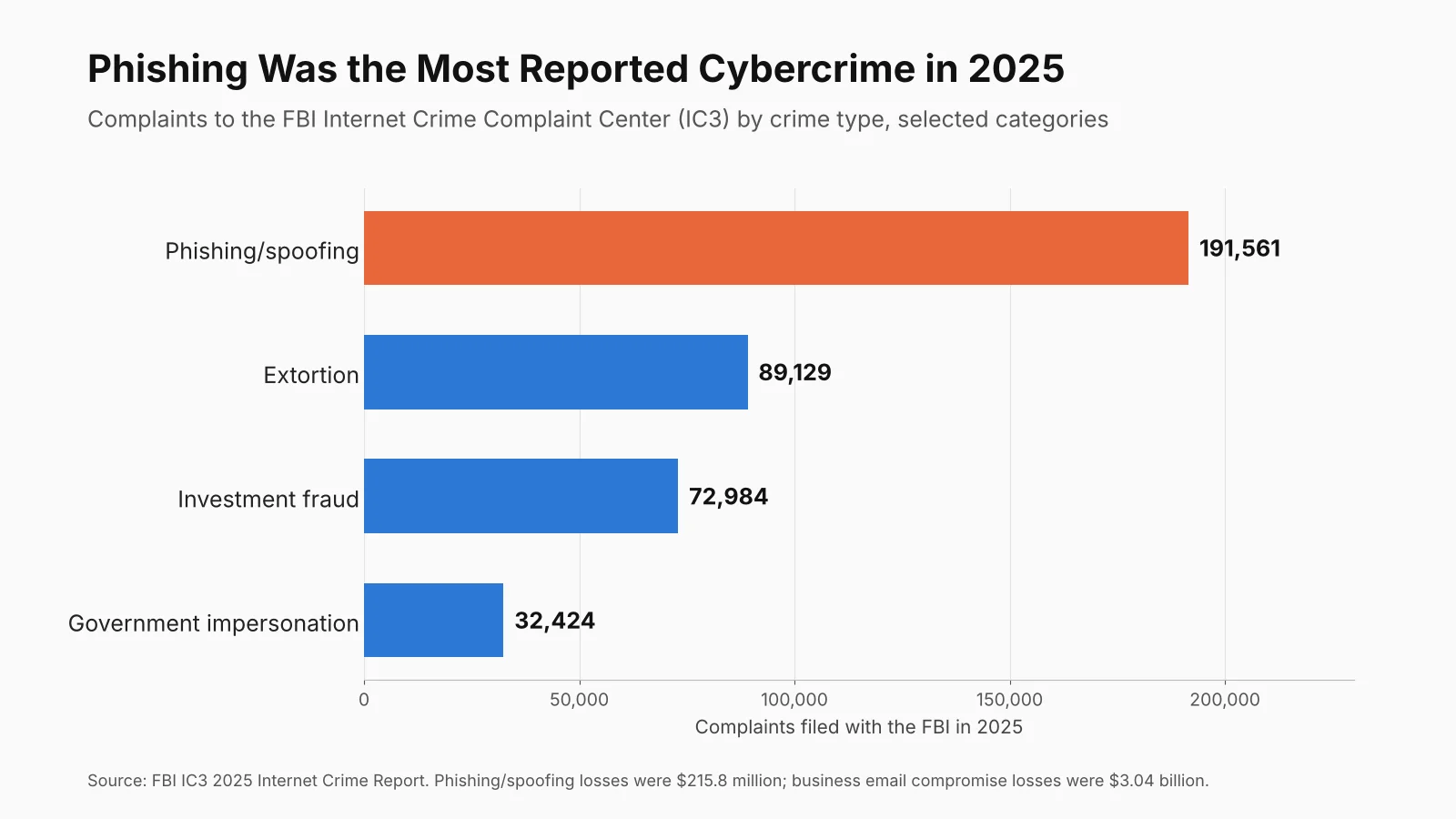
The chart shows how far ahead phishing sits on volume. The dollar figures tell a different story, because a phishing email is usually the first step rather than the theft itself, and the loss often gets filed under whatever came next, such as a fake invoice that was paid or an account that was taken over.
| Measure | Figure | Source |
|---|---|---|
| Phishing/spoofing complaints, 2025 | 191,561 | FBI IC3 |
| Phishing/spoofing losses, 2025 | $215.8 million | FBI IC3 |
| Business email compromise losses, 2025 | $3.04 billion | FBI IC3 |
| Government impersonation complaints and losses, 2025 | 32,424 complaints, $797.9 million | FBI IC3 |
| Total fraud losses reported to the FTC, 2025 | $15.9 billion from 3 million fraud reports | FTC testimony, March 2026 |
| Impersonation scams reported to the FTC, 2025 | Over 1 million reports, over $3.5 billion lost | FTC testimony, March 2026 |
| Median click rate in phishing email simulations | 1.4% | Verizon 2026 DBIR |
The Federal Trade Commission runs a separate database, Consumer Sentinel. In testimony to Congress in March 2026, the agency said consumers reported $15.9 billion in fraud losses in 2025. Impersonation scams, the family most phishing emails belong to, made up more than 1 million reports and more than $3.5 billion of those losses.
Verizon’s 2026 Data Breach Investigations Report looks at company breaches rather than consumer complaints. After analyzing more than 22,000 confirmed breaches, one finding stands out for anyone who runs training: in phishing simulations, the median click rate for email was 1.4%. That sounds small, but in a company that sends 50 staff a fake lure every month, it still means someone clicks most months.
Seven Phishing Email Examples, Annotated
Each example below shows the email as it might land in an inbox, followed by the red flags and then a description of what a genuine message from that sender would look like. Read them as a set, because the same psychological tricks repeat across all seven.
1. The Fake Invoice and Bank Detail Change
This is the scam that costs businesses the most, and it hides inside normal accounts payable work, so it rarely feels like a scam at all.
ILLUSTRATIVE EXAMPLE. Names and addresses are invented.
From: Dana Ruiz <accounts@northfield-supp1y.example>
Subject: Updated remittance details - Invoice 4471 overdue

Hi,
Please note our bank has changed following an audit. Invoice 4471
for $18,640.00 is now 12 days overdue. Kindly remit to the new account
in the attached PDF today to avoid a late fee and a hold on your orders.
Please reply to this email only, as our phones are being upgraded.
Regards, Dana, Accounts Receivable
- Look-alike domain: “supp1y” uses the number 1 in place of the letter l, and real suppliers do not change their email domain without warning.
- Bank details changed by email: no supplier should switch payment accounts through a single message, and this request is the core of business email compromise.
- Blocked call-back: “our phones are being upgraded” exists to stop you from checking.
- Deadline plus penalty: a late fee and an order hold add pressure so you skip your usual checks.
What the real thing looks like: a genuine change of bank details comes with time to verify it, and the safe habit is simple: call the supplier on the number in your own records, never the one in the email, and confirm the new account before paying. Keeping supplier records inside your accounting software also helps, because a sudden change to a saved payee stands out. The IC3 report put business email compromise losses at $3.04 billion for 2025, so this one check is worth more than any other on this page.
2. The Package Delivery Problem
ILLUSTRATIVE EXAMPLE. Names and addresses are invented.
From: Parcel Notice <no-reply@track-parcelhub.example>
Subject: Delivery attempt failed - action required

We were unable to deliver your package (ID 9X4-221-07).
A redelivery fee of $1.95 is due. Update your address and pay
within 24 hours or the item will be returned to sender.
[ Schedule Redelivery ]
- No order details: no sender name, no item and no store, while real delivery notices tie back to something you bought.
- A tiny fee: the $1.95 is the bait, and the real goal is your full card number, expiry date and security code.
- Generic greeting: the message uses no name, because the sender does not know it.
- The button hides the link: hover over it on a computer, or press and hold on a phone, and the address will not belong to a real carrier.
What the real thing looks like: carriers send tracking numbers you can paste into the carrier’s own website or app. If you are expecting a parcel, open the store’s order page yourself and track the delivery from there instead of through the email.
3. The CEO Gift Card Request
ILLUSTRATIVE EXAMPLE. Names and addresses are invented.
From: Mark Ellison <mark.ellison.ceo@freemail.example>
Subject: Quick favor

Are you at your desk? I need a favor done discreetly. I am about to
go into a board meeting and cannot take calls. I want to surprise a
few clients with gift cards. Can you buy 6 x $200 cards and send me
the codes on the back? I will reimburse you today.
Sent from my phone
- Personal email for company business: the “CEO” writes from a free webmail account, not the company domain.
- Secrecy and no calls: “discreetly” and “cannot take calls” stop you from checking with anyone.
- Gift card codes: once the codes are sent, the money is gone. The FTC says no real business or agency will insist you pay with gift cards.
- The soft opener: “Are you at your desk?” is often sent first to see who will reply.
What the real thing looks like: a manager who wants gifts bought will use the company card or ask in person. A two-minute call or chat message to the real person, using contact details you already have, ends this scam. Scammers now use AI tools to write cleaner versions of these notes, so a small team should agree on simple rules for AI and email. Our AI acceptable use policy guide for small businesses covers how to set those rules.
4. The Password Reset or Mailbox Full Warning
ILLUSTRATIVE EXAMPLE. Names and addresses are invented.
From: IT Service Desk <helpdesk@mail-secure-login.example>
Subject: Your mailbox storage is 98% full

Your email account will stop receiving messages in 2 hours.
Sign in below to verify your account and keep your messages.
[ Verify Account ]
Failure to verify will result in permanent deletion.
- Fake sign-in page: the button leads to a copy of a familiar login screen, and whatever you type goes straight to the attacker.
- Wrong sender: your IT team or email provider would use your own company domain or the provider’s real one.
- Threat of loss: “permanent deletion” is meant to rush you.
- No details about you: no name, no account, nothing that shows the sender knows who you are.
What the real thing looks like: storage warnings appear inside the email app or admin console itself. If you are worried, open a new browser tab, type the site address yourself and sign in there. A password manager helps here too, because it will not offer to fill in your saved login on a fake domain, which gives you an early warning that something is off. Our comparison of easy password managers covers free options.
5. The Tax Refund Notice
ILLUSTRATIVE EXAMPLE. Names and addresses are invented.
From: Refund Department <refunds@tax-refund-center.example>
Subject: You are eligible for a tax refund of $1,284.60

After the annual calculation of your fiscal activity, you are
eligible to receive a refund. Submit the form below with your
Social Security number and bank login to receive payment within
3 business days.
- The IRS does not start contact this way: the agency says it does not contact taxpayers by email, text or social media to ask for personal or financial information.
- Bank login requested: no tax agency anywhere needs your online banking password to pay a refund.
- Odd phrasing: “fiscal activity” and “annual calculation” are wording a real tax office would not use.
- A precise figure: an exact amount like $1,284.60 makes the message feel official, but it is only a prop.
What the real thing looks like: in the US, check refund status only on IRS.gov or through a tax professional. The IRS asks people to forward tax-themed phishing to phishing@irs.gov, as its report phishing page explains. Indian taxpayers should treat “refund” emails the same way and check status only by logging in to the official income tax e-filing portal themselves.
6. The MFA Fatigue Attack
This one often starts after a password has already leaked. The attacker signs in with it, which sends a stream of approval prompts to your phone before the email or message arrives.
ILLUSTRATIVE EXAMPLE. Names and addresses are invented.
From: IT Security <security-team@corp-it-support.example>
Subject: Sign-in prompts - please approve to stop them

We are running a security update on your account. You may get
several sign-in requests on your phone. Please tap Approve on the
next one so the update can finish and the alerts will stop.
- A prompt you did not start: if you are not signing in at that moment, every approval request is someone else holding your password.
- A request to approve: real IT teams never need you to approve a sign-in to finish an update.
- Wearing you down: the flood of prompts is the attack itself, since tired people often tap Approve just to make the buzzing stop.
What the real thing looks like: no genuine version of this message exists. Deny the prompt, change your password from a device you trust, and tell your IT contact. CISA’s guidance on multi-factor authentication favors methods that resist this trick, such as number matching (where you type the number shown on screen) and passkeys or hardware security keys.
7. The QR Code Phishing Email
ILLUSTRATIVE EXAMPLE. Names and addresses are invented.
From: HR Benefits <benefits@hr-portal-update.example>
Subject: Action needed: confirm your 2027 benefits enrollment

Your enrollment will lapse unless you confirm by Friday.
For security, scan the QR code below with your phone to sign in.
[ QR code image ]
- A QR code in an email: you are reading the email on a screen already, so a code that must be scanned with a second device makes little sense. Its real purpose is to move you to a phone, where links are harder to inspect and work filters may not apply.
- A sign-in request: the code leads to a login page that captures your username and password.
- A deadline tied to benefits: money and health cover are strong motivators, which is why scammers use them.
What the real thing looks like: HR teams link to the benefits portal you already use, or ask you to sign in through the company intranet. If you make QR codes for your own business, for menus or flyers, a free QR code generator shows the destination address before you print, and customers will learn to check it. Fake e-signature requests work in a similar way, which is one reason to stick with a known e-signature tool and open signing requests from its app or website.

Red Flags That Appear in Almost Every Phishing Email
Strip away the stories and the same handful of tricks keep showing up. The table lists them, where to look, and which examples above use them.
| Red flag | Where to check | Seen in examples |
|---|---|---|
| Sender domain does not match the company, or uses a look-alike spelling | Full sender address, not just the display name | 1, 3, 4, 5 |
| Urgent deadline, threat or penalty | Subject line and first two sentences | 1, 2, 4, 7 |
| Link text does not match the real address | Hover on desktop, press and hold on mobile | 2, 4, 5 |
| Request for passwords, codes, gift cards or bank logins | Any form or reply the email asks for | 3, 4, 5, 6 |
| Change of payment details | Any message about where to send money | 1 |
| Generic greeting or no personal details | Opening line | 2, 4, 5 |
| Tries to move you off email to a phone or approval prompt | QR codes, push prompts, “call this number” | 6, 7 |
| Secrecy or “do not call” | Anywhere in the message | 1, 3 |
Spelling mistakes used to be the easiest clue, but they are less useful now. AI writing tools let scammers produce clean, polite English, and the FBI counted more than 22,000 AI-linked complaints in 2025, according to the Help Net Security summary of its report. Judge the request rather than the grammar, because a perfectly written email that asks you to change bank details is still a scam until you confirm it another way.
How to Check a Suspicious Email Without Clicking Anything
You can test most emails in under a minute without opening a link or an attachment if you work through these checks in order.
- Read the real sender address. On a phone, tap the sender name to reveal the address behind it. Look at the part after the @ sign, and read it letter by letter.
- Check the reply address. Hit Reply but do not send the message, and if the “To” field fills with a different address from the sender, that is a strong warning sign.
- Inspect links without opening them. Hover the mouse over a link and read the address that appears at the bottom of the browser or email window. The part just before “.com” or the country ending is the real site.
- Look at the authentication results. In Gmail, the “Show original” option shows whether the message passed SPF, DKIM and DMARC checks. A failure on a message claiming to be from your bank is close to proof.
- Contact the sender another way. Use a phone number from your own records, the company’s app, or a website address you type yourself.
- Ask before you act. In a business, a two-line message to a colleague (“Is this real?”) costs nothing, and staff should never be blamed for asking.
Businesses can also make spoofing harder from their own side. Publishing SPF, DKIM and DMARC records for your domain makes it much harder for scammers to send mail that looks like it came from you. Our small business cybersecurity checklist walks through those records alongside backups, patching and staff training.
What to Do If You Clicked a Phishing Link
Clicking is not the end of the world, because what matters most is what happened next and how fast you respond. Match your situation to the steps below.
You Clicked but Did Not Enter Anything
Close the page and do not download anything it offers. Run a full scan with your security software, and keep your device and browser updated. Watch for odd behavior over the next few days, such as new browser add-ons or password prompts you did not expect.
You Entered a Password
Change that password at once, from a different device if you can, by typing the real site address yourself. If you used the same password anywhere else, change it there too, and then turn on multi-factor authentication. Check the account’s recent activity, forwarding rules and recovery email address, because attackers often add a hidden forwarding rule so they can keep reading your mail after you change the password. The FTC’s phishing guidance also recommends updating security software and running a scan.
You Shared Card or Bank Details, or Sent Money
Call your bank or card issuer straight away using the number on your card. Ask them to block the card and try to stop or recall any payment. Speed matters most for wire transfers: the FBI says its Recovery Asset Team took 3,900 actions in 2025 on attempted thefts worth more than $1.1 billion, and froze $679 million, according to Help Net Security’s summary of the IC3 report. Report the loss at ic3.gov right after you call the bank. If cryptocurrency was involved, our guide to crypto address whitelisting explains a setting that limits where your exchange can send funds in future.
You Gave Your Social Security Number or Other ID
Go to IdentityTheft.gov, the FTC’s official recovery site, which builds a personal recovery plan and pre-filled letters based on what was exposed. Consider placing a fraud alert or a credit freeze with the credit bureaus.
You Opened an Attachment at Work
Disconnect the device from Wi-Fi or unplug the network cable, but do not switch it off, and then tell your IT contact or manager right away, since speed matters far more than embarrassment. CISA’s phishing guidance stresses reporting quickly so others can be warned and the message removed from other inboxes.
Where to Report Phishing Emails
Reporting helps take scam sites down and warns other people, and since it only takes a minute, you can report to more than one place.
| Where you are | What happened | Where to report |
|---|---|---|
| United States | Any phishing email | Forward it to reportphishing@apwg.org (Anti-Phishing Working Group) |
| United States | Scam email, text or call, with or without loss | ReportFraud.ftc.gov |
| United States | Money lost online, or business email compromise | ic3.gov (FBI Internet Crime Complaint Center) |
| United States | Personal data used to open accounts | IdentityTheft.gov |
| United States | Email pretending to be the IRS | Forward to phishing@irs.gov |
| United States | Scam text message | Forward to 7726 (SPAM) on most carriers |
| United Kingdom | Suspicious email | report@phishing.gov.uk (NCSC) |
| India | Cyber fraud, including money lost | cybercrime.gov.in or the 1930 helpline |
| India | Suspected fraud calls, texts or WhatsApp messages | Chakshu on Sancharsaathi.gov.in |
| Anywhere | Email in your inbox | The “Report phishing” option in Gmail, Outlook or your email app |
The FTC’s 2025 consumer alert on phishing and its main phishing guide both point US readers to reportphishing@apwg.org and ReportFraud.ftc.gov. In India, the National Cyber Crime Reporting Portal at cybercrime.gov.in and the 1930 helpline are run by the Ministry of Home Affairs. Call 1930 as soon as possible after a financial fraud, because quick reports give the best chance of freezing the money. If the email pretended to be a real company, also tell that company. Most banks and big brands publish an abuse or phishing address on their security pages.
Teaching a Small Team to Spot Phishing
Most small businesses do not need a costly training platform to get started, because a short monthly habit works well. Share one real phishing email that reached the team, with the red flags marked up the way they are above. Make reporting easy, and thank people who report, even when it turns out to be a false alarm.
Three rules cover most of the risk for a small team:
- Money moves only after a call: any new payee or change of bank details is confirmed by phone, using a number already on file.
- Nobody approves a prompt they did not start: an unexpected sign-in request is always denied and reported.
- Gift cards are never a payment method: no genuine manager, client or government agency will ask for gift card codes by email.
Pair those rules with technical controls like multi-factor authentication, a password manager and email authentication, and a single click becomes far less likely to turn into a loss.
Opening vs Replying, Unsubscribe Links and Smishing or Vishing
Can You Get Hacked Just by Opening a Phishing Email?
Opening an email on an updated phone or computer is rarely enough on its own. The danger comes from clicking links, opening attachments, enabling macros or replying with information. Loading images can tell the sender your address is active, so many email apps block remote images by default.
What Happens If I Reply to a Phishing Email?
A reply confirms that your address is real and read by a person, which usually means more scam emails. If you only replied and shared nothing, stop responding, report the message and block the sender. If you shared details, follow the steps for that situation above.
How Can I Tell If an Email From My Bank Is Real?
Do not use the links or phone numbers in the email. Open your bank’s app or type its web address yourself, and check for the same message there. Banks do not ask for your full password, PIN or one-time code by email.
Is It Safe to Click Unsubscribe in a Spam Email?
Not in obvious scam emails, because the unsubscribe link may confirm your address or lead to a phishing page. Use your email app’s own unsubscribe or “Report spam” button instead, which does not open the sender’s link.
What Is the Difference Between Phishing, Smishing and Vishing?
They are the same scam delivered through different channels. Phishing usually means email, smishing uses text messages, and vishing uses voice calls. The FTC said text messages were the top contact method by number of fraud reports in 2025, so the same red flags apply to your phone.
Should I Report Phishing Even If I Did Not Fall for It?
Yes. Reports help groups like the Anti-Phishing Working Group and the FTC spot campaigns and get scam sites taken down. Forwarding a message takes seconds and can protect someone less careful.
FBI’s 2025 IC3 Report, FTC Testimony and Verizon DBIR
- FBI Internet Crime Complaint Center: 2025 Internet Crime Report
- Help Net Security: Cybercrime Losses Break the $20 Billion Mark (April 2026)
- Red Sift: FBI IC3 2025 Report and Email Fraud
- FTC: Testimony on the Rising Scam Economy (March 25, 2026)
- Verizon: 2026 Data Breach Investigations Report
- Keepnet: Summary of the 2026 Verizon DBIR With Page References
- FTC Consumer Advice: How to Recognize and Avoid Phishing Scams
- FTC Consumer Alert: Protect Yourself From Phishing Scams (April 2025)
- CISA: Recognize and Report Phishing
- CISA: Multifactor Authentication
- IRS: Report Phishing and Online Scams
- FTC: IdentityTheft.gov
- UK NCSC: Report a Scam Email
- Government of India: National Cyber Crime Reporting Portal
- Department of Telecommunications: Sanchar Saathi