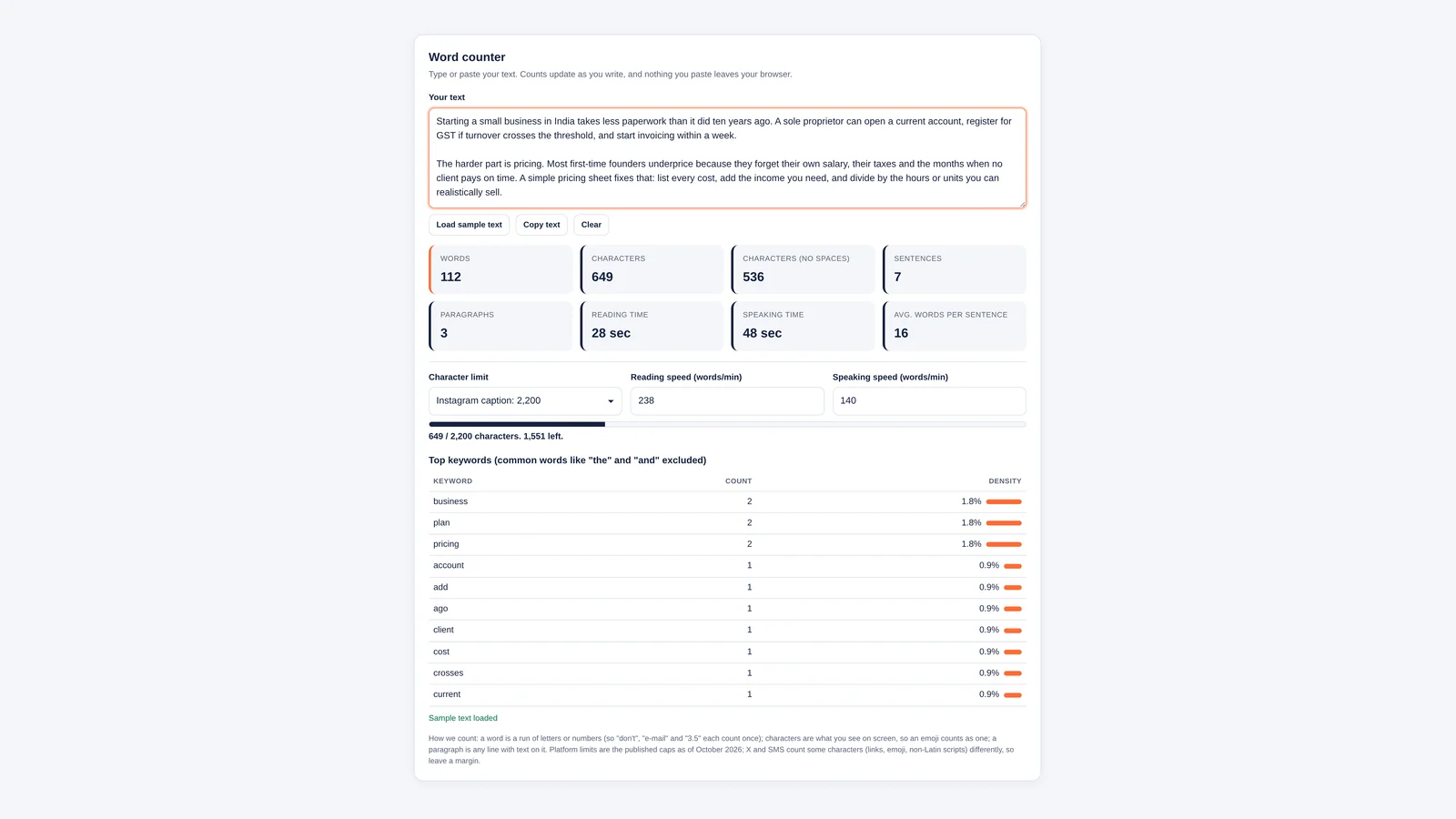
Paste your text into the free word counter below and it tells you, as you type, how many words, characters, sentences and paragraphs you have, how long the piece takes to read or say out loud, and which words you lean on most. It also tracks a character limit for X posts, meta descriptions, YouTube titles, Instagram captions and SMS, so you know you fit before you hit publish.
Everything happens in your browser. Nothing you paste is uploaded or saved, which matters when the draft is a client proposal or an unreleased announcement.
Reading Speed, Emoji Counts and How Keyword Density Works
- Reading time uses 238 words a minute, the average silent reading speed for non-fiction in a 2019 review of 190 studies. You can change it.
- Speaking time defaults to 140 words a minute, a steady presentation pace, and is also adjustable.
- Characters are counted the way you see them, so an emoji with a skin tone counts once, not as four hidden code units.
- The keyword table leaves out common words such as “the” and “and” and shows density as a share of all words.
- Platform limits are a guide. X and SMS count some characters differently, and Google trims search snippets by width, not by a fixed number.
Word counter
Type or paste your text. Counts update as you write, and nothing you paste leaves your browser.
Words
0
Characters
0
Characters (no spaces)
0
Sentences
0
Paragraphs
0
Reading time
0 sec
Speaking time
0 sec
Avg. words per sentence
0
Top keywords (common words like “the” and “and” excluded)
Add some text to see which words you use most.
| Keyword | Count | Density |
|---|
How we count: a word is a run of letters or numbers (so “don’t”, “e-mail” and “3.5” each count once); characters are what you see on screen, so an emoji counts as one; a paragraph is any line with text on it. Platform limits are the published caps as of October 2026; X and SMS count some characters (links, emoji, non-Latin scripts) differently, so leave a margin.
How to Use the Word Counter
- Paste or type: all eight counters update as you write. Press Load sample text to see a filled-in example.
- Pick a limit: choose a preset such as X post (280) or Meta description (about 155), or set your own. A bar fills as you type, turns orange at 90% and red once you go over, and the line under it says how many characters you have left.
- Adjust the speeds: if you read or talk faster or slower than average, change the words-per-minute boxes and the times update.
- Check your keywords: the table lists your ten most-used words with a count and density, so repetition jumps out.
- Copy or clear: Copy text sends your edited draft back to the clipboard; Clear starts again.
How the Counts Work
Word counters disagree more than you would expect, usually over punctuation. These are the rules this one follows:
- Words: a run of letters or digits. Apostrophes, hyphens and decimal points inside a word keep it together, so "don't", "well-known", "3.5" and "e.g." each count as one. Symbols on their own, such as "&" or "–", are not words. Hindi, accented and other non-English letters count normally.
- Characters: every visible character plus spaces and line breaks. Emoji and accented letters built from several code points count once, as you see them.
- Characters without spaces: the same count with all spaces, tabs and line breaks removed.
- Sentences: text ending in a full stop, question mark, exclamation mark or ellipsis, plus any line without end punctuation. Common abbreviations (Mr., Dr., e.g.) and initials do not end a sentence.
- Paragraphs: any line that contains text. Blank lines between paragraphs are ignored.
Reading Time and Speaking Time
The reading speed default comes from Marc Brysbaert's 2019 meta-analysis in the Journal of Memory and Language, which estimated that adults reading English silently get through about 238 words a minute for non-fiction and 260 for fiction, and about 183 when reading aloud. Most business writing is non-fiction, hence 238.
Speeches run slower than reading aloud, because speakers pause for emphasis, slides and laughs. The tool uses 140 words a minute as a starting point; time yourself once and set your own number. Using the defaults:
| Length | Reading time (238 wpm) | Speaking time (140 wpm) |
|---|---|---|
| 250 words | 1 min 3 sec | 1 min 47 sec |
| 500 words | 2 min 6 sec | 3 min 34 sec |
| 1,000 words | 4 min 12 sec | 7 min 9 sec |
| 1,500 words | 6 min 18 sec | 10 min 43 sec |
| 2,500 words | 10 min 30 sec | 17 min 51 sec |
For a five-minute pitch or a two-minute video script, work backwards: at 140 words a minute, two minutes is about 280 words.
Character Limits for Popular Platforms
| Where | Limit | What to know |
|---|---|---|
| X post | 280 | Links count as 23 characters and each emoji or Chinese, Japanese or Korean character as 2 |
| YouTube title | 100 | Descriptions allow 5,000 |
| Instagram caption | 2,200 | Also capped at 30 hashtags and 20 @ tags |
| SMS | 160 | Only 70 if the message contains emoji or non-Latin letters |
| Meta description | About 155 (guide) | Google sets no limit but trims snippets to fit the screen |
| SEO title tag | About 60 (guide) | Also trimmed by width, so wide letters run out sooner |
Sources for each limit, checked in October 2026: X's counting characters documentation, YouTube's help page on editing video details, Meta's Instagram API error reference, Twilio's explainer on the SMS character limit and Google's guidance on search snippets. Because X weights links and emoji, a post this tool shows at 270 characters may still be too long on X if it contains several links. Creators writing titles and descriptions will find more on how those videos earn in our explainer on how YouTubers make money.
Keyword Density Without the Myths
Density is how often a word appears as a share of all words. In the sample text, "business" appears twice in 112 words, a density of 1.8%. There is no magic figure that search engines reward, so use the table for editing rather than for scoring:
- Spot repetition: if one word sits far above the rest, find a synonym or restructure the sentence.
- Check focus: the top five words should describe what the piece is about. If they do not, the draft has wandered.
- Catch filler: words like "very" and "really" are already filtered out, but "actually", "simply" and "basically" show up quickly when you overuse them.
Tips for Hitting a Word Count
- Cutting: watch the average-words-per-sentence tile. Anything above 25 usually hides a sentence you can split or drop.
- Adding: add an example, a number or a quote, not adjectives. Readers notice padding.
- AI drafts: if staff use AI tools to write first drafts, set out what is allowed in an AI acceptable use policy, and still check counts and facts by hand.
- Taglines and names: testing a slogan or a new brand? Short is easier to remember; pair this tool with our business name generator.
More free utilities live on the Bizolaunch tools page.
Why Counts Differ From Word or Google Docs
Is This Word Counter Free and Private?
Yes. It is free with no sign-up, and the counting runs in your browser. Your text is not uploaded, stored or used for anything else.
Why Is My Count Different From Microsoft Word or Google Docs?
Each program treats hyphens, dashes, numbers, URLs and symbols slightly differently. The gap is usually a handful of words in a long document. If a client or publisher sets a limit, use the counter they use for the final check.
How Long Does It Take to Read 1,000 Words?
About four minutes at an average silent reading speed of 238 words a minute, and about seven minutes to say aloud at a presentation pace of 140 words a minute.
Do Spaces Count as Characters?
On almost every platform, yes. X, Instagram, YouTube and SMS all count spaces. The "characters without spaces" figure is mainly for translators and some academic or publishing limits.
How Many Characters Should a Meta Description Be?
Google does not set a limit, but it trims snippets to fit the screen. Around 150 to 155 characters, with the main point in the first 120, is a sensible target.
Brysbaert's Reading Study and Platform Character Limits
- Brysbaert (2019): How many words do we read per minute? Journal of Memory and Language
- X Developer Platform: Counting characters
- YouTube Help: Edit video details
- Meta for Developers: Instagram Platform error codes
- Twilio: What is the SMS character limit?
- Google Search Central: Control your snippets in search results