

Only 21% of US Realtors now say they don’t use AI at all, down from 32% a year earlier, in the National Association of Realtors’ 2026 technology report. Yet most of that use is one person typing into ChatGPT: 75% of agents who use AI write listing descriptions with it, and only 46% of agents use a CRM. The gap between “uses ChatGPT” and “has systems that run without them” is the opening for an AI automation agency.
Such an agency builds workflows that answer new leads in seconds, follow up for months, book showings and turn listing data into marketing, using tools like GoHighLevel, Make, Zapier and AI chat and voice assistants. Setting one up takes a niche, three or four repeatable automations, a small tool stack and a price that agents can afford.
What Agents Already Do With AI
The NAR report, based on 1,165 Realtor responses, shows where agents are today:
| AI use among Realtors who use AI | Share |
|---|---|
| Writing listing descriptions | 75% |
| Social media posts | 56% |
| Emails and follow-ups | 52% |
| Market summaries | 30% |
| Document review and summaries | 27% |
| Client education | 26% |
| Pricing and comps support | 23% |
Two other findings matter to anyone selling to agents. 81% pick new tools mainly to save time, and 63% say the learning curve is their biggest tech problem. An agency that does the setup and maintenance removes exactly that barrier.
Pick Teams and Brokerages, Not Solo Agents
Budget decides your first niche. NAR’s spending data shows most agents run lean:
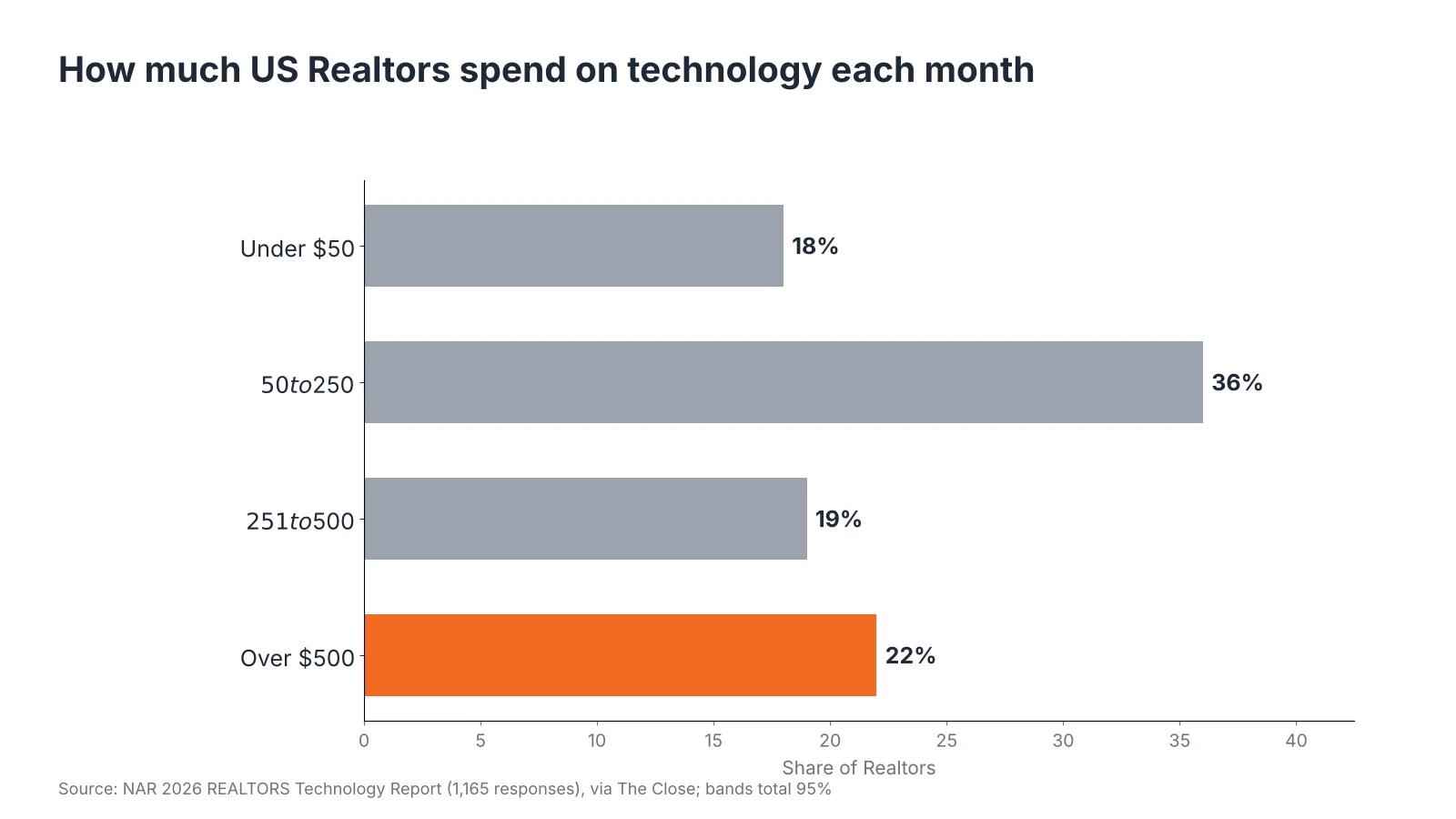
| Monthly tech spend | Share of Realtors |
|---|---|
| Under $50 | 18% |
| $50 to $250 | 36% |
| $251 to $500 | 19% |
| Over $500 | 22% |
More than half of Realtors (54%) spend $250 a month or less on all their technology. A $500 monthly retainer would more than double their tech budget. The 22% who spend over $500 are mostly busy agents, teams and brokerages, and they are the buyers who can pay for done-for-you automation. Start there, and offer solo agents a lighter, cheaper package later if at all.
Other niches inside real estate with clear pain points:
- Property managers: maintenance requests, rent reminders and tenant questions.
- Mortgage brokers: document collection and status updates.
- New-build sales teams: high lead volume from ads and portals.
- Short-term rental hosts: guest messages, reviews and cleaning schedules.
Automations Real Estate Clients Pay For
Sell outcomes an agent can count, not “AI.” These four workflows are the easiest to explain and measure:
| Automation | What it does | How the client measures it |
|---|---|---|
| Speed-to-lead response | Texts and emails every new portal or ad lead within a minute, asks qualifying questions and offers a call slot | Minutes to first reply; booked calls |
| Long-term nurture | Sends months of personal-sounding follow-ups and market updates to cold leads | Leads revived; appointments from old lists |
| Showing and appointment booking | AI chat or voice assistant answers questions and books showings into the agent’s calendar | Showings booked without agent time |
| Listing content pipeline | Turns listing data into descriptions, social posts, emails and a property page | Hours saved per listing |
Speed-to-lead is the best first product. Every agent already pays for leads, so faster replies make money they have already spent work harder. It also connects to the work agents already do in AI: content and follow-up emails.
A Starter Tool Stack and What It Costs
A new agency needs only a few tools at first, adding more per client:
| Tool | Role | Published price |
|---|---|---|
| GoHighLevel Starter | CRM, SMS, email, funnels for up to 3 client accounts | $97 a month |
| GoHighLevel Unlimited | Same, with unlimited client sub-accounts | $297 a month |
| Make Core | Connects apps and runs workflows | $12 a month billed yearly, 10,000 credits |
| Zapier Professional | Alternative to Make, simpler setup | $19.99 a month billed yearly, 750 tasks |
| AI model access | Writing replies, summaries and content | Usage-based |
GoHighLevel also charges usage for texts, calls and AI messages. One published breakdown puts typical usage for a local service business at about $25 to $75 a month per account, and texting in the US needs A2P 10DLC registration for each brand. Build those costs into your price, or rebill them to the client.
A Sample Package and First-Year Numbers
This is an example model, not market data. Adjust it to your own prices and costs.
| Item | Example figure |
|---|---|
| Setup fee per client | $1,500 (speed-to-lead plus nurture, CRM setup, A2P registration) |
| Monthly retainer per client | $497 (monitoring, monthly tweaks, reporting) |
| Agency tools | About $310 a month (GoHighLevel Unlimited plus Make Core) |
| Usage per client | About $50 a month, rebilled or included |
With five clients, monthly retainers bring in $2,485. Tools and usage cost about $560, leaving roughly $1,925 a month before your time and taxes, plus $7,500 in setup fees. The first client’s retainer already covers the agency’s tool bill, which is why the GoHighLevel Unlimited plan makes sense once you pass three clients.
The weak point in this model is churn. Agents cancel when they cannot see results, so a monthly report showing reply times, booked calls and revived leads matters as much as the automations themselves.
Steps to Launch the Agency
- Build one demo system. Set up speed-to-lead and nurture for a fake brokerage, and record a two-minute walkthrough.
- Offer a pilot to two teams. A discounted 60-day pilot in exchange for a case study with real numbers.
- Register the business and get insurance. Check local business registration, and get professional liability cover.
- Handle texting rules. Use A2P 10DLC registration and get consent before sending marketing texts, and follow TCPA rules in the US.
- Write a data agreement. Agents share client data with you, so spell out who owns it and how you protect it.
- Productize. Turn the pilot into a fixed package with a setup fee and retainer.
- Sell through referrals. Brokerage owners and team leads talk to each other; one well-documented case study opens doors.
Mistakes That Sink New Real Estate AI Agencies
- Selling to agents who do not buy leads. Without lead flow, speed-to-lead has nothing to speed up.
- Building custom work for every client. It does not scale; keep 80% of each build the same.
- Letting AI promise things. An assistant should never quote prices, give legal advice or describe a property inaccurately. Keep a human in the loop for anything binding.
- Ignoring fair housing rules. Ad and message copy must follow fair housing laws, so review templates and AI prompts carefully.
- No reporting. If clients cannot see the results, they cancel.
For more on the tools agents already use, see our guide to AI tools for real estate agents in India, and for other lean startup ideas, our list of business ideas to start from home.
Starting a Real Estate AI Agency: What New Founders Ask
How much does it cost to start an AI automation agency for real estate?
A starter stack can cost about $100 to $350 a month, for example GoHighLevel at $97 or $297 and Make at $12, plus usage fees. Add business registration and insurance.
What should a real estate AI agency charge?
Many agencies charge a one-time setup fee plus a monthly retainer. Our example uses $1,500 setup and $497 a month, but price against the results you can show.
Do real estate agents use AI?
Yes. NAR’s 2026 technology report found only 21% of Realtors don’t use AI, and 75% of AI users write listing descriptions with it.
Which automation should I sell first?
Speed-to-lead response. Agents already pay for leads, so replying in a minute instead of hours is easy to understand and measure.
Do I need to code to run an AI automation agency?
No. Tools like GoHighLevel, Make and Zapier are built for no-code workflows, though basic knowledge of APIs and webhooks helps for custom work.