Copy addresses off websites with a bot and email them a sales pitch, and US law treats that as an aggravated violation. CAN-SPAM puts address harvesting next to hacking and open-relay spam, with fines on top of the base penalty of up to $53,088 per email. That is why the best email extractor tools today are not crude scrapers. They are email finders that guess, test and verify a work address, then show you how sure they are.
Ranked by features, Hunter is the best all-round email extractor for finding addresses by company domain, Snov.io is the best value if you also want built-in cold email, and Apollo suits teams that need a large contact database. Findymail leads on verified accuracy, Skrapp and Kaspr are built for LinkedIn prospecting, Lusha suits teams that care most about compliance paperwork, and RocketReach is for broad lookups across a huge profile base.
Hunter’s 50 Free Credits, Snov.io’s Low Entry and Cold Email Law
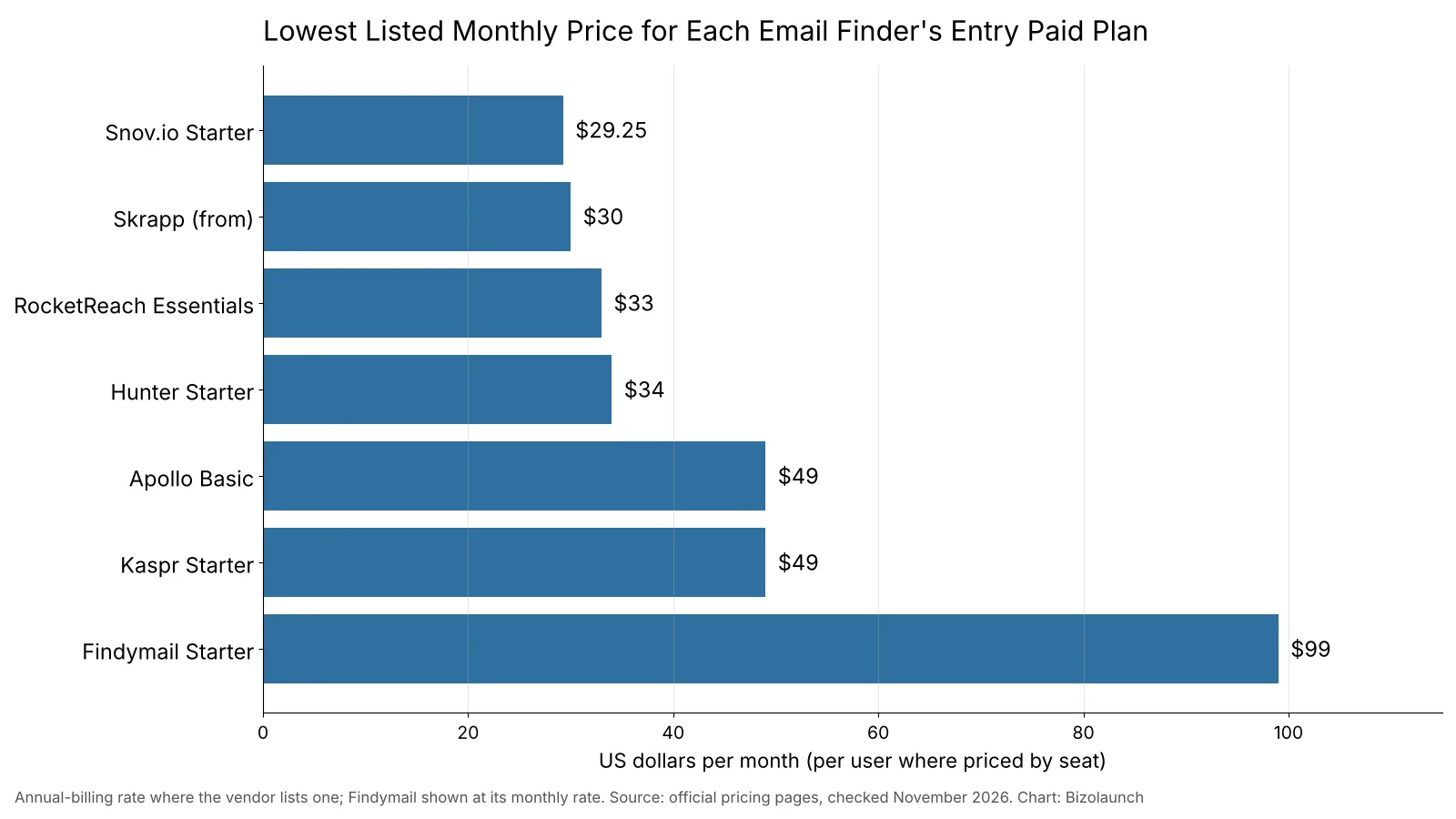
- Hunter’s free plan gives 50 credits a month with unlimited team members, and its Starter plan costs $34 a month on yearly billing for 2,000 monthly credits.
- Snov.io has the lowest entry price in this ranking at $29.25 a month on yearly billing, or $39 month to month, for 1,000 credits.
- Findymail costs more at $99 a month, but it charges only for verified results and guarantees a bounce rate under 5%.
- CAN-SPAM covers business-to-business email in the US, and the UK GDPR applies to a named person’s work address such as first.last@company.com.
- Gmail wants bulk senders to keep spam complaints under 0.1% and never reach 0.3%, so verify every list before the first send.
Email Finders vs Email Scrapers: What These Tools Really Do
The phrase “email extractor” covers two very different kinds of software. The old kind crawls web pages and copies every string with an @ sign in it. The modern kind starts with a name and a company, works out the address pattern the company uses, and checks whether the mailbox exists before it shows you a result.
Every tool in this ranking belongs to the second group. They pull addresses from three main sources:
- Domain search: you type a company website, such as acme.com, and the tool lists the work addresses it has found for that domain, often with the job title and a confidence score.
- Name plus company lookup: you give a first name, last name and domain, and the tool returns the most likely address after testing it against the mail server.
- Browser extension: you open a company site or a professional profile, click the extension, and it shows the contact details it holds for that page.
The difference matters for two reasons. Raw scraped lists are full of dead, generic and trap addresses that wreck your sender reputation. And sending commercial email to harvested addresses can turn an ordinary CAN-SPAM breach into a criminal one. We left out tools whose main pitch is bulk-scraping websites or social networks, because that kind of collection often breaks the terms of the site being scraped.
What We Ranked Email Extractors On
We ranked eight tools on features first and price second. We did not run our own accuracy test, so we do not repeat vendor accuracy claims as fact. Each tool was judged on six things.
- Ways to find an address: domain search, name lookup, a Chrome extension, and support for LinkedIn or Sales Navigator pages.
- Bulk work: the option to upload a spreadsheet of names or domains and get results back in one go.
- Verification: whether the tool checks each address and lets you verify lists you already own.
- Integrations: native links to CRMs such as HubSpot, Salesforce and Pipedrive, plus API access.
- Free tier: how much you can test before you pay.
- Cost per useful email: what one found and verified address costs on the entry plan.
Email Extractor Features Compared
| Tool | Find by domain | Chrome extension | LinkedIn pages | Bulk upload | Verification | CRM integrations | Free tier | Entry paid price |
|---|---|---|---|---|---|---|---|---|
| Hunter | Yes, Domain Search | Yes, free | Website focused | Yes, Bulk Finder and Bulk Domain Search | Yes, 0.5 credit per check | Yes | 50 credits a month | $34 a month yearly, $49 monthly |
| Snov.io | Yes | Yes | Yes | Starter and up | Yes, bulk on paid plans | HubSpot, Pipedrive, Zapier, Make, own CRM | 50 credits a month | $29.25 a month yearly, $39 monthly |
| Apollo | Company search in its database | Yes | Yes | Yes, list enrichment | Yes, through credits | Native from Basic | Free plan | $49 per user a month, billed yearly |
| Findymail | Name plus domain | Yes | Yes, including Sales Navigator | Yes, Bulk Finder and Google Sheets | Yes, real time, under 5% bounce guarantee | Clay, HubSpot, Salesforce and more | 10 credits | $99 a month |
| Skrapp | Company Search | Yes | Yes, including Sales Navigator | Yes, spreadsheet enrichment | Yes, single and bulk | Salesforce, HubSpot, API | 50 credits | From $30 a month |
| Kaspr | No, profile based | Yes | Yes, its main use | Yes, CSV enrichment | Reveal based | HubSpot, Salesforce, Pipedrive, Zoho and more | Limited monthly credits | $49 per user a month |
| Lusha | Company prospecting | Yes, all plans | Yes, including Sales Navigator | Yes | Verified email reveals | HubSpot and Salesforce on all plans, plus others | 40 credits a month | Set by credit slider |
| RocketReach | Company search | Yes | Yes | Yes | Separate Verify product | Salesforce, HubSpot, Zapier | Free account | $33 per seat a month, billed yearly |
Seat-based tools (Apollo, Kaspr, RocketReach) charge for each user. Hunter lets unlimited team members share one credit pool on every plan, which is unusual and makes it cheap for small teams.
What Email Finders Cost to Start
Most of these tools sell credits rather than flat access. One credit usually buys one found email, while a phone number can cost 5 or 10 credits. If you are new to this kind of pricing, our explainer on how SaaS pricing models work covers why usage-based plans can look cheap and then climb fast.
A cheaper sticker price does not always mean a cheaper email. The fair way to compare is the cost of one credit over a year. The worked example below uses each plan’s published price and credit allowance.
| Plan | Yearly cost | Credits in a year | Cost per credit |
|---|---|---|---|
| Hunter Starter, billed yearly | $408 | 24,000 | $0.017 |
| Hunter Growth, billed yearly | $1,248 | 120,000 | $0.0104 |
| Snov.io Starter, billed yearly | $351 | 12,000 | $0.029 |
| Snov.io Pro S, billed yearly | $891 | 60,000 | $0.0149 |
| Findymail Starter, billed monthly | $1,188 | 60,000 finder credits | $0.0198 |
The math changes the ranking. Snov.io Starter is the cheapest plan to buy, but Hunter Starter gives you twice the credits for $57 more a year, so each credit costs about 40% less. Findymail looks expensive at $99 a month, yet its price per finder credit sits close to Hunter’s, and it also includes 5,000 verifier credits a month. Hunter charges half a credit for each verification, so finding 1,000 emails and then checking another 1,000 you already own uses 1,500 credits.
Data tools are part of what it costs you to win a customer. If you track CAC payback period, add your email finder subscription to sales and marketing spend so the number stays honest.
The 8 Best Email Extractor Tools, Ranked
1. Hunter
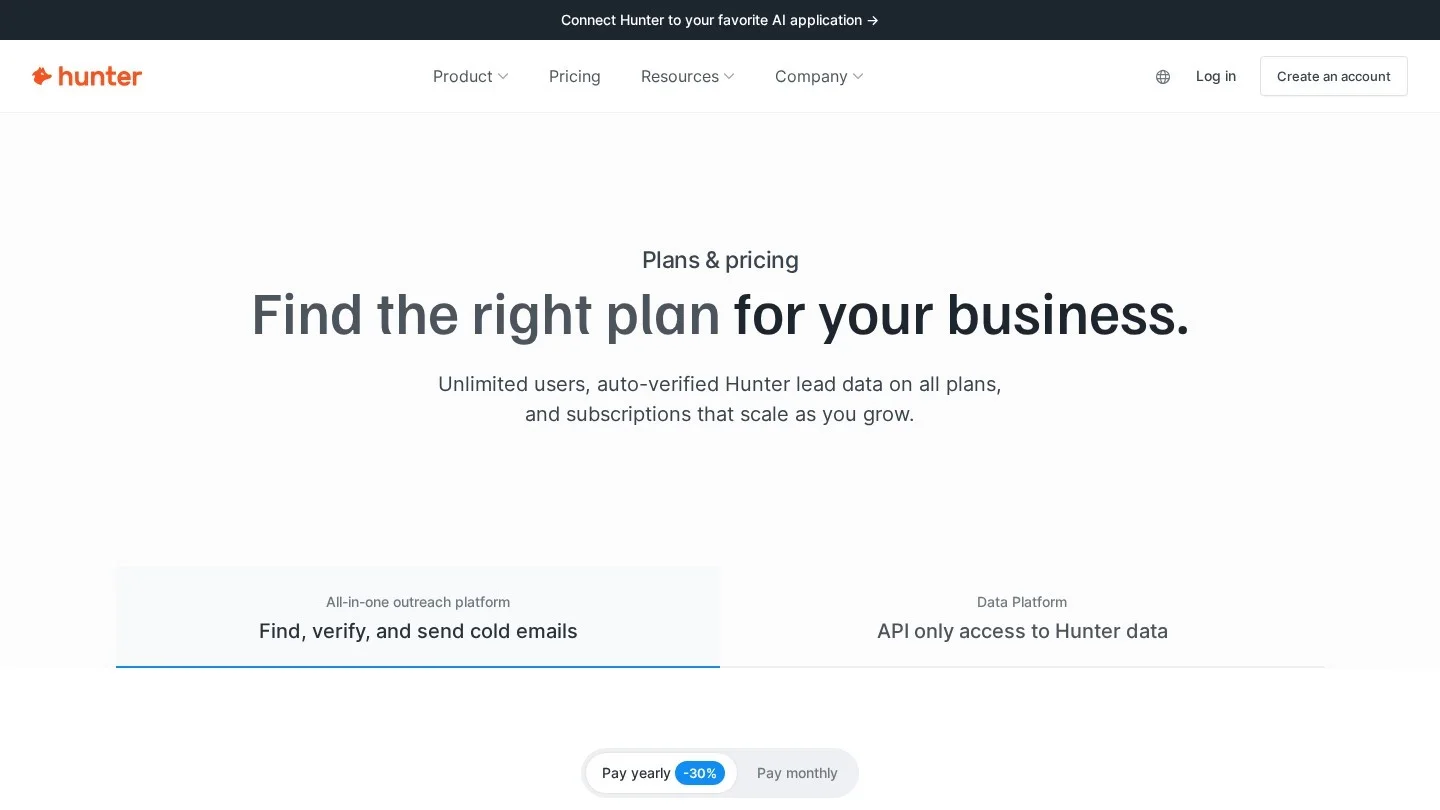
Hunter made domain search popular, and it is still the cleanest version of it. Type a company website and you get a list of addresses found for that domain, along with the company’s email pattern. The Email Finder handles single names, and two bulk tools take a spreadsheet of names or domains. Each found email costs one credit, while Bulk Domain Search charges one credit for up to 10 emails.
Hunter’s free plan includes 50 credits a month. Starter costs $49 a month, or $34 a month on yearly billing, for 2,000 credits. Growth is $149 a month ($104 yearly) for 10,000 credits, and Scale is $299 a month ($209 yearly) for 25,000. Credits reset each month and do not roll over. Every plan, including the free one, allows unlimited team members, and the Chrome extension is free.
- Pros: the best domain search here, a usable free plan, shared credits with no seat fees, and verification at half a credit.
- Cons: it is built around company websites rather than social profiles, and unused credits vanish at month end.
- Best for: founders, agencies and small sales teams who know which companies they want and need the right person’s address.
2. Snov.io
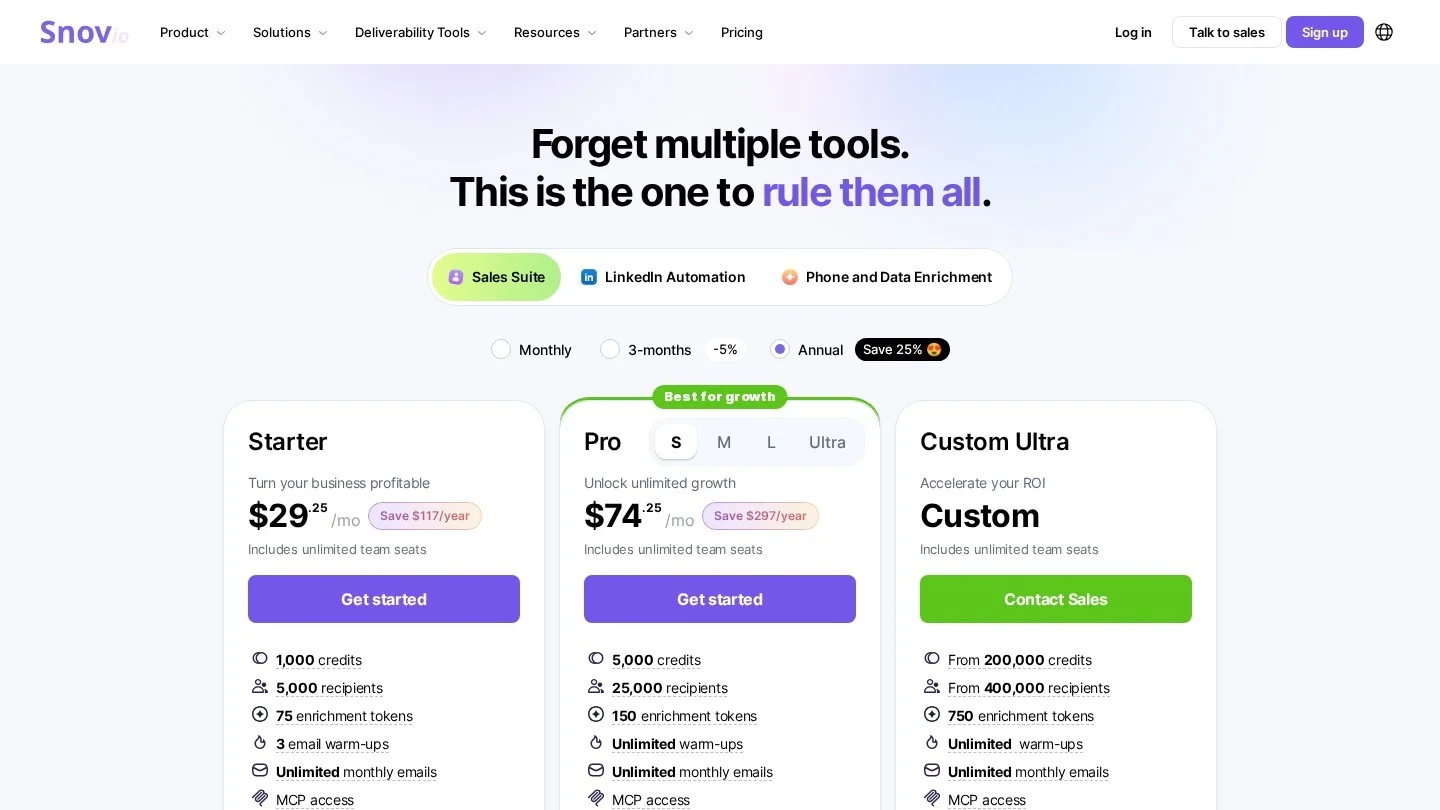
Snov.io bundles an email finder, a verifier, a basic sales CRM and cold email sequences in one account. That makes it a good fit if you want to find, check and contact leads without paying for three tools. Its Chrome extensions work on company websites and LinkedIn. Bulk domain search and uploads of LinkedIn URL lists start on the Starter plan.
The free Trial plan renews every month with 50 credits and 100 email recipients. Snov.io Starter costs $39 a month, or $29.25 a month on yearly billing, for 1,000 credits. Pro S costs $99 a month ($74.25 yearly) for 5,000 credits, and the Pro tiers climb to 100,000 credits. Integrations with HubSpot, Pipedrive, Zapier and Make are partly included on Starter and fully on Pro.
- Pros: lowest entry price, LinkedIn and website extensions, and outreach tools in the same account.
- Cons: only 1,000 credits on Starter, and the free trial leaves out bulk features and integrations.
- Best for: solo founders and small teams who want an all-in-one prospecting and cold email setup on a tight budget.
3. Apollo
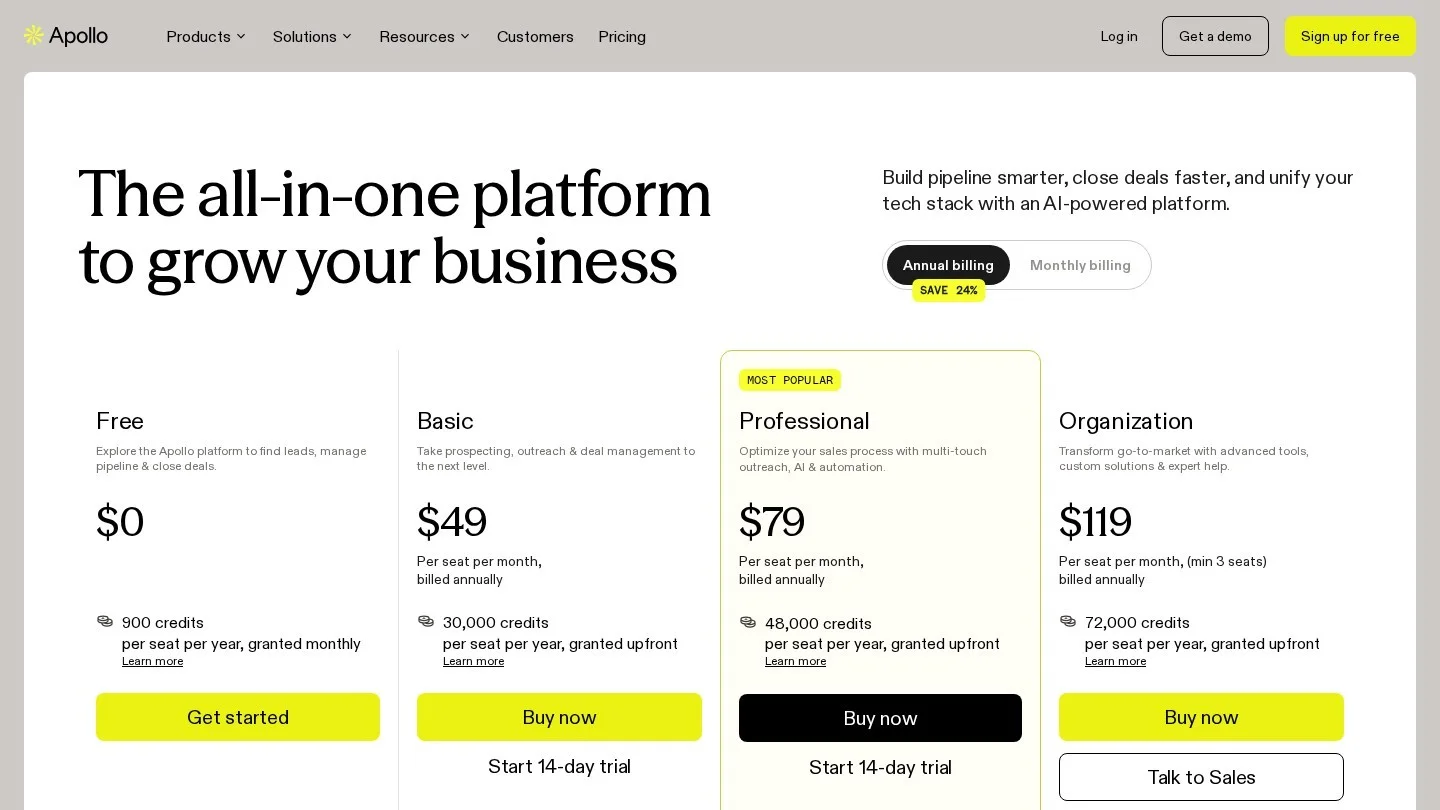
Apollo works the other way round from Hunter. Instead of starting with a company you already chose, you filter a large contact database by job title, industry, company size and location, then reveal emails for the people who fit. Its Chrome extension shows contact details on LinkedIn and company sites, and sequences let you email those leads from the same place.
Apollo has a free plan, Basic at $49 per user a month on yearly billing, Professional at $79 per user and Organization at $119 per user with a three-user minimum. Basic adds native CRM integrations and unlimited sequences. Credits pay for email reveals and verification, and waterfall enrichment can use several credits on one record.
- Pros: you can build a target list from scratch, and the free plan is enough to test the search.
- Cons: per-user pricing adds up fast, and credit use on enrichment is harder to predict than a simple finder.
- Best for: sales teams that need to discover new accounts, not just look up people at known ones.
4. Findymail
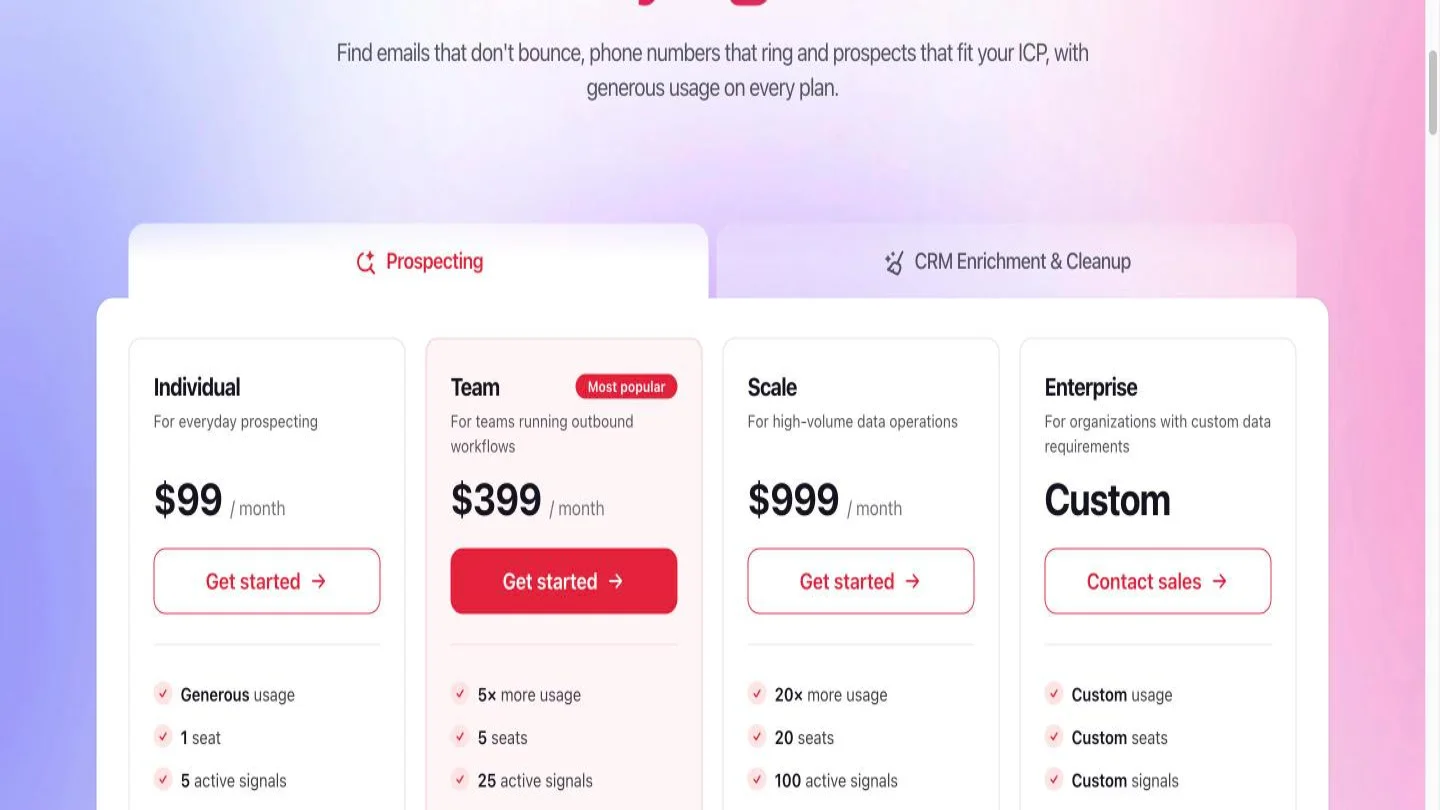
Findymail’s whole pitch is accuracy. Findymail says every plan includes real-time verification and a guaranteed bounce rate under 5%, and you are charged only for verified results. It finds addresses from a name and domain, works inside LinkedIn Sales Navigator, and offers a bulk finder, a Google Sheets integration and API access on all plans.
The credit-based Starter plan costs $99 a month for 5,000 finder credits and 5,000 verifier credits. Yearly billing gives two months free, which brings a year down to $990. Unused credits roll over for a month, up to twice the monthly allowance. A free account comes with 10 credits and no card. One email costs one credit, and a phone number costs 10.
- Pros: pay only for verified emails, a written bounce guarantee, and a separate verifier allowance included.
- Cons: the highest entry price here, and a tiny free trial.
- Best for: agencies and outbound teams that send in volume and cannot afford bounces on a fresh domain.
5. Skrapp
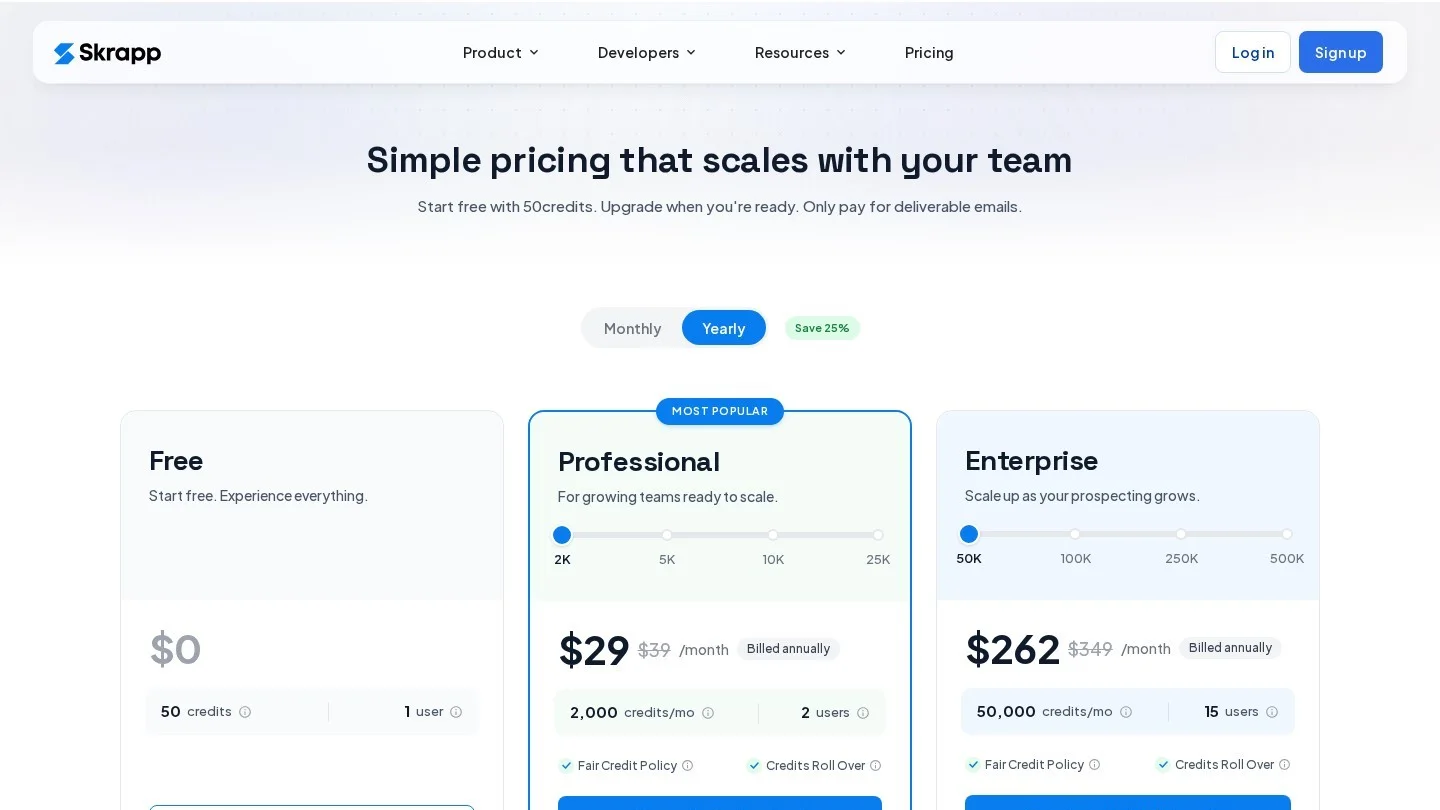
Skrapp covers both sides of prospecting in one Chrome extension. It finds emails on LinkedIn and Sales Navigator profiles and also pulls contacts from company websites. On the web app you can search by person and company, look up everyone at a company, turn a spreadsheet into a verified list, and check single or bulk addresses with its verifier.
Skrapp’s free plan includes 50 email credits with the finder, verifier and extension, and paid plans start at $30 a month. It has native Salesforce and HubSpot integrations, a REST API and CSV export.
- Pros: one extension for profiles and websites, a free verifier, and a low starting price.
- Cons: only two native CRM integrations, Salesforce and HubSpot, so other CRMs need the API or a CSV export.
- Best for: recruiters and B2B sellers who prospect mainly from LinkedIn but also want website lookups.
6. Kaspr
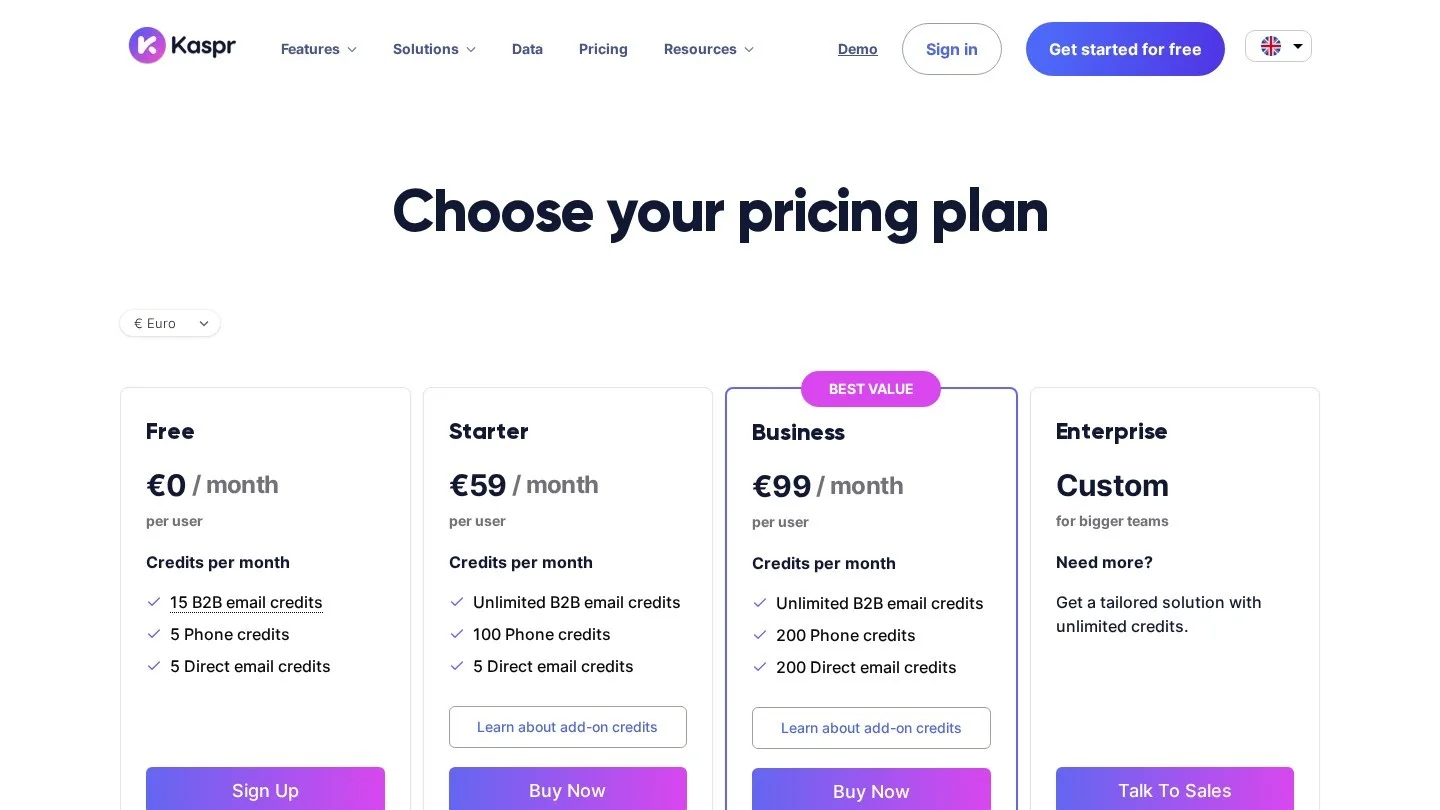
Kaspr is a LinkedIn tool first. You open a profile, click the extension and get the person’s email and phone details, which you can push straight into HubSpot, Salesforce, Pipedrive, Zoho, Lemlist or Brevo. Paid plans add Zapier and larger CSV enrichment runs, from 500 rows a file on Starter to 10,000 on Enterprise.
Kaspr prices Starter at $49 per user a month against a higher listed rate of $65, and Business at $79 against $99. Both paid plans include unlimited B2B email credits, with phone credits rationed at 100 a month on Starter and 200 on Business. Prices also show in euros and pounds, which helps European buyers.
- Pros: unlimited B2B emails on paid plans, phone numbers, and broad CRM links even on the free tier.
- Cons: no domain search, so it does little if your leads are not on LinkedIn, and seats are priced per user.
- Best for: European sales teams and recruiters who live inside LinkedIn and also want direct dials.
7. Lusha
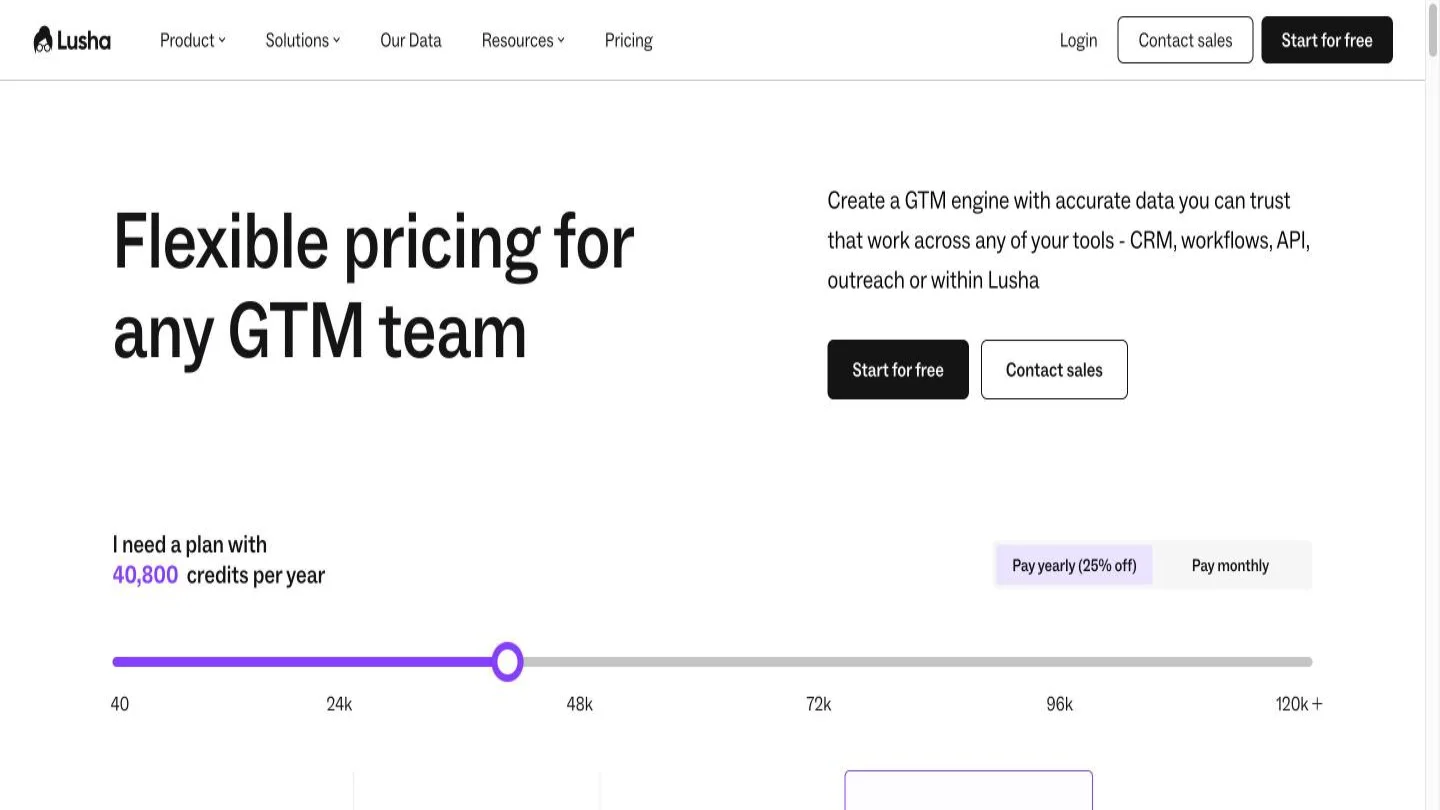
Lusha’s extension reveals emails and phone numbers on LinkedIn, Sales Navigator and company websites, and it is included on every plan. A verified email reveal costs 1 credit and a phone number costs 5. The free plan gives 40 credits a month for one seat, with the extension and CRM integrations included.
Paid plans (Starter, Pro and Premium) are priced with a credit slider at checkout, and Scale is a custom annual deal. On monthly plans, unused credits roll over up to twice the monthly limit. Where Lusha stands out is compliance. It holds SOC 2 Type II, several ISO certifications, a GDPR certification from ePrivacyseal and CCPA validation by TrustArc. HubSpot and Salesforce integrations come on every plan.
- Pros: strong compliance paperwork, rollover credits on monthly plans, and a simple extension.
- Cons: phone reveals burn credits five times faster, and paid prices are only visible on the slider.
- Best for: mid-size sales teams whose legal or security reviewers want certificates before approving a data vendor.
8. RocketReach
RocketReach is a lookup engine for a very large profile base. The company says it covers more than 700 million professionals and 60 million companies. You search by name, company or title, and its Chrome extension surfaces contact details while you browse. A separate Verify product checks addresses, and integrations cover Salesforce, HubSpot and Zapier.
RocketReach Essentials costs $33 per seat a month on yearly billing with email lookups, Pro is $75 with email and phone, and Ultimate is $175 with 20,000 exports a year. Team plans start at $6,000 a year. A free account is available with no card.
- Pros: huge coverage beyond tech companies and a low yearly entry price.
- Cons: phone data needs the much pricier Pro plan, and exports are capped even on Ultimate.
- Best for: recruiters, PR teams and journalists who need contacts across many industries rather than a narrow software niche.

Which Email Finder Fits Your Team
Start with where your leads come from, not with the price. A tool that is cheap per credit is still a waste if it cannot find the people you sell to.
If you already have a list of target companies, pick Hunter. Its domain search shows who works there, and unlimited users can share one pool of credits. If your leads mostly sit on LinkedIn, choose between Kaspr, Skrapp and Lusha. Kaspr gives unlimited B2B emails on paid plans, Skrapp also handles company websites, and Lusha brings the paperwork that procurement teams ask for.
If you do not yet know which accounts to target, Apollo’s database search is the better starting point. If you plan to send hundreds of cold emails a week from a new domain, the extra cost of Findymail buys you a bounce guarantee. Snov.io makes sense when you want finding and sending under one login and your volume is modest.
Volume also shapes the plan. Teams that use lead-driven sales forecasting can work backward from the pipeline target to the number of new contacts needed each month, then pick the credit tier that covers it with a little room to spare.
Is Using an Email Extractor Legal? US, UK, EU and India Rules
Finding a business address is usually lawful. What you do with it is where the rules bite. This is a summary, not legal advice.
United States: CAN-SPAM
CAN-SPAM makes no exception for business-to-business email. Every commercial message needs accurate header details, a subject line that matches the content, a clear note that it is an ad, and a valid physical postal address. You must offer a working opt-out, keep it live for at least 30 days after sending, and honor requests within 10 business days. Each violating email can cost up to $53,088, and hiring an agency to send for you does not move the liability off your company.
Harvesting addresses and dictionary attacks, where software sends to made-up addresses hoping some are real, are also among the aggravated violations that can bring extra fines and criminal penalties. That is the clearest legal reason to use a verified finder instead of a bulk website scraper.
United Kingdom and EU: PECR, GDPR and Legitimate Interests
The UK rules split recipients into two groups. Companies, LLPs and some public bodies are “corporate subscribers,” and PECR does not require their consent for marketing emails. You still must say who you are and give a valid address for opt-outs. Sole traders and some partnerships count as individuals, so you need their consent or a valid soft opt-in. If you cannot tell which group a contact is in, treat them as an individual.
The UK GDPR still applies to work addresses that name a person, such as first.last@company.com. Legitimate interests can be your lawful basis for B2B marketing, but only after you pass a three-part test: name the interest, show the processing is needed, and balance it against the person’s rights. People have an absolute right to object to direct marketing. If you collect their data from a public source or a tool, you must give them privacy information within a reasonable time and no later than one month. Data being public, for example on a company website, does not mean the person agreed to marketing.
The EU GDPR uses the same lawful bases and the same right to object, while each EU country sets its own e-privacy rules on B2B email. Check the rules where your recipients are based before you send.
India: The DPDP Act 2023
India notified the Digital Personal Data Protection Rules on 14 November 2025, with an 18-month window for phased compliance. Under the framework, consent must be clear and informed, each data fiduciary must give a separate notice that states the purpose, and people can withdraw consent at any time. Penalties reach ₹250 crore for failing to keep reasonable security safeguards, ₹200 crore for breach-notification failures, and ₹50 crore for other violations.
Whatever the country, exported lead files are personal data. Store them like any other sensitive file, and run through a small business cybersecurity checklist so a spreadsheet of contacts does not end up in a shared folder anyone can open.
Verify Emails Before You Send to Protect Deliverability
Even a good finder returns some addresses that are risky. People change jobs, companies switch mail servers, and some domains accept every address so they cannot be tested. Sending to those addresses produces hard bounces, and mailbox providers read a high bounce rate as a sign of a careless or spammy sender.
Gmail’s rules are the bar most senders must clear. Gmail treats anyone who sends close to 5,000 or more messages to personal Gmail accounts in a day as a bulk sender, and that label is permanent. Senders should keep their spam rate below 0.1% and never reach 0.3%. Bulk senders need SPF, DKIM and a DMARC record, and promotional mail needs one-click unsubscribe that is honored within 48 hours.
Bounces add up quickly. Send 2,000 cold emails with a 5% bounce rate and 100 of them fail. At 2%, only 40 fail. Run every list through a verifier before you send, and follow these steps:
- Send only “valid” results at first: hold back addresses marked “accept all” or “unknown” until your domain has a track record.
- Re-verify old lists: check any list that is more than a few months old, because job changes quietly turn good addresses into bounces.
- Use a separate sending domain: keep cold outreach off the domain your invoices and customer emails use.
- Start small: ramp up daily volume over a few weeks instead of sending a full list on day one.
- Keep a suppression list: store everyone who opts out or objects, and screen every new export against it.
The message itself matters too. Plain, specific emails from a real person get filtered far less than the urgent, link-heavy style that filters learn from common phishing emails. And when a prospect replies and asks for a call, a prepared sales call script helps you turn that reply into a real conversation.
LinkedIn Scraping, Finder Accuracy and UK Consent for B2B Email
What Is the Best Free Email Extractor?
Hunter, Snov.io and Skrapp each offer 50 credits on their free plans, and Lusha gives 40 a month. Hunter’s free plan stands out because it allows unlimited team members and includes its free Chrome extension.
Can I Extract Emails From LinkedIn Legally?
Tools such as Kaspr, Lusha, Skrapp and Findymail show contact details from their own databases while you view a profile. That is different from scraping LinkedIn pages in bulk, which can break the site’s terms. Any email you then send must still follow CAN-SPAM, PECR, the GDPR or the DPDP Act, depending on where your recipient is.
How Accurate Are Email Finder Tools?
Accuracy varies by tool, industry and company size, and the numbers vendors publish are their own claims. Findymail is the only tool here that offers a bounce guarantee, under 5%. Verifying each list before you send is the safest habit with any tool.
Do I Need Consent to Cold Email a Business in the UK?
Not for corporate subscribers such as limited companies and LLPs. You need consent or a valid soft opt-in for sole traders and some partnerships. In every case you must identify yourself, offer an opt-out and meet the UK GDPR when the address names a person.
Hunter or Snov.io: Which Is Cheaper?
Snov.io has the lower entry price at $29.25 a month on yearly billing. Hunter Starter costs $34 a month on yearly billing but includes 2,000 credits instead of 1,000, so each credit costs about $0.017 against Snov.io’s $0.029.
CAN-SPAM, ICO and DPDP Rules Plus Email Finder Price Lists
- FTC: CAN-SPAM Act, A Compliance Guide for Business
- ICO: Business-to-Business Marketing
- PIB: Digital Personal Data Protection Rules, 2025 (November 2025)
- Google: Email Sender Guidelines FAQ
- Hunter: Plans and Pricing
- Snov.io: Pricing
- Snov.io: Pricing Plans Overview
- Apollo: What Does Apollo’s Pricing Actually Include? (September 2026)
- Findymail: Pricing
- Skrapp: Homepage and Plans
- Kaspr: Plans and Pricing
- Lusha: Pricing
- Lusha: Company Facts on Data, Plans and Compliance (October 2026)
- RocketReach: RocketReach vs ZoomInfo, Price and Data Compared