For staff sign-in, the best passwordless authentication software for most companies is the identity platform they already run: Microsoft Entra ID includes passkeys in every edition, even the free one, and Okta, Cisco Duo and HYPR sell passwordless at published per-user prices. For customer logins in your own app, Descope, Auth0 and Stytch publish free tiers large enough to launch on, and Microsoft’s External ID is free up to 50,000 monthly active users. Beyond Identity and Ping Identity suit larger rollouts but sell by quote.
We compared what each vendor publishes on its own pricing and documentation pages, then did our own cost math for three company sizes. Where a vendor sells only by quote, we say so instead of guessing a number.

What Passwordless Means in Practice
Passwordless sign-in replaces the password with something you hold and something you are. In most products today, that something is a passkey. A passkey is a cryptographic key pair made for one website or app. The private half stays on your phone, laptop or security key. The public half sits with the service. When you sign in, the device proves it holds the private key, after you confirm it is you with a face, fingerprint or PIN.
Two features make passkeys stronger than codes sent by text or push prompts. First, nothing secret travels to the server, so there is no password to steal in a breach. Second, a passkey is tied to the real web address, so it will not work on a look-alike phishing site. That is why security teams call these methods phishing-resistant.
There are two kinds of passkeys. Device-bound passkeys live on one physical device, such as a FIDO2 security key or the Microsoft Authenticator app. Synced passkeys are encrypted and copied through a provider such as iCloud Keychain or Google Password Manager. Synced passkeys are easier for users but do not support attestation, which is how an employer proves which device made the key. One sensible split is device-bound keys for admins and synced keys for everyone else.
Passwordless Authentication Tools Compared on Published Facts
We split the field by job, because staff sign-in and customer sign-in are bought very differently.
| Product | Main use | Lowest published price | Passwordless methods named by vendor | Free option |
|---|---|---|---|---|
| Microsoft Entra ID | Workforce | P1 $7, P2 $10, Suite $12 per user per month | Passkeys (FIDO2), including Authenticator passkeys | Entra ID Free includes passkeys |
| Okta Workforce Identity | Workforce | Starter $6, Core Essentials $14, Essentials $17 per user per month; $1,500 annual minimum | Device Access “passwordless Okta authentication” (add-on below Professional) | None listed |
| Cisco Duo | Workforce | Essentials $3, Advantage $6, Premier $9 per user per month | Duo Mobile and FIDO2 passwordless | Free up to 10 users |
| HYPR | Workforce | $3, $6 or $9 per user per month | Enterprise passkeys, FIDO2 keys, desktop MFA, QR login | None listed |
| Beyond Identity | Workforce | Quote-based | Device-bound passkeys with device checks | None listed |
| Ping Identity | Workforce and customer | Quote-based | Passwordless-ready MFA | None listed |
| Descope | Customer apps | Pro from $249 a month, Growth from $799 a month | Passkeys, magic links, email OTP | Free up to 7,500 MAU |
| Auth0 | Customer apps | Essentials $35, Professional $240 a month at 500 MAU | Passkeys and passwordless on all plans | Free up to 25,000 MAU |
| Stytch | Customer and B2B apps | Pay as you go from $0 | Passkeys toolkit | Free up to 10,000 MAU |
| Microsoft Entra External ID | Customer apps | Usage-based above free tier | Uses Entra’s sign-in methods | Free for first 50,000 MAU |
MAU means monthly active users. Prices are list prices in US dollars from each vendor’s site, before tax, discounts or add-ons.
Workforce Platforms for Employee Sign-In
Microsoft Entra ID
If your company runs Microsoft 365, start here. Microsoft’s passkey guide states that passkeys are available in all Entra ID editions, including Entra ID Free, with no extra license. That means many firms already own a passwordless option and simply have not switched it on.
Paid plans add the controls that make a rollout safe. P1 costs $7 per user per month and P2 costs $10, both paid yearly. Both include Conditional Access, the policy engine that can require a phishing-resistant method for admins or risky sign-ins. The Entra Suite costs $12.
The setup has some fine print. Users must complete MFA within five minutes before they register a passkey. Guest users cannot register passkeys. Admins can create up to three passkey profiles, and opting in to profiles cannot be reversed.
Okta Workforce Identity
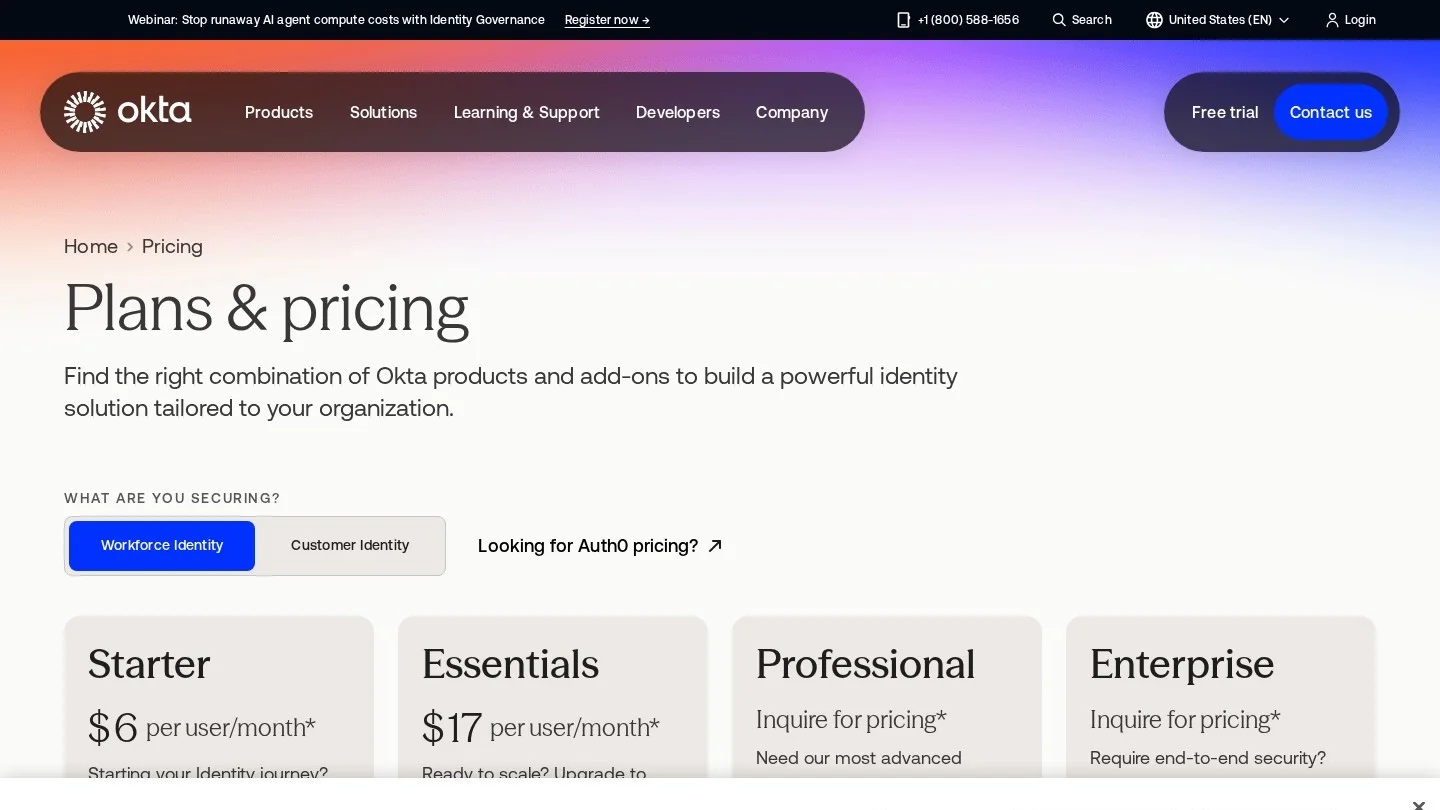
Okta charges $6 for Starter, $14 for Core Essentials and $17 for Essentials per user per month, with all suites billed yearly and a $1,500 minimum contract. Professional and Enterprise are quote-based.
Read the passwordless row carefully. Okta lists Device Access, which it describes as passwordless Okta sign-in for desktops and devices, as an add-on for Starter and Essentials and as included in Professional and Enterprise. Adaptive MFA is an add-on for Starter and included from Core Essentials up. Okta may suit firms with many cloud apps that do not run Microsoft as their main platform, and the $1,500 minimum means very small teams pay for more seats than they use.
Cisco Duo
Duo publishes the simplest price ladder in this group: Free for up to 10 users, then Essentials at $3, Advantage at $6 and Premier at $9 per user per month. Every paid edition lists passwordless sign-in and phishing-resistant MFA. Advantage and Premier add Duo Passport and risk-based authentication.
Duo suits small teams that want passwordless on top of existing systems without changing their identity provider. A ten-person office can start for nothing.
HYPR
HYPR has three workforce tiers. Identity Assurance Access costs $3 per user per month and covers web sign-in plus phishing-resistant onboarding and recovery. Plus costs $6 and adds desktop MFA, VPN, VDI and remote access. Advanced costs $9 and adds identity checks for higher-risk cases.
HYPR names enterprise passkeys, FIDO2 and PIV keys, desktop sign-in for Windows and Mac, offline mode and a non-push QR login among its features. Its attention to recovery matters for buyers, because the weak point of most passwordless rollouts is the help-desk call when someone loses a phone.
Beyond Identity
Beyond Identity sells by quote. Its Secure Access platform uses device-bound passkeys that replace passwords, one-time codes and push prompts, plus device posture checks. Policies can check firewall status, antivirus, jailbreak status and enrollment in the company’s device management tools, and access can be cut if risk changes after login. It supports Windows, macOS, iOS, Android, Linux and ChromeOS.
This design fits firms that want sign-in to depend on the health of the device, not just the person. It may suit mid-size and larger teams better than a five-person office.
Ping Identity
Ping Identity prices by identity count and type, covering both workforce and customer identities, and buyers contact sales for a price. It lists MFA as an optional service described as passwordless-ready. Ping may suit large organizations that want employee and customer sign-in from one vendor under one contract.
What Passwordless Costs for 10, 50 and 250 Employees
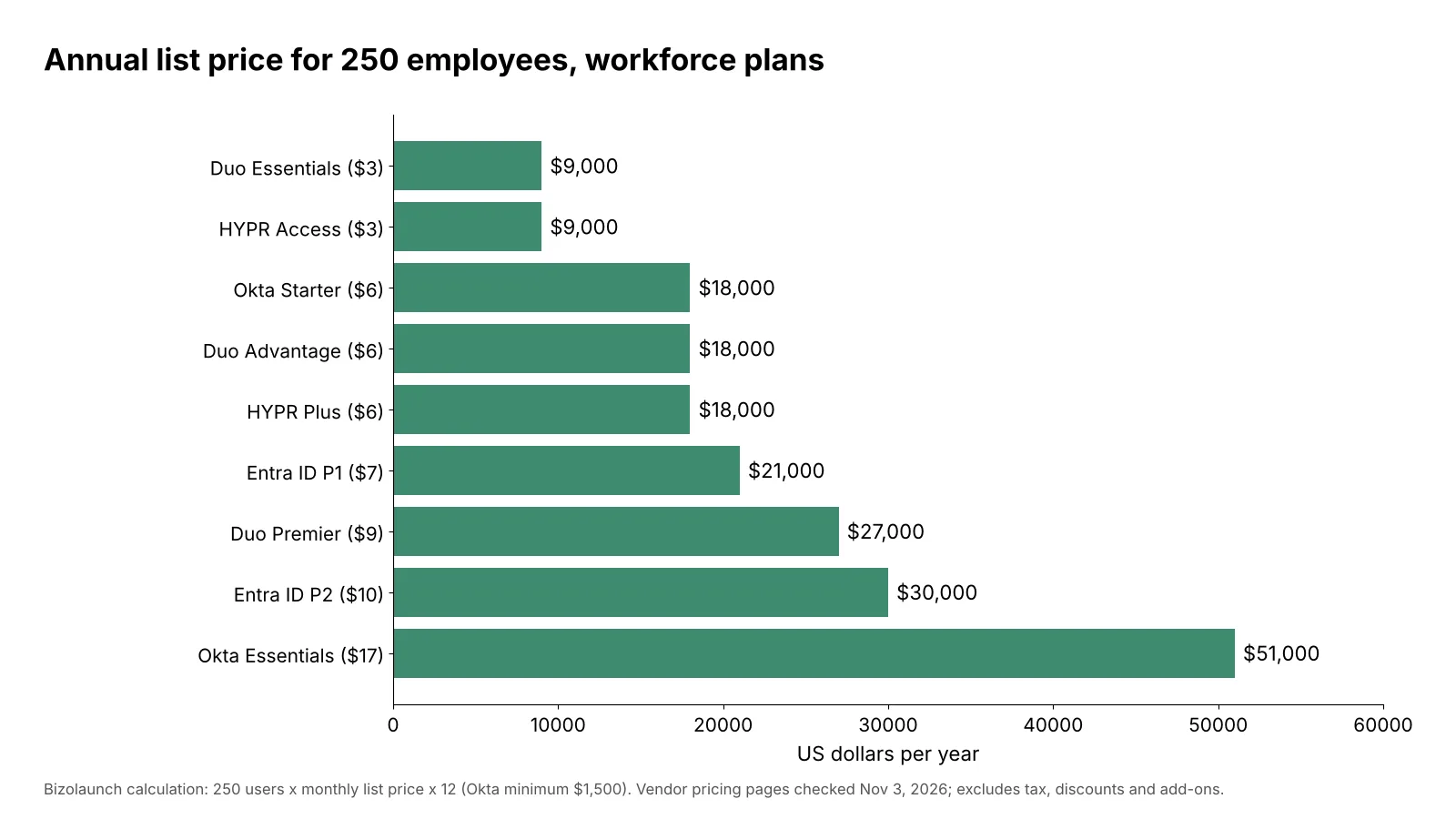
We multiplied each published per-user price by headcount and by 12 months, then applied Okta’s $1,500 minimum. Duo’s free plan covers the 10-user case.
| Plan | 10 employees | 50 employees | 250 employees |
|---|---|---|---|
| Entra ID Free (passkeys) | $0 | $0 | $0 |
| Duo Essentials ($3) | $0 on Free plan | $1,800 | $9,000 |
| HYPR Access ($3) | $360 | $1,800 | $9,000 |
| Okta Starter ($6) | $1,500 minimum | $3,600 | $18,000 |
| Duo Advantage or HYPR Plus ($6) | $720 | $3,600 | $18,000 |
| Entra ID P1 ($7) | $840 | $4,200 | $21,000 |
| Duo Premier or HYPR Advanced ($9) | $1,080 | $5,400 | $27,000 |
| Entra ID P2 ($10) | $1,200 | $6,000 | $30,000 |
| Okta Essentials ($17) | $2,040 | $10,200 | $51,000 |
The spread at 250 people is wide, from $9,000 to $51,000 a year. The plans are not equal, though. The pricier suites from Okta and Microsoft bundle identity features well beyond sign-in, so the fair comparison is against the other tools you would otherwise buy.
Customer Login Platforms for Your Own App
Descope
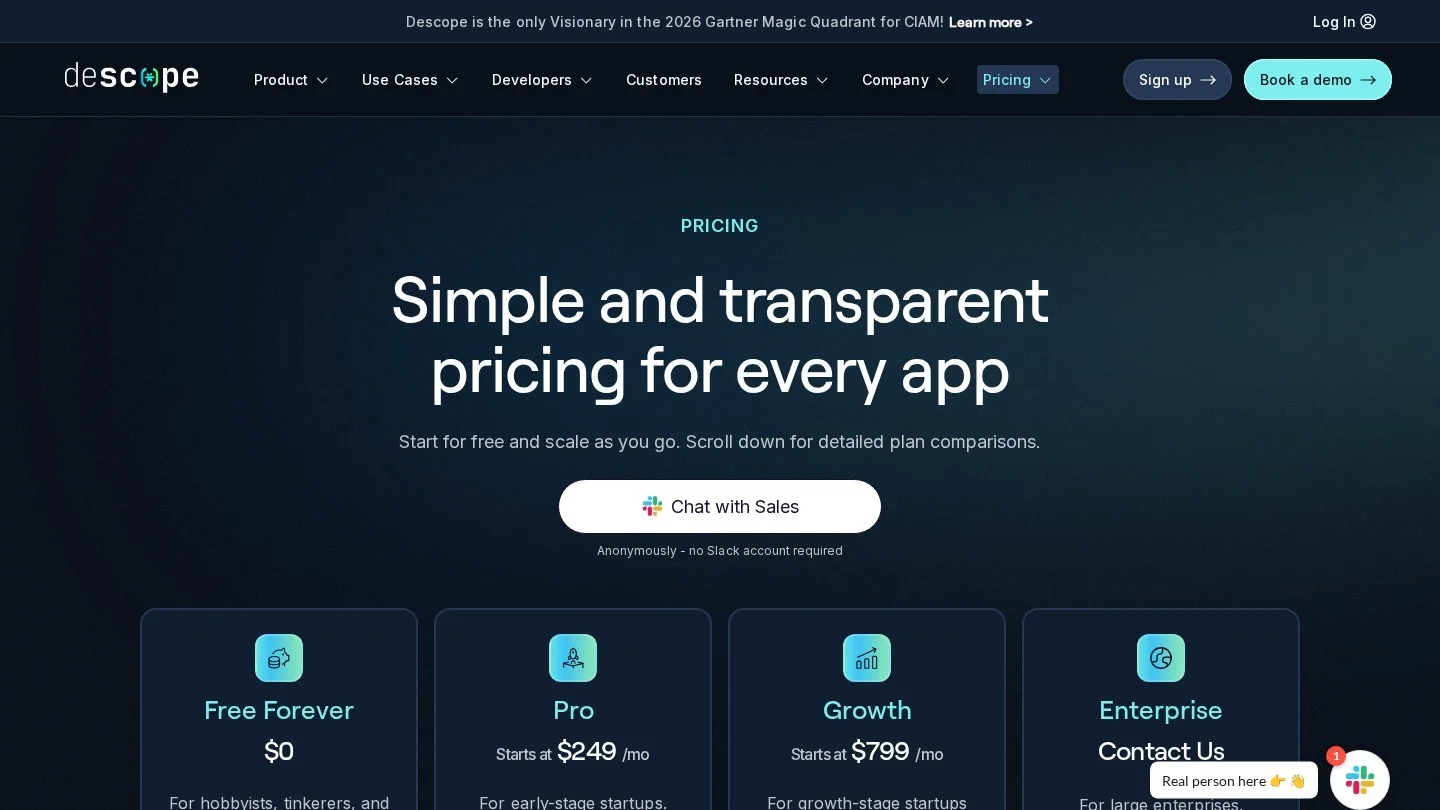
Descope includes passkeys, biometrics, magic links, email codes and authenticator apps on every plan. The Free Forever plan covers 7,500 monthly active users. Pro starts at $249 a month billed yearly with 10,000 users included, and Growth starts at $799 with 25,000 included. Both charge $0.05 per extra user.
Our math found a crossover. Pro costs $249 plus $0.05 for each user above 10,000. Growth stays at $799 until 25,000 users. The two meet at 21,000 users, and above that Growth is cheaper. At 50,000 users, Pro works out to $2,249 a month and Growth to $2,049. Growth also adds SCIM and more single sign-on connections, so a fast-growing app should price both.
Auth0
Auth0, part of Okta, lists a Free plan for up to 25,000 monthly active users and paid B2C plans that start at $35 a month for Essentials and $240 a month for Professional at the 500-user tier. Passkeys and passwordless are listed on every plan, including Free. Prices rise by user tier, so check Auth0’s price slider for your own volume.
Stytch
Stytch includes 10,000 monthly active users or agents, unlimited organizations and five SSO or SCIM connections at no charge, with pay-as-you-go use after that. Extra SSO connections cost $125 each. Stytch launched a dedicated passkeys toolkit for developers in December 2023. It leans toward B2B software teams that need organizations, SSO and passkeys in one API.
Microsoft Entra External ID
Microsoft’s customer identity service is free for the first 50,000 monthly active users. For a Microsoft-hosted app, that free tier is the largest in our comparison.
| Monthly active users | Descope | Auth0 | Stytch | Entra External ID |
|---|---|---|---|---|
| 5,000 | $0 (Free) | $0 (Free) | $0 (free tier) | $0 |
| 20,000 | $749 (Pro) | $0 (Free) | Usage-based | $0 |
| 50,000 | $2,049 (Growth) | Tier pricing | Usage-based | $0 |
Free tiers carry feature limits, so check what single sign-on, branding and support you need before you count on the zero.
Rolling Out Passwordless Without Locking People Out
The software is the easy part. The rollout decides whether staff love it or flood the help desk. A sound plan looks like this.
- Start with admins: give IT and finance staff device-bound passkeys or security keys first, since attackers target them most.
- Keep a recovery path: decide how a person with a lost phone gets back in, and make that path as strong as sign-in itself. HYPR and Duo both list onboarding and recovery features for this reason.
- Turn on synced passkeys for everyone else: they work across a user’s own devices and cut support calls.
- Enforce with policy, not memos: use Conditional Access in Entra or the equivalent in Okta to require a phishing-resistant method for sensitive apps.
- Retire SMS codes last: remove weaker methods only after most users have a passkey.
Passwordless also changes how you think about password managers. Shared vaults still matter for service accounts and old systems, which is why our guide to LastPass alternatives covers passkey storage too. And because phishing is the attack passkeys stop best, the lures in our phishing email examples make good training material for launch week.

Where Passwordless Still Has Gaps
No vendor in this comparison claims that passkeys cover every account on day one, and buyers should plan for the leftovers.
Old apps and shared accounts. Many internal tools still accept only a username and password. Service accounts, shared mailboxes and machine logins do not have a person to scan a face. Those accounts need a vault, rotation and monitoring until the apps are replaced or put behind single sign-on.
Guests and contractors. Microsoft’s documentation says passkey registration is not supported for guest users, including B2B collaboration users. If contractors sign in through your tenant, they will need a different strong method, or a passkey in their own home tenant.
Proof of which device holds the key. Synced passkeys are convenient, but they do not support attestation. A company that must prove keys live only on approved hardware will lean on device-bound passkeys or security keys for those users, and accept the higher support load.
Recovery and onboarding. A new hire has no passkey yet, and a person with a broken phone has lost theirs. The first-day and lost-device flows decide how strong the whole system is. Ask each vendor to show you both flows before you sign.
The long view on cryptography. Passkeys today rely on elliptic-curve signatures. NIST’s final transition report, published in October 2026, marks those algorithms as deprecated after 2030 and disallowed after 2035, because a large quantum computer could break them. Vendors will need to move passkeys to new signature schemes over the next decade. Our guide on preparing for post-quantum encryption explains what that shift means for buyers, and it is a fair question to put to any identity vendor now.
Matching a Passwordless Tool to Your Company
- Microsoft 365 shop: turn on passkeys in Entra ID, and buy P1 if you need Conditional Access to enforce them.
- Team of ten or fewer with no identity platform: Duo’s free plan is the cheapest start in our comparison.
- Many cloud apps, no Microsoft focus: Okta, with Device Access priced in.
- Strict device rules or regulated data: Beyond Identity or HYPR, which tie sign-in to device checks or offer desktop and VPN coverage.
- Startup building a consumer app: Auth0’s or Descope’s free tier, then compare Descope Pro and Growth once you pass 21,000 users.
- B2B SaaS team: Stytch or Descope Growth for SSO, SCIM and organizations alongside passkeys.
For a wider security baseline around any of these tools, our small business cybersecurity checklist lists the other controls auditors ask about. Passkeys also show up outside the office: the same phone hardware now carries state IDs, as our guide to digital identity wallets in the USA explains.
Buyer Questions About Passwordless Sign-In
Is Passwordless Authentication More Secure Than MFA?
Passkey sign-in is a form of MFA, because it combines a device you hold with a face, fingerprint or PIN. It is stronger than SMS codes or push prompts because it resists phishing.
Can Small Businesses Go Passwordless for Free?
Yes, in two common cases. Entra ID Free includes passkeys for Microsoft 365 tenants, and Duo’s free plan covers up to 10 users.
What Happens If an Employee Loses Their Phone?
They use the recovery path you set up, such as a second registered device, a security key or an identity check with IT. Plan this before launch.
Do Passkeys Work on Shared or Older Computers?
Microsoft recommends Windows 10 version 1903 or later for Entra-joined devices with FIDO2 keys. On shared machines, a security key or a phone-based passkey is usually easier than a passkey saved to the computer.