
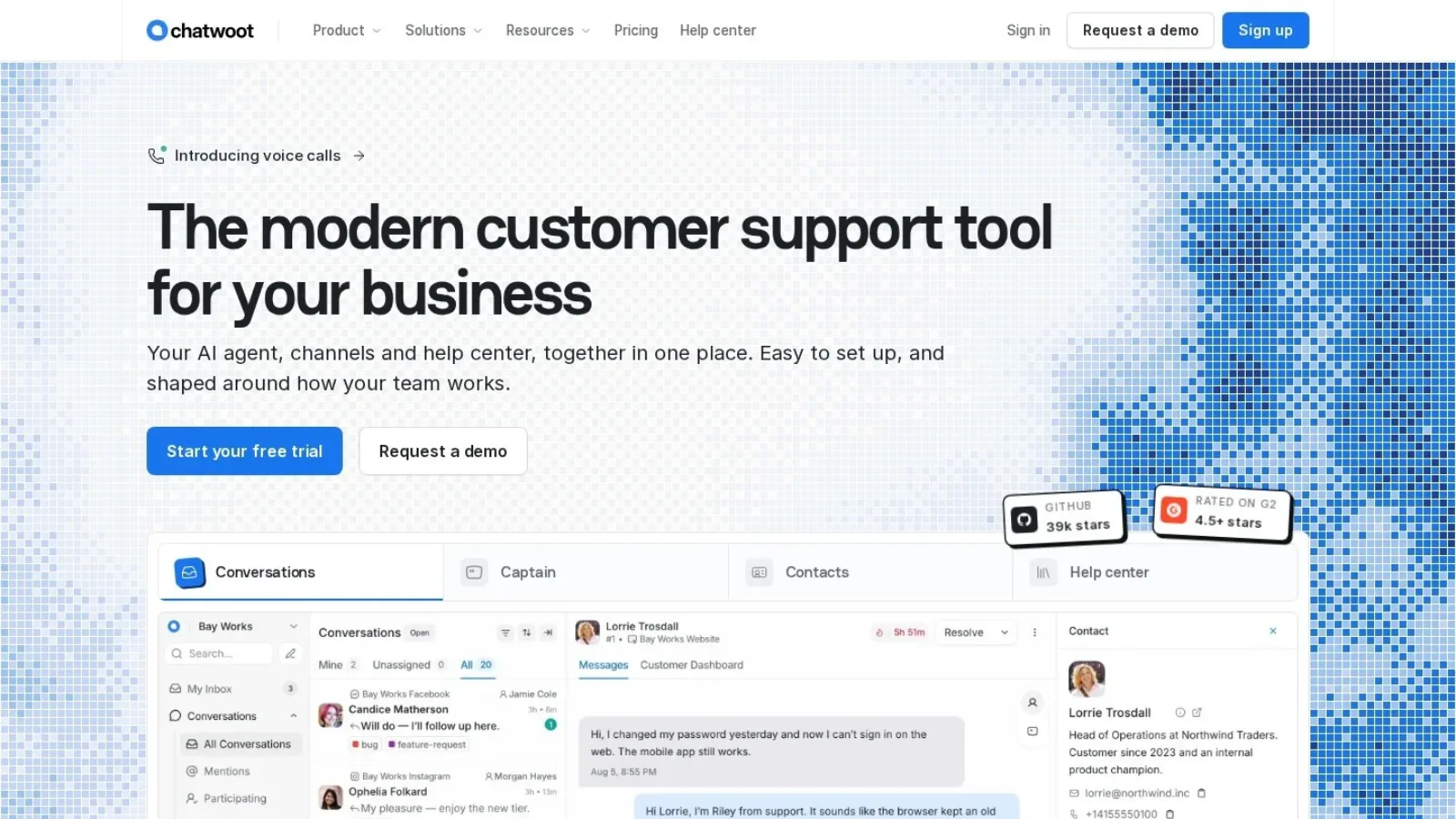
Should you use Chatwoot for live chat and support? If you want an open-source tool that you can run on your own server for free, Chatwoot is one of the best picks. It brings website chat, email, WhatsApp, Instagram and other channels into one inbox. And the self-hosted Community Edition costs nothing.
If you would rather not manage servers, the cloud version works too. Paid cloud plans start at $19 per agent a month and include its AI assistant, Captain. However, the free cloud plan is small. It allows only 2 agents, 500 conversations a month and website chat.
For this Chatwoot review, we compared the cloud and self-hosted price sheets, read the GitHub project and studied what reviewers on G2 like and dislike. Then we worked out what a typical support team would pay.

What Chatwoot Is
Chatwoot is an open-source customer support platform. It works as a shared inbox for live chat, email and social messages. The project describes itself as an alternative to Intercom, Zendesk and Salesforce Service Cloud.
The code lives on GitHub under the MIT License. In fact, the project has about 39,800 stars and 9,700 forks there. That is a large community for a support tool. As a result, you can find plenty of guides, fixes and add-ons.
Chatwoot runs on Ruby on Rails with a Vue.js front end. That matters if you self-host, because your team needs to be comfortable running a Rails app. On the other hand, cloud users never touch the code.
Chatwoot Features for Live Chat and Support
Chatwoot covers most of what a small support team needs every day. We sorted the features by how often a team would use them.
Live chat widget
The website chat widget is the heart of Chatwoot. You add a script to your site, and visitors can start a chat. Pre-chat forms can collect a name and email before the chat starts. So your agents know who they are talking to.
The widget works on every plan, including the free cloud plan. Agents can reply from the web app or the mobile app.
One inbox for many channels
Beyond chat, Chatwoot connects email, Facebook, Instagram, Twitter, WhatsApp, Telegram, Line and SMS. All of them land in the same inbox. Then agents reply from one screen, no matter where the message came from.
However, the free cloud plan covers live chat only. To use the other channels in the cloud, you need the Startups plan or higher. Self-hosted users get the channels on the free Community Edition.
Captain, the AI assistant
Captain is Chatwoot’s AI. It works in two ways. First, it answers customer questions using your help docs and past conversations. Second, it helps human agents by drafting replies and translating messages.
Captain also has a memory feature that keeps key details from past chats. Plus, it spots questions that come up often and suggests new FAQ entries. That way, your help center fills its own gaps over time.
Captain runs on monthly credits. Paid cloud plans include between 300 and 800 credits. Extra credits cost $20 per 1,000. The credits cover reply suggestions, summaries, auto-translation and help center answers.
Help center
Chatwoot includes a help center portal. You can publish help articles, FAQs and guides there. Also, those articles feed Captain’s answers. So one good article can cut both chat volume and agent workload.
Canned replies, labels and automation
Agents can save canned responses for common questions. Labels sort chats by topic, such as “billing” or “bug.” Then auto-assignment sends new chats to agents who are online.
Teams and automation rules help as the team grows. For example, you can send all refund chats to the billing team. Note that teams and automation need the Business cloud plan.
Reports and integrations
Chatwoot offers reports for conversations, agents, inboxes, labels and teams. It also tracks CSAT scores, and you can download the reports.
For integrations, Chatwoot connects with Slack, Shopify, Dialogflow, Google Translate and Linear. So a store can see order details next to the chat, and a product team can log bugs in Linear.

Chatwoot Pricing: Cloud and Self-Hosted
Chatwoot sells two kinds of plans. Cloud plans run on Chatwoot’s servers. Self-hosted plans run on yours. Both charge per agent per month.
Cloud plans
The cloud pricing page lists four plans. Paid plans come with a 15-day free trial.
| Cloud plan | Price per agent a month | Captain AI credits | Data kept for | Main extras |
|---|---|---|---|---|
| Hacker | $0 (up to 2 agents) | None | 30 days | Live chat only, 500 conversations a month |
| Startups | $19 | 300 | 1 year | All channels, help center |
| Business | $39 | 500 | 2 years | Voice, teams, automation |
| Enterprise | $99 | 800 | 3 years | SSO and SAML, audit logs |
Paid cloud plans allow unlimited conversations under a fair use policy. Also, Chatwoot offers the Startups plan free to open-source projects and nonprofits on request.
Self-hosted plans
The self-hosted pricing page lists three options.
| Self-hosted plan | Price per agent a month | What it adds | Support |
|---|---|---|---|
| Community Edition | $0, free forever | Core inbox, channels and help center | Discord and GitHub |
| Premium Support | $19 | Captain AI, voice calls, custom branding, roles and permissions | Priority email |
| Enterprise Edition | $99 | SSO, SAML and SLA policies | Phone and dev office hours |
So the free Community Edition does not include Captain AI or custom roles. If you need those, budget for Premium Support.
What a team of five would pay
Let us take a support team of five agents. On the Startups cloud plan, the bill is $95 a month. On Business, it rises to $195 a month for voice, teams and automation.
Self-hosting changes the math. The Community Edition costs $0 in licence fees. Still, you pay for the server and for someone’s time to update it. So a small team without a developer may find the cloud plan cheaper in practice.
If you want to see how per-agent pricing compares with flat pricing, read our guide to SaaS pricing models.
How to Run Chatwoot Yourself
Self-hosting is the main reason many teams choose Chatwoot. The self-hosted docs cover the setup in detail.
You have several options:
- Docker: Use the official Docker image and Docker Compose files. This is the most common route.
- Heroku: A one-click deploy button sets up the app on Heroku.
- Kubernetes: Use the Helm chart or the DigitalOcean 1-Click Kubernetes app.
Before you begin, plan for backups and updates. Your customer chats will live on your server. So read our guide on how to back up business data first. Also, check our small business cybersecurity checklist before you put a support tool on the open internet.
What Users Say on G2
Chatwoot has a 4.5 out of 5 rating on G2, but from only 16 reviews. So treat it as an early signal.
On the plus side, reviewers say Chatwoot is easy to set up and use. Many like that it brings several channels into one place and connects with their other tools. Also, several recommend it for small businesses and startups.
On the other hand, the most common complaint is that the portal sometimes disconnects. A few users also report bugs that interrupt their work.
Where Chatwoot Works Well
From our research, a few strengths stand out.
- Free and open source: The MIT-licensed Community Edition costs nothing to self-host.
- You own the data: Self-hosting keeps customer chats on your own servers. This helps teams with strict privacy rules.
- Many channels in one inbox: Chat, email, WhatsApp, Instagram, Telegram, Line and SMS share one screen.
- Clear public pricing: Every cloud and self-hosted price is on the website. You do not need a sales call to get a number.
- Free for nonprofits: Open-source projects and nonprofits can ask for the Startups plan at no cost.
- Large community: Nearly 40,000 GitHub stars mean many shared fixes and guides.
Where Chatwoot Could Improve
Chatwoot also leaves some room to grow.
- Small free cloud plan: Two agents, 500 conversations and chat only is a tight start. A slightly larger free tier would help small teams test more channels.
- AI not in the free self-hosted edition: Captain needs a paid plan. An entry level AI option for Community users would be welcome.
- Connection stability: G2 reviewers mention disconnects. Better stability would raise trust for busy teams.
- Self-hosting takes skill: Running a Rails app needs a developer. A simpler managed self-hosted option would widen the audience.
- Few reviews so far: Only 16 G2 reviews make it hard to compare with bigger tools.
Chatwoot Alternatives to Compare
Chatwoot sits between free chat widgets and large help desks. We picked four common options.
Crisp is a customer messaging platform with flat per-workspace pricing. It has a free plan for 2 agents and paid plans from $45 a month. It also offers co-browsing through a feature called MagicBrowse.
Intercom is a large customer service platform with its own AI agent. It aims at bigger teams with bigger budgets.
Zendesk is a full help desk built around ticketing. Teams with heavy email volume often look at it.
tawk.to is a free live chat tool. It makes sense when you only need a chat widget.
| Tool | Open source | Pricing style | Consider it if |
|---|---|---|---|
| Chatwoot | Yes | Free self-hosted or per agent | You want control of your data |
| Crisp | No | Flat price per workspace | You want low cost per agent with no servers |
| Intercom | No | Per seat plus AI usage | You run a large support team |
| Zendesk | No | Per agent | Ticketing is your main channel |
| tawk.to | No | Free chat tool | You only need a basic widget |
Is Chatwoot Worth It?
Yes, Chatwoot is worth it for teams that value control and clear pricing. If you have a developer, the free Community Edition gives you live chat and an omnichannel inbox at no licence cost. And if you do not, the Startups cloud plan at $19 per agent is fair for what you get.
We would steer very large teams toward a test first. Check how the inbox handles your peak chat volume during the 15-day trial. Also, read our AI chatbot usage statistics if you plan to lean on Captain for first replies.
Questions People Ask About Chatwoot
Is Chatwoot free?
Yes. The self-hosted Community Edition is free forever. In the cloud, the Hacker plan is free for up to 2 agents and 500 conversations a month, with live chat only.
How much does Chatwoot cost?
Cloud plans cost $19, $39 and $99 per agent a month for Startups, Business and Enterprise. Self-hosted Premium Support costs $19 per agent and Enterprise Edition $99.
Is Chatwoot open source?
Yes. Chatwoot is released under the MIT License, and the code is on GitHub.
Does Chatwoot have AI?
Yes. Captain is Chatwoot’s AI. It answers customers from your help docs and helps agents draft and translate replies. It comes with paid plans.
Can I self-host Chatwoot?
Yes. You can run Chatwoot with Docker, Heroku or Kubernetes. The Community Edition is free, and paid self-hosted plans add AI, branding and SSO.