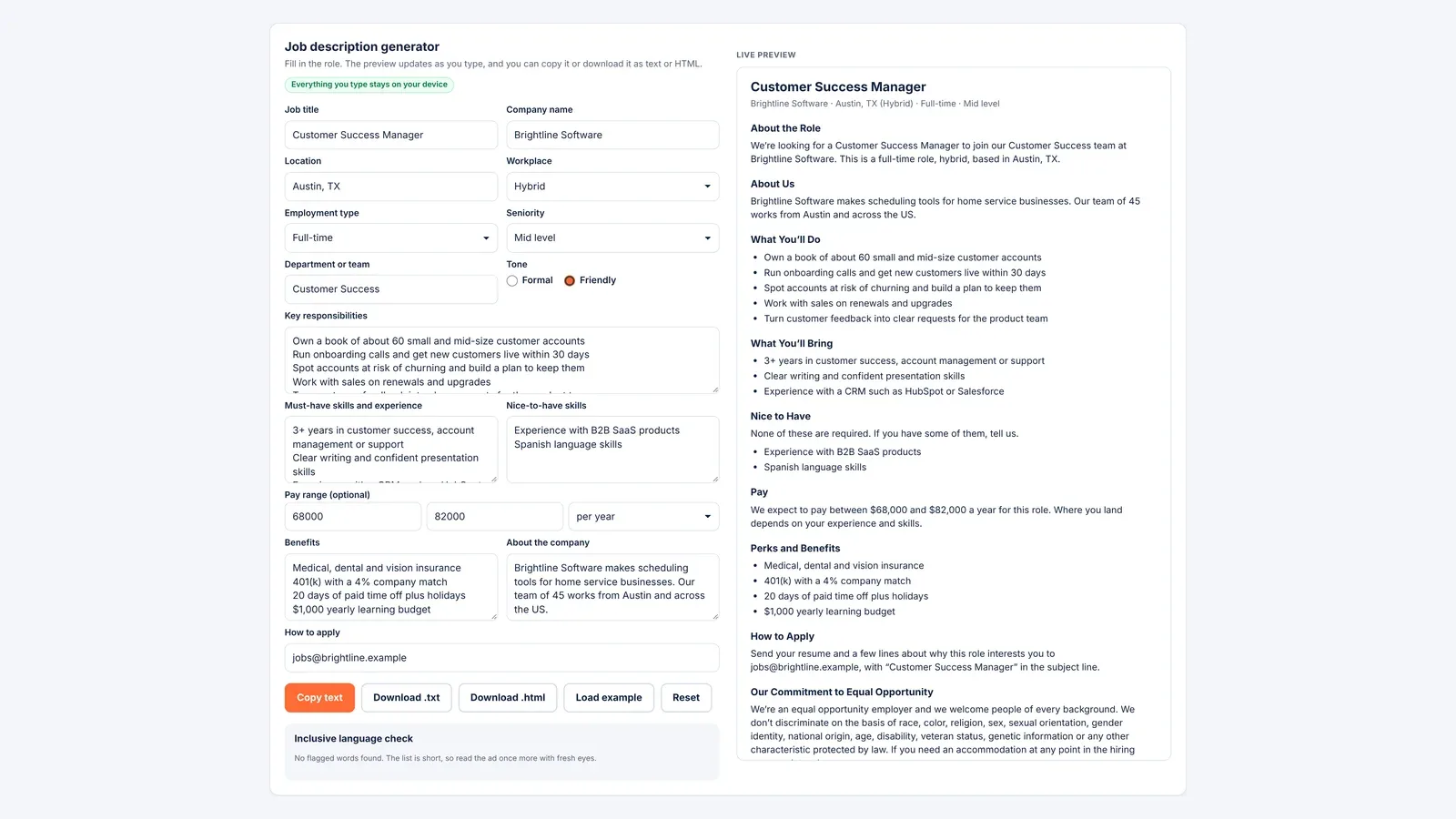
A job description generator turns your rough notes about a role into a complete, ready-to-post job description. A good one covers nine parts in a set order: a role summary, a few lines about the company, the main duties, the must-have requirements, the nice-to-have skills, pay, benefits, how to apply and an equal opportunity statement. In California, New York and Massachusetts, leaving out the pay range can also break state law.
The free generator below builds that structure from your inputs with fixed templates, not AI. Pick a formal or friendly tone, watch the live preview as you type, then copy the text or download it as a text or HTML file. It also flags gendered and coded words that can put some people off. Nothing you type leaves your browser.
Duty Length, Pay Range Laws and Gendered Wording in Ads
- Keep duties to three to eight lines, and split true requirements from nice-to-have skills.
- California employers with 15 or more employees must include a good faith pay scale in every job posting, and a link or QR code does not count.
- Massachusetts has required pay ranges in postings from employers with 25 or more employees since October 29, 2025.
- In a 2011 study, women found job ads with masculine wording less appealing and felt they would belong less, though the wording did not change how they rated their own skills.
Job description generator
Fill in the role. The preview updates as you type, and you can copy it or download it as text or HTML.
Everything you type stays on your device
Inclusive language check
Start typing and flagged words will appear here.
Live preview
Add a job title and company name to see your job description.
The generator builds your text from templates in your browser. Nothing is sent to a server or stored. Review the result, and check pay transparency and employment rules for the place where the job is based.
How to Use the Job Description Generator
Start with the job title and company name, since the preview appears once both are filled in. Press Load example to see a finished posting, then replace it with your own details.
- Role basics: pick the workplace, job type and seniority. The tool adds a seniority word only when your title lacks one, so “Senior Accountant” never becomes “senior Senior Accountant.”
- Duties and skills: type one item per line. The tool strips stray bullets and numbers, capitalizes each line and warns you if you list fewer than three duties or more than eight.
- Pay range: enter a minimum and maximum, then pick yearly or hourly. Leave both empty and the pay section is dropped, and a pay transparency reminder appears.
- How to apply: enter an email address, a link or your own instructions. An email address becomes a request for a resume with the job title in the subject line.
When the preview looks right, use Copy text to paste it into a job board. Download .txt gives you plain text with capitalized headings, and Download .html gives you a clean web page for a careers site.
What Goes in Each Section of a Job Description
The generator puts the role first and the legal text last. Each section has one job to do.
| Section | What it should do | Common mistake |
|---|---|---|
| About the role | Name the title, team, seniority, employment type and location in two sentences | Opening with a long company history |
| About the company | Say what the business does and who the person will work with | Vague claims such as “fast-paced environment” |
| Responsibilities | List the three to eight things the person will spend most time on | Fifteen bullets that include every rare task |
| Requirements | Give only what someone must have on day one | Listing wishes as requirements |
| Nice to have | Show skills that help but are not essential | Leaving it out, so every skill reads as required |
| Compensation | State the pay range and whether it is yearly or hourly | “Competitive salary” with no numbers |
| Benefits | Name concrete benefits such as insurance, retirement match and paid time off | Generic lines such as “great benefits” |
| How to apply | Give one clear route and what to send | Several routes that conflict |
| Equal opportunity | Confirm fair consideration and offer accommodations | Leaving it off or burying it |
The split between requirements and nice-to-haves matters most. If every skill sits in one list, a strong person who lacks one item may not apply. A separate list tells them the gap is fine. Be just as specific about benefits; our guide to companies with paid parental leave compares 21 real policies.
Formal or Friendly: How the Tone Setting Changes the Text
The tone setting changes the headings and the wording of the summary, pay, application and equal opportunity text. The facts stay the same, so you can switch and compare.
| Part of the posting | Formal tone | Friendly tone |
|---|---|---|
| Opening line | “Brightline Software is seeking a Customer Success Manager to join its Customer Success team.” | “We’re looking for a Customer Success Manager to join our Customer Success team at Brightline Software.” |
| Responsibilities heading | Responsibilities | What You’ll Do |
| Requirements heading | Requirements | What You’ll Bring |
| Pay wording | “The base salary range for this position is $68,000 to $82,000 per year.” | “We expect to pay between $68,000 and $82,000 a year for this role.” |
| Equal opportunity heading | Equal Opportunity Statement | Our Commitment to Equal Opportunity |
Formal wording suits law firms, banks and public sector roles. Friendly wording fits startups, shops and small teams that want the ad to sound like the people who work there. Either way, read the result aloud once before you post it.
Pay Transparency Laws for Job Postings
Several US states now require a pay range in job postings. The rules differ on who is covered and what counts as a valid range, so check each state where the job could be based, including for remote roles.
| State | Who must comply | What the posting needs |
|---|---|---|
| California | Employers with 15 or more employees, at least one of them in California | A good faith estimate of the salary or hourly wage range in the posting itself; a link or QR code does not satisfy the rule |
| New York | Employers advertising jobs done at least partly in New York, or remote jobs reporting to a New York supervisor or office | A good faith minimum and maximum pay, with no open-ended ranges, plus a job description (in effect since September 17, 2023) |
| Massachusetts | Employers with 25 or more employees in Massachusetts | The annual salary or hourly wage range the employer reasonably expects to pay (in effect since October 29, 2025) |
Sources: the California Labor Commissioner’s Office, the New York State Department of Labor and Mass.gov, checked October 31, 2026. For commission or piece-rate jobs, California and Massachusetts want the expected range of that pay too. New York says commissions should not be mixed into the base range, but you may list them on their own. Candidates who see a range can also negotiate from it, as our salary negotiation email templates show.
How the Inclusive Language Check Works
The check scans every text field for a short list of words and suggests swaps. It flags gendered terms such as “salesman” or “he,” masculine-coded words such as “aggressive,” jargon such as “rockstar” and age-coded phrases such as “digital native.” It also lists feminine-coded words such as “supportive,” but only for balance, since they are fine to keep.
The idea of coded words comes from a study by Danielle Gaucher, Justin Friesen and Aaron Kay in the Journal of Personality and Social Psychology in 2011. Women found ads with masculine wording less appealing and felt they would belong less in those jobs. Men’s ratings barely moved. The wording did not change how women rated their own skills, so the words seem to signal who belongs, not who is able.
Treat the flags as prompts, not rules. “Competitive pay” is a normal phrase, but an ad full of “dominate” and “aggressive” sends a clear message. The list is short on purpose, so a second reader is still the best check.
Tips for Writing Responsibilities and Requirements
Begin each duty with a verb and add a number where you can, such as “manage about 60 customer accounts” rather than “account management.” Numbers help people picture the work, and they give you clear questions to ask in interviews.
For each requirement, ask whether you would turn away an otherwise great person who lacks it. If not, move it to the nice-to-have list, and apply the same test to degree requirements. If your team works an unusual schedule, say so in the summary; our guide to jobs with four-day work weeks covers the common models. For more free tools, including our resignation letter generator, see the Bizolaunch tools page.
This generator and article are for general information only and are not legal advice. Pay transparency rules were checked on October 31, 2026; confirm current requirements with the relevant state agency or an employment lawyer before posting.
Salary in Postings, EEO Statements and Whether the Tool Uses AI
What Should a Job Description Include?
It should include a role summary, a short company overview, the main duties, required and preferred skills, pay, benefits, how to apply and an equal opportunity statement. The generator builds each of these from your inputs.
Do You Have to Include Salary in a Job Posting?
It depends on the state. California requires a pay scale from employers with 15 or more employees, New York requires a good faith minimum and maximum for covered jobs, and Massachusetts requires a range from employers with 25 or more employees. Check the rules wherever the job could be based.
What Is an EEO Statement in a Job Description?
An equal employment opportunity statement tells applicants that every qualified person will be considered regardless of traits such as race, sex, age or disability. The generator adds one in your chosen tone, with a line inviting requests for accommodation.
Does This Job Description Generator Use AI?
No. It assembles the description from fixed templates and your own words, inside your browser. That makes the output predictable, and it means your company details are never sent to a server.
What Is the Difference Between a Job Description and a Job Posting?
A job description is an internal document that sets out the duties and requirements of a role. A job posting is the public ad built from it, with pay, benefits and how to apply added. The generator writes text you can post.
State Pay Transparency Rules and the 2011 Gaucher Study
- California Labor Commissioner’s Office: California Equal Pay Act and pay scale disclosure
- New York State Department of Labor: Pay Transparency Act frequently asked questions
- Mass.gov: Pay transparency in Massachusetts
- Harvard Kennedy School Gender Action Portal: Gaucher, Friesen and Kay (2011), Evidence That Gendered Wording in Job Advertisements Exists and Sustains Gender Inequality