Online quiz tools let teachers build a quiz once, run it on student screens and get the marks back without a stack of paper. The best tools for creating online quizzes for teachers are Kahoot! for live games, Wayground (formerly Quizizz) for self-paced homework, Google Forms for free graded tests and Socrative for exit tickets. Also, Google Forms and Microsoft Forms cost nothing, and every paid plan here comes to less than $1.50 per student a year for a teacher with 150 students.
So the real choice depends on what the quiz is for: a loud review game, a graded test, a two-minute exit ticket or homework done at home. The 12 tools follow in one ranked list, then a cost table, a simple pairing plan and answers to common questions.

Quiz Tools for Teachers Compared by Free Plan and Price
Quiz tools for teachers all have a free plan, and paid plans for one teacher start at $3 a month with Kahoot! Bronze.
| Tool | Main classroom use | Free plan | Paid plan for one teacher |
|---|---|---|---|
| Kahoot! | Live whole-class quiz games | Yes, with a small player cap | From $3 a month billed yearly ($36) |
| Wayground (formerly Quizizz) | Self-paced quizzes and homework | Yes | Paid plans available |
| Blooket | Game-based review | Yes, up to 60 players | $4.99 a month billed yearly ($59.88) |
| Gimkit | Strategy games that reward correct answers | Yes, limited | About $60 a year; $650 a year for 20 teachers |
| Quizlet | Flashcards and vocabulary quizzes | Yes | About $36 a year for teachers |
| Google Forms | Free graded tests in Google Classroom | Free | Free |
| Microsoft Forms | Free quizzes in Microsoft 365 schools | Free with school accounts | Free with school accounts |
| Socrative | Quick checks and exit tickets | Yes, 1 room, 50 students | $120 a year (Essentials) |
| Formative | Live monitoring of student work | Yes | Paid plans available |
| Edpuzzle | Quizzes inside videos | Yes | Paid plans available |
| Mentimeter | Polls and quick quizzes in lessons | Yes | Paid plans available |
| Plickers | Quizzes without student devices | Yes | Paid plan available |
The 12 Best Tools for Creating Online Quizzes for Teachers
The 12 best tools for creating online quizzes for teachers are Kahoot!, Blooket, Gimkit, Wayground, Quizlet, Google Forms, Microsoft Forms, Socrative, Formative, Edpuzzle, Mentimeter and Plickers.
1. Kahoot!
Kahoot! is the classic live quiz game, with questions on the board, answers on student devices and a leaderboard after each question. Teacher plans, billed yearly, cost $3 a month for Bronze (50 players), $6 for Silver (100 players), $10 for Gold (200 players) and $19 for Kahoot! One (800 players).
On top of that, paid plans add AI quiz creation from topics and web pages, plus polls, puzzles, word clouds and better reports. The free Go plan still runs classic quiz games, but it limits players, reports and question options.
2. Blooket
Like Kahoot!, Blooket is a live game, but it turns each quiz into game modes where students compete for points, gold or territory. The free Starter plan hosts games for up to 60 players. Blooket Plus costs $4.99 a month billed yearly ($59.88), or $9.99 a month on Plus Flex. For that price you get extra game modes, better reports, audio questions and games for up to 300 players.
3. Gimkit
Built by a high school student, Gimkit pays students in-game money for right answers, which they then spend on upgrades. Also, its KitCollab feature lets students write questions with the teacher before a game starts.
Gimkit Pro opens all modes and assignments for about $60 a year. However, departments save more by buying together, since group pricing is $650 a year for 20 teachers, or $1,000 a year for a whole school.
4. Wayground (formerly Quizizz)
For homework and practice, Wayground is the top pick, and it is the new name for Quizizz. Students join with a code and no account, answer at their own pace and see their results right away. Teachers can turn timers, leaderboards and memes on or off, and they can send results to parents. In addition, its AI can adapt a quiz for different students and turn a single file into quiz and lesson formats.
5. Quizlet
Best known for flashcards, Quizlet also works as a quiz tool through its Learn and Test modes and the Quizlet Live team game. A free teacher account includes classes, assignments and Quizlet Live. Quizlet Plus for Teachers, at about $36 a year, then adds progress tracking. As a result, it gets the most use in vocabulary, language and fact-heavy subjects.
6. Google Forms
Completely free with a Google account, Google Forms has a quiz mode with point values, automatic grading and feedback for each answer. It also works with Google Classroom, so you can import grades straight into your class.
7. Microsoft Forms
Schools on Microsoft 365 get the same idea in Microsoft Forms, with quizzes, automatic grading and results in Excel. It also runs inside Microsoft Teams for Education.
8. Socrative
Exit tickets and fast checks for understanding are the main job of Socrative. The free plan includes 1 room, up to 50 students per activity and 5 saved quizzes. Next up, Essentials costs $120 a year with 5 rooms and unlimited quizzes, while Pro costs $200.04 a year with 30 rooms and up to 300 students. All plans include AI question writing, with weekly limits.
9. Formative
With Formative, you watch student answers appear live as they work, including drawn and written responses. That way you can step in while students are still thinking. As a result, math and science teachers can see the working, and not only the final answer.
10. Edpuzzle
Video lessons get quizzes through Edpuzzle, which adds questions inside videos, including YouTube clips. Students must answer before the video continues, and you can see who watched and how they did.
11. Mentimeter
Mentimeter is mostly known for live polls and word clouds, but it also has quiz slides with a leaderboard. Because it sits inside a slideshow, it works best for quick quizzes during a lecture, especially in high school and university.
12. Plickers
Unlike the other 11 tools, Plickers works without student devices. Instead, each student holds up a printed card, and the teacher scans the room with a phone to collect the answers. So it works for younger students and rooms with few devices.
Read also: 10 Best Tools for Creating Online Forms
What Quiz Tools Cost a Teacher Each Year
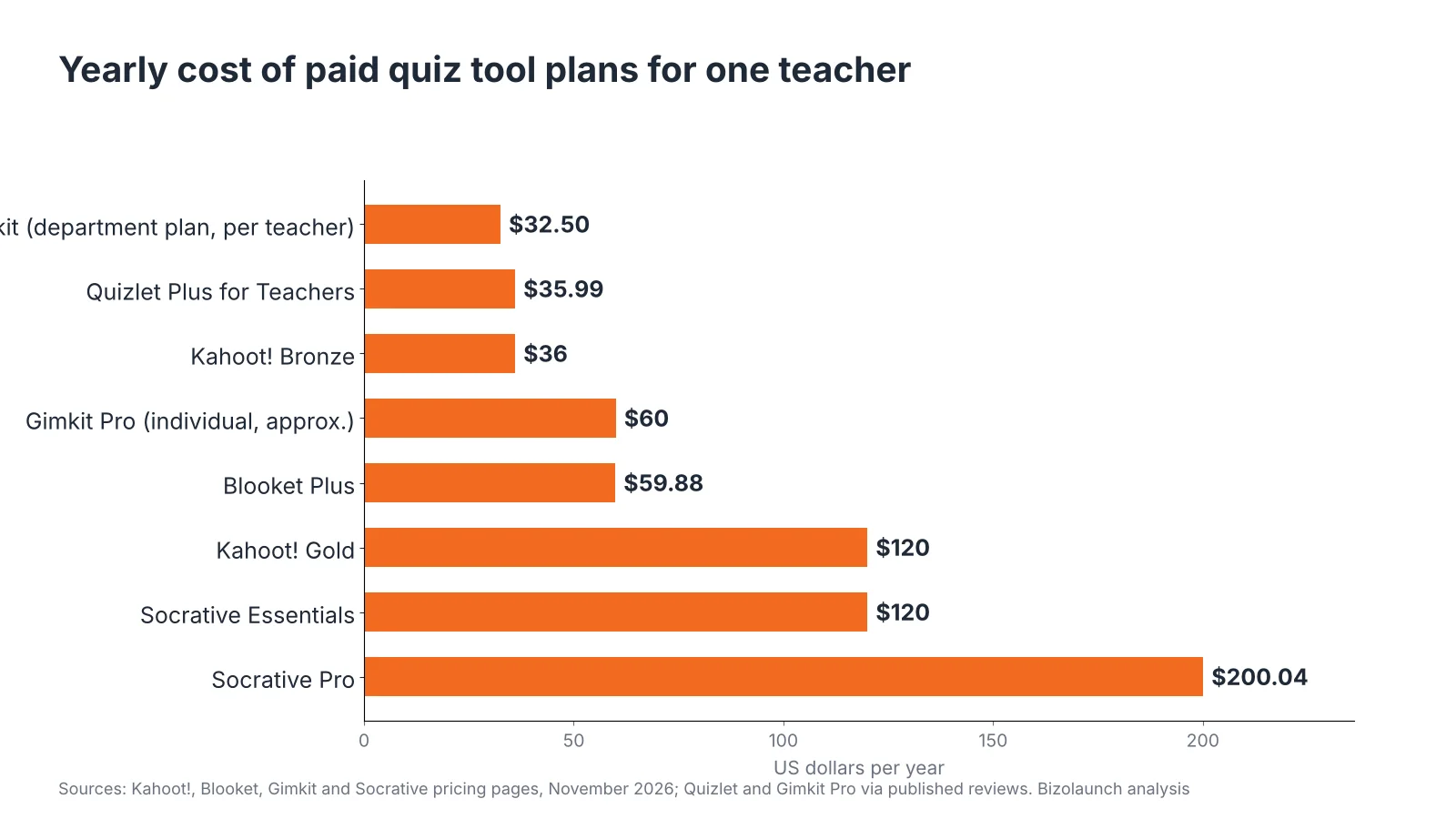
Paid quiz tools cost one teacher between $32.50 and $200.04 a year, or about $0.22 to $1.33 per student for 150 students. The table lists each paid plan from cheapest to dearest.
| Plan | Yearly cost for one teacher | Cost per student for 150 students |
|---|---|---|
| Gimkit department plan (20 teachers) | $32.50 | About $0.22 |
| Kahoot! Bronze | $36 | About $0.24 |
| Quizlet Plus for Teachers | About $36 | About $0.24 |
| Blooket Plus | $59.88 | About $0.40 |
| Kahoot! Gold | $120 | About $0.80 |
| Socrative Essentials | $120 | About $0.80 |
| Socrative Pro | $200.04 | About $1.33 |
For a teacher with five classes of 30 students, then, every paid plan costs well under $1.50 per student a year. Buying together saves more. For example, the Gimkit department plan works out to $32.50 per teacher, about half the price of one Pro account, and Blooket and Kahoot! also offer group pricing.
Why Teachers Should Pair One Game Tool With One Grading Tool
Teachers should pair one game tool with one grading tool because games build interest while grading tools show what students really know. In practice, that means:
- One game tool such as Kahoot!, Blooket or Gimkit for review and class energy.
- One assessment tool such as Google Forms, Microsoft Forms or Socrative for graded or exit-ticket quizzes.
Game tools reward speed, which is fun but can hide gaps in what students know. By contrast, assessment tools are calmer and give cleaner data. Using one of each gives you lively lessons and accurate grades without paying for many subscriptions.
Five Checks Before You Pick a Quiz App for Your Class
Before you pick a quiz app, check five things: the job, your school platform, the free player cap, student privacy and group pricing.
- Decide the job first. A review game, a graded test, an exit ticket and homework each call for a different tool.
- Match your school platform. Google Forms belongs in Google schools, and Microsoft Forms belongs in Microsoft schools.
- Look at the free player cap. Free plans often limit players, which matters with large classes.
- Protect student privacy. Where you can, pick tools that let students join with a code and no account.
- Ask about group pricing. Department plans often cut the cost per teacher by half.
For more ways to use AI and software at work, see our list of AI tools for insurance agents.
Read also: How to Become a Substitute Teacher in Florida
Common Teacher Questions About Quiz Apps
Teachers most often ask which quiz app is free, what Kahoot! and Blooket cost and what happened to Quizizz.
What is the best free quiz tool for teachers?
The best free quiz tools for teachers are Google Forms and Microsoft Forms, which are fully free for graded quizzes. For games, the free plans of Kahoot!, Blooket and Wayground cover most classroom needs.
Is Kahoot! free for teachers?
Yes, Kahoot! is free for teachers on its Go plan, with limits on players and features. Paid teacher plans start at $3 a month, billed yearly.
What happened to Quizizz?
Quizizz was renamed Wayground. It still offers quizzes and lessons, and it now adds AI tools for teachers.
Which quiz tool works without student devices?
Plickers is the quiz tool that works without student devices. Students hold up printed cards, and the teacher scans them with a phone.
How much does Blooket Plus cost?
Blooket Plus costs $4.99 a month, charged yearly at $59.88, or $9.99 a month on the monthly Plus Flex plan.