Data annotation is the work of adding labels to raw data, such as photos, text, audio or video, so a machine learning model can learn from it. A box drawn around a car in a street photo is an annotation. So is a tag that marks a product review as positive. Even a note that picks the better of two chatbot answers counts.
Doing it well comes down to three habits. Write tight label rules first, use a tool built for your data type, and measure how often two people agree. For images and video, CVAT is the most practical pick. For mixed work across text, audio and images, Label Studio covers more ground. A spreadsheet works only for a few hundred text labels.
The sections cover the main types of annotation with examples, the file formats they produce and how labels trained an OpenAI chat model. Tool prices, an eight-step workflow, a worked quality check and the most common mistakes come last.
What Data Annotation Means in Machine Learning
A machine learning model learns by example. In supervised learning, each example pairs an input with the right answer. The photo is the input, and “cat” is the answer. Annotation is the step where people, or people helped by software, attach those answers.
The words get mixed up a lot. “Data labeling” usually means the same thing. Some teams use “labeling” for single tags and “annotation” for richer marks like outlines, boxes and notes. Either way, the output is a labeled data set that a model can train on.
Bad labels lead to bad models. For example, if one annotator tags sarcastic reviews as positive and another tags them as negative, the model sees mixed signals and learns neither rule. That is why the label rules matter as much as the labeling itself.
Types of Data Annotation With Examples
Each data type has its own kinds of marks. The table shows the common ones, with a real-world example and the file format that teams often export.
| Data type | Annotation type | Example | Common export format |
|---|---|---|---|
| Image | Classification tag | Mark a photo as cat, dog or neither | CSV or folder per class |
| Image | Bounding box | Draw a box around each car in a street photo | COCO JSON or YOLO text files |
| Image | Polygon or mask | Trace the exact outline of a tumor on a scan | COCO JSON with masks |
| Image | Keypoints | Mark elbows, knees and wrists for pose tracking | COCO keypoints JSON |
| Video | Object tracking | Follow one forklift across 300 frames | CVAT video XML or MOT format |
| Text | Classification | Tag a support ticket as billing, login or bug | CSV or JSONL |
| Text | Named entities | Mark Apple as a company and Paris as a place | CoNLL or JSONL with spans |
| Audio | Transcription | Type out a caller’s words, with timestamps | JSON or SRT |
| Audio | Speaker labels | Mark when speaker A stops and speaker B starts | RTTM or JSON |
| Chatbot output | Preference ranking | Rank four answers to one prompt from best to worst | JSONL pairs |
Image annotation examples
Bounding boxes are the most common image task, since they are fast to draw. A self-driving data set might need boxes on cars, people, bikes and signs in every frame. Polygons take longer, but they matter when shape counts, as with crop rows in a drone photo or a wound on a medical image.
Text annotation examples
Text work ranges from a single tag per sentence to marking every word. For instance, a bank might label 20,000 complaint emails by topic so it can route new ones to the right team. A legal tech firm might mark party names, dates and amounts inside contracts.
Audio and video annotation examples
Audio teams type out speech and mark who is talking. Video teams track objects from frame to frame, so one label follows a person across a whole clip. Good tools fill in the frames between two boxes, which cuts the work a lot.
How Human Labels Trained OpenAI’s InstructGPT
Annotation is not just for photos of cats. Chatbots also learn from human labels. OpenAI’s InstructGPT paper, Training language models to follow instructions with human feedback, shows the scale.
OpenAI hired a team of about 40 contractors through Upwork and Scale AI and picked them with a screening test. These labelers did two jobs. First, they wrote model answers to prompts. Next, they ranked several model outputs from best to worst.

The written-answer set had about 13,000 training prompts, and the ranking set had about 33,000. Even trained labelers did not always agree. Training labelers agreed with each other 72.6% of the time, and a held-out group agreed 77.3% of the time. So even expert labeling has a ceiling, and your own quality checks should expect some disagreement.
Read also: Random Forest Algorithm: Meaning, How-to, Examples
Data Annotation Tools and What They Cost
The tool you pick shapes your speed more than anything else. Two tools cover most small and mid-size projects, and both have open-source versions.
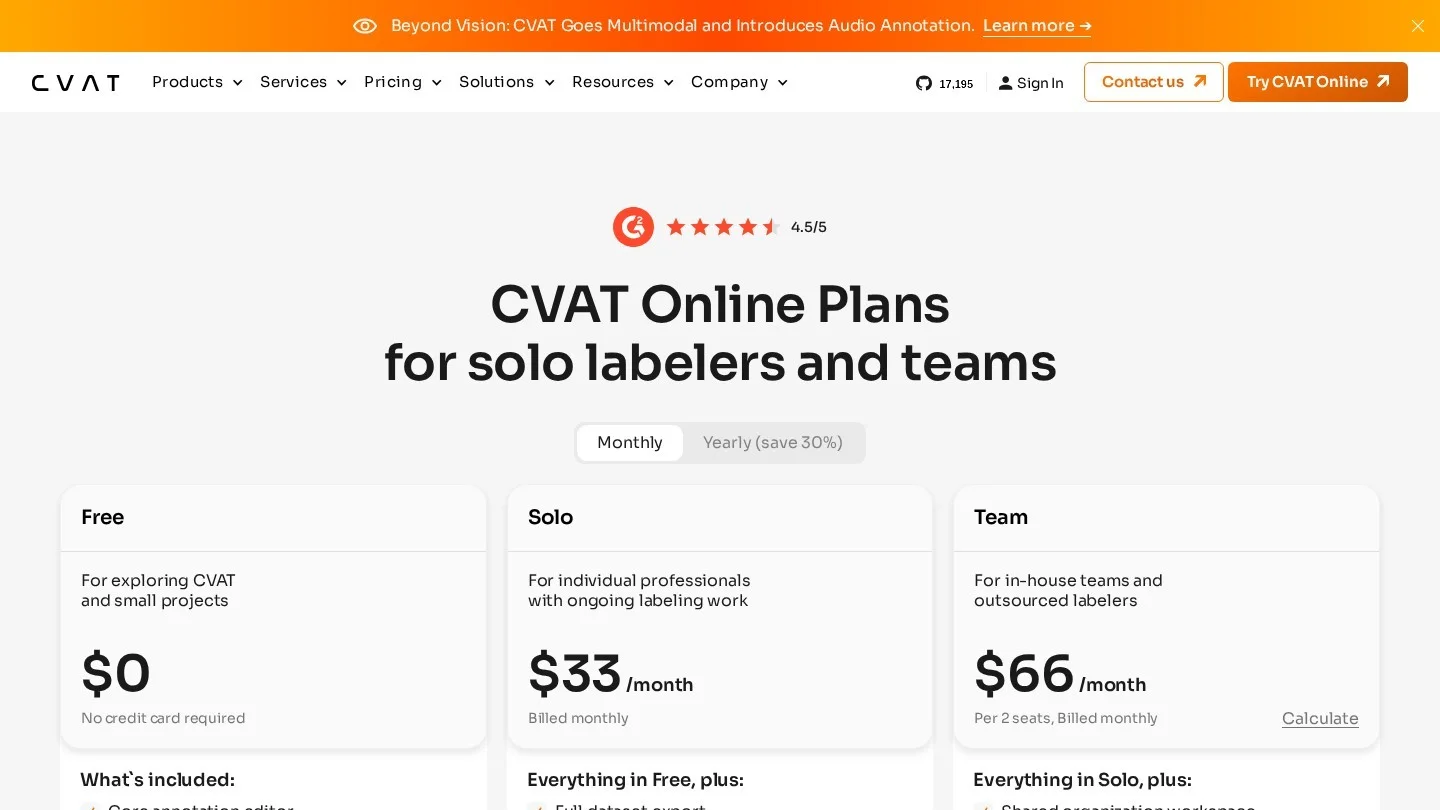
| Tool and plan | Monthly price | Yearly billing | What you get |
|---|---|---|---|
| CVAT Online Free | $0 | $0 | 1 project, 3 tasks, 1 GB, for testing |
| CVAT Online Solo | $33 | $23 a month | One annotator, paid features |
| CVAT Online Team | $33 per user | $23 per user a month | 2 to 50 users |
| Label Studio Community | Free, self-hosted | Free | Open source, you run the server |
| Label Studio Starter Cloud | From $99 | Not listed | Hosted, extra users $49 a month each |
The CVAT Online Team plan costs $23 per user a month on yearly billing, with a two-user minimum. So a five-person team pays $115 a month, or $1,380 a year. The free plan is for trying the tool, since it caps you at 3 tasks and 1 GB.
Meanwhile, Label Studio Starter Cloud starts at $99 a month, with extra users at $49 each. The Community Edition is free, but you host it yourself and handle updates and backups.
Which annotation tool to pick
CVAT is the winner for images and video, because its box, polygon and tracking tools are built for that work. It is not for chatbot ranking or long text work, where it feels clumsy.
Label Studio is the winner for mixed projects, because one setup handles text, audio, images and model output ranking. It is not for a team that wants zero setup and only draws boxes, since CVAT gets you there faster.
A spreadsheet is fine for a few hundred text tags. However, it is not for anything with boxes, audio or more than one labeler, because you cannot track who changed what.
How to Annotate Data, Step by Step
The steps are the same for 500 items or 500,000. Skip one and the cost shows up later as rework.
- Define the task. Write one sentence on what the model must predict, such as “Find every pallet in warehouse photos.”
- Write label rules. List each label, with two good examples and one tricky case for each. Say what to do when an item is cut off at the edge or blurry.
- Run a pilot. Label 50 to 100 items with two people, then compare their work and fix the rules where they disagreed.
- Set up the tool. Create the label set, import the data and turn on review steps.
- Label in batches. Send work in small batches so you can catch drift early.
- Review a sample. Have a second person check 5% to 10% of each batch, and send errors back with a note on the rule that was broken.
- Measure agreement. Track a score like Cohen’s kappa every week.
- Export and version. Export to the format your training code needs, and save each version so you can trace model changes back to label changes.
A worked cost and time example
Say you need boxes on 10,000 warehouse photos, and the pilot shows an average of 30 seconds per photo. That comes to 300,000 seconds, or about 83 hours of labeling. Add a 10% review pass and the total is about 92 hours.
With three annotators at 25 focused hours a week, the job takes a little over one week. On CVAT Team with yearly billing, three seats cost $69 a month. So the tool is a small part of the bill, and labor is the big part.
How to Measure Annotation Quality With Cohen’s Kappa
Raw agreement can fool you, because two people will agree some of the time by luck. Cohen’s kappa removes that luck. A score of 1 means full agreement, and 0 means no better than chance.
For example, two annotators tag the same 100 product reviews as positive or negative.
| Result | Count |
|---|---|
| Both picked positive | 40 |
| Both picked negative | 45 |
| A picked positive, B picked negative | 5 |
| A picked negative, B picked positive | 10 |
First, find the observed agreement. They agreed on 40 plus 45, or 85 of 100 reviews, which is 0.85.
Next, find the agreement you would expect by chance. Annotator A picked positive 45 times and B picked it 50 times. So chance agreement on positive is 0.45 times 0.50, or 0.225. For negative, it is 0.55 times 0.50, or 0.275. Together, that makes 0.50.
Finally, kappa is (0.85 minus 0.50) divided by (1 minus 0.50), which is 0.70. In Python, cohen_kappa_score from scikit-learn returns the same 0.70 for these labels. A kappa from 0.61 to 0.80 is commonly read as substantial agreement, and medical or legal work should aim higher. If your score is low, the fix is usually clearer rules, not faster labelers.
Common Data Annotation Mistakes and Their Fixes
Most label problems repeat from project to project. These six cause the most rework.
- Loose boxes. Some annotators leave wide gaps around objects, and others crop tight. As a fix, add a rule such as “the box edge touches the object on all four sides.” Then show one right and one wrong box.
- No rule for edge cases. A half-hidden car, a sarcastic review or two people talking at once will split your team. So add every tricky case from the pilot to the rules, with the agreed answer.
- Label drift. Rules change in week three, but items labeled in week one keep the old meaning. Log each rule change with a date, then relabel or flag older batches.
- Rare classes buried. If 2% of your photos show a damaged parcel, labelers start skipping them. Instead, pull a separate batch of likely rare cases and label it on its own.
- Duplicates across train and test. Near-identical frames from one video can land in both sets, which makes test scores look better than they are. Split by video or by customer, not by single item.
- One person checks their own work. Self-review misses the same errors twice. Always route a sample to a second person.
Each fix costs a few minutes up front. By contrast, finding the problem after training means relabeling thousands of items and training again.
Read also: Tonic AI Review: Safe Test Data for Software Teams
Data Annotation as a Job or a Business
Annotation is also paid work. Many entry-level remote roles involve tagging text, rating chatbot answers or drawing boxes. Our list of remote jobs that need no experience shows where that kind of work fits. Some labelers then move up to reviewer or project lead. Others go on to the roles in our guide to the highest-paying AI careers.
To sell labeling as a service instead, read how to start an AI data annotation business. It covers clients, pricing and setup.
Data Annotation Questions People Ask
What is a gold set in data annotation?
A gold set is a batch of items with answers you already trust. You mix them into the work without telling the labelers. Then you score each person on how often they match the known answers.
Can AI annotate data by itself?
Partly. A model can pre-label the data, and people then fix its mistakes. That is faster than labeling from zero, but a person still has to check the work.
How many labeled examples does a model need?
It depends on the task and the model. Tuning a model that is already trained can work with a few hundred examples per class. Training from scratch needs far more. So run a pilot, train, and add labels where the model fails.
What skills does an annotator need?
Close focus, patience and the habit of following written rules. Medical, legal and coding tasks also need real subject know-how.
Should I outsource annotation or keep it in-house?
Keep it in-house when the data is private or the rules change often. Send out large, stable jobs like box drawing, but keep your own staff checking a sample.