Most AI voices still give themselves away. The pace is flat, a brand name comes out wrong, or every sentence ends on the same note. So you spend an hour fixing a two-minute script.
For most creators, the best AI tool for realistic voiceovers is ElevenLabs. Its Creator plan costs $22 a month after a $1 first month, and it includes professional voice cloning. Murf and WellSaid are the calmer picks for training videos and corporate work, because they give you fine control over pronunciation and pacing. Developers who need voices inside an app should look at Cartesia, Amazon Polly or Google Cloud Text-to-Speech, which charge by the character.
This list covers 12 voice tools. PlayHT is not included, because Meta bought it and the service shut down at the end of last year. Resemble AI is also left out, since its public pricing now covers deepfake detection, with no voice generation plans. For each tool, you get the cheapest paid plan, how much audio it buys and whether commercial use is included.
AI Voiceover Tools Compared by Price and Audio Included
Every price in this table comes from the vendor’s own pricing page. Plans change often, so treat the figures as a starting point and confirm at checkout.
| Tool | Best for | Free option | Cheapest paid plan | Audio on that plan |
|---|---|---|---|---|
| ElevenLabs | Expressive voices and cloning | 10k credits a month | $6 a month (Starter) | About 30 minutes |
| Murf | Training and explainer videos | 10 minutes | $19 a month, billed yearly (Creator) | See plan details |
| WellSaid | Corporate e-learning voices | Trial | Price not published on plan page | 240 minutes a year (Starter) |
| Speechify Studio | Long voiceovers on a yearly budget | 600 credits | $100 a year (Studio Starter) | About 24 hours a year |
| LOVO Genny | Voiceover plus video editing | Not listed | $24 per user a month | 2 hours a month |
| Descript | Fixing your own recorded voice | 1 hour of media a month | $16 a month, billed yearly (Hobbyist) | 10 media hours a month |
| Fish Audio | Cheap high-volume generation | About 7 minutes | $11 a month (Plus) | Up to 200 minutes |
| Narakeet | Slides and documents to narrated video | 20 conversions | $6 for 30 minutes (one-time) | 30 minutes |
| Cartesia | Low-latency voices for apps | 20k characters | $5 a month (Pro) | 100k characters |
| Amazon Polly | AWS developers | Monthly free tier | $4 per 1M characters (Standard) | Pay as you go |
| Google Cloud Text-to-Speech | Google Cloud developers | Up to 4M characters a month | $4 per 1M characters (Standard) | Pay as you go |
| Azure AI Speech | Microsoft stack and custom brand voices | 0.5M characters a month | Priced in Azure calculator | Pay as you go |
AI Voice Studios for Creators and Marketers
These tools work in a browser. You paste a script, pick a voice, adjust delivery and download an audio file.
ElevenLabs
ElevenLabs is the tool we would try first for expressive narration. You can pick a stock voice, design a new one from a text prompt, or clone your own voice from a recording.
The model you choose changes the result.
- Eleven v4: It covers 90+ languages and takes up to 10,000 characters per request, about 10 minutes of audio. ElevenLabs aims it at character voiceovers, audiobooks and emotional dialogue.
- Multilingual v2: It covers 29 languages and is the most stable model on long-form scripts. So it is a safer choice for a 20-minute course module.
- Flash v2.5: It covers 32 languages with about 100ms median latency. API calls cost 50% less per character, which helps when you convert large volumes.
Pricing runs on credits. Starter costs $6 a month for 30k credits, or about 30 minutes, with a commercial licence and instant cloning. Creator is $22 a month for 121k credits and adds one professional voice clone. Pro is $99 for 600k credits, Scale is $299 and Business is $990. The free plan gives you 10k credits a month for limited use.

Murf
ElevenLabs is built around expressive voices. Murf is built around the editing screen, which makes it a practical ElevenLabs alternative for training teams. You can change pitch, speed and pause length for each sentence or even each word. Then you can add word-level emphasis where a line sounds too flat.
A few Murf features save real time on long projects.
- Pronunciation editor: You define how a word should sound once, and Murf applies it everywhere in the project. That matters for product names and acronyms.
- Voice styles: Murf offers 10+ styles, such as conversational, documentary, promotional and calm.
- Voice library: It lists 200+ voices across 35 languages, plus 10+ accents.
The free plan includes 2 projects and 10 minutes of voice generation, with no card needed. Creator costs $19 a month and Business costs $66 a month, both billed yearly. Murf’s Falcon API is priced at $0.01 per minute for developers.
WellSaid
WellSaid takes a narrower path than Murf. It builds English voices from licensed professional voice actors, so the audio can go into courses, products and videos without extra licence fees. It is SOC 2 Type II compliant and uses closed-source voice models, which matters to legal teams.
Its Studio gives you two kinds of control.
- Pronunciation tools: You can fix how a word or phrase is said, use a built-in Oxford dictionary and save rules for names and brand terms.
- Delivery cues: You adjust pauses, pacing, emphasis and tone inside the script, with no separate audio editor.
The Starter plan includes 240 minutes a year of downloaded audio, unlimited generation and 10 projects at 24 kHz. Pro raises that to 2,160 minutes a year, unlimited projects and up to 48 kHz audio, plus an Adobe Express integration. WellSaid does not publish plan prices, and annual billing saves 10% over monthly.
Speechify Studio
WellSaid limits downloads by the minute. Speechify Studio sells a large yearly block of credits instead, which works out well for people who publish a lot of narration. Voiceover costs 1 credit per second, and dubbing costs 3 credits per second.
So the yearly plans buy a lot of audio.
- Free: 600 credits, which is about 10 minutes of voiceover, without commercial rights.
- Studio Starter: $100 a year for 86,400 credits, about 24 hours of voiceover, with commercial rights.
- Studio Creator: $300 a year for 345,600 credits, about 96 hours of voiceover.
All plans include access to 1,000+ voices and the Dubbing Studio. Speechify supports 20 voiceover languages, including English, Hindi, Japanese, Spanish and Polish. There is no monthly price, so you pay for the year up front.

LOVO Genny
Speechify is mostly about audio. LOVO‘s Genny combines the voice generator with a video editor, so you can build a narrated clip in one place. It lists 500+ voices in 100+ languages.
The plans differ mainly by generation hours and cloning.
- Basic: 2 hours of voice generation a month, 5 cloned voices and commercial rights.
- Pro: 5 hours a month and unlimited voice cloning.
- Pro+: 20 hours a month for $75 per user a month, or $900 a year.
Paid plans start at $24 per user a month. LOVO shows these as 50% off list prices, so check the current offer before you budget for a full year.
Descript
Descript solves a different problem. You record your own voice, and Descript lets you edit the audio by editing the transcript. When you fix a word in the text, a clone of your voice can fill the gap. That keeps your own sound on the track, with no full re-record.
Each paid plan includes custom voice clones.
- Hobbyist: $16 a month billed yearly, or $24 monthly, with 10 media hours and 400 AI credits a month.
- Creator: $24 a month billed yearly, or $35 monthly, with 30 media hours and 800 AI credits.
- Business: $50 a month billed yearly, or $65 monthly, with 40 media hours, 60+ stock AI speakers and AI speakers in 14 languages.
The free plan gives you 1 hour of media a month and 100 one-time AI credits. However, free exports are 720p with a watermark. If you also record podcasts, our guide on how to start a podcast covers the rest of the setup.
Fish Audio
Descript charges for editing time. Fish Audio charges for generation, and it is one of the cheapest options per minute in our list. The Plus plan costs $11 a month and allows up to 200 minutes, with 15,000 characters per generation.
The plans scale like this.
- Free: 8,000 credits, up to about 7 minutes, for personal, non-commercial projects only.
- Plus: $11 a month or $132 a year, with commercial use and 1 professional voice slot.
- Pro: $75 a month or $900 a year, up to 1,620 minutes, with 5 professional voice slots.
Each minute of generation on Fish Audio costs about 600 to 625 credits. Its API is billed separately from these subscriptions.

Narakeet
Fish Audio needs a script. Narakeet can work straight from the files you already have. You upload PowerPoint, Google Slides or Keynote decks, and it turns them into narrated videos. It also converts Word, PDF and EPUB files into audio.
Two features help teams that update content often.
- Markdown scripts: You write a video in Markdown with stage directions for slides and call-outs. Then the narration syncs to them.
- Quick re-renders: You edit the text, upload again, and Narakeet builds a new version.
Narakeet has 900 voices in 100 languages. Pricing is pay as you go, with no subscription. The smallest pack is 30 minutes for $6, or $0.20 a minute. Free accounts get 20 conversions with no commercial use.

Read also: AI Writing Tool Adoption by Industry: Who Uses It
AI Voice APIs for Developers and Apps
These four tools are built for code. You send text to an API and get audio back, so they cost far less per minute. However, you need a developer or a no-code tool to use them.
Cartesia
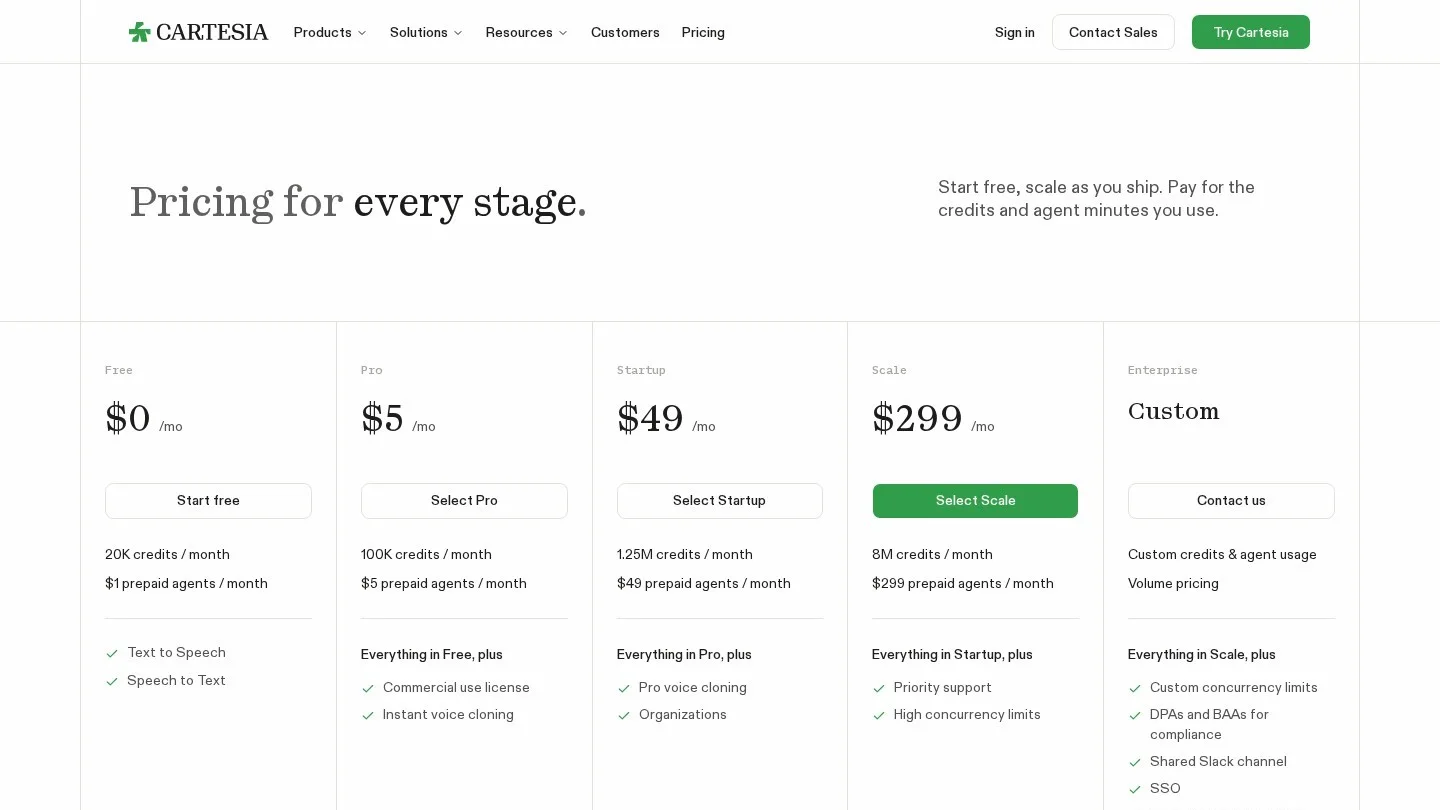
Cartesia sells text-to-speech, speech-to-text and voice agent plans, so it is aimed at live apps. Its Sonic text-to-speech model charges 1 credit per character, which makes costs easy to predict.
The plans step up quickly.
- Free: 20K credits a month and 2 concurrent TTS requests.
- Pro: $5 a month for 100K credits, instant voice cloning and a commercial use licence.
- Startup: $49 a month for 1.25M credits and 2 professional voice cloning slots.
- Scale: $299 a month for 8M credits and 4 professional cloning slots.
For a solo builder testing a voice feature, the $5 Pro plan is the cheapest commercial entry point in this list.
Amazon Polly
Cartesia sells monthly plans. Amazon Polly bills per character inside your AWS account. It works for teams that already store content on AWS and want to batch-convert articles or help docs into audio.
Polly has four voice engines, each with its own price per million characters.
- Standard: $4, with 5 million free characters a month.
- Neural: $16, with 1 million free characters a month for the first 12 months.
- Long-Form: $100, with 500 thousand free characters a month for the first 12 months.
- Generative: $30, with 100 thousand free characters a month for the first 12 months.
Neural costs about half as much as Generative. So test both voices on a help article before you commit.

Google Cloud Text-to-Speech
Polly and Google charge the same $4 per million characters for basic voices. The difference is in Google’s premium tiers and its larger free allowance. Standard and WaveNet voices include up to 4 million free characters a month.
Google’s voice types climb in price.
- Neural2: $16 per 1 million characters.
- Chirp 3: HD: $30 per 1 million characters, with 1 million free each month.
- Studio: $160 per 1 million characters, the top per-character rate in Google’s list.
- Instant custom voice: $60 per 1 million characters.
Google also offers Gemini-TTS, priced by tokens. Gemini 2.5 Flash TTS costs $0.50 per million input tokens and $10 per million audio output tokens. Every character counts toward billing, including spaces and most SSML tags.

Azure AI Speech
Google wins on free characters. Microsoft’s Azure AI Speech is the pick when you want a custom brand voice inside a Microsoft setup. Its Custom voice (Professional) option trains a model on your recordings and hosts it on an endpoint.
The service offers three paths.
- Standard and HD voices: Prebuilt neural voices billed per million characters.
- Custom voice (Professional): Training is billed per compute hour, and hosting is billed per model per hour.
- Personal voice: Voice creation is free, and synthesis is billed per million characters. It is a limited-access feature.
The free F0 tier includes 0.5 million neural characters a month. Paid rates show in the Azure pricing calculator for your region.

What a 10-Minute Voiceover Costs on Each Tool
Prices per month mean little until you put a real script through them. Take one job: a 10-minute explainer video.
A 10-minute script runs about 10,000 characters. We based that on ElevenLabs’ own plan table, where 30k credits equal about 30 minutes. Then we applied each vendor’s published rate.
| Tool and plan | How it bills | Cost of 10,000 characters |
|---|---|---|
| Amazon Polly Standard | $4 per 1M characters | $0.04 |
| Google Cloud Neural2 | $16 per 1M characters | $0.16 |
| Amazon Polly Generative | $30 per 1M characters | $0.30 |
| Google Cloud Studio | $160 per 1M characters | $1.60 |
| Narakeet | $0.20 a minute | $2.00 |
| Cartesia Pro | $5 for 100K characters | $0.50 share of the plan |
| ElevenLabs Starter | $6 for about 30 minutes | $2.00 share of the plan |
These totals assume you use the whole plan each month. If you only make one video, a monthly plan costs its full price. In that case, Narakeet’s one-time pack or a cloud free tier is cheaper.
Retakes matter too. You rarely accept the first render. If you regenerate each line twice, your real usage can double on credit-based tools. WellSaid avoids some of that, because it counts downloads and offers unlimited generation.
How to Pick an AI Voiceover Tool for Your Project
Choose by the job, then test the free plan with your real script. A two-paragraph test with your brand name tells you more than any demo voice.
- YouTube and social videos: Try ElevenLabs or Fish Audio for expressive delivery. Check that your plan includes commercial rights.
- Corporate training and e-learning: Look at WellSaid or Murf. Both let you save pronunciation rules for product names.
- Lots of narration on a fixed budget: Speechify Studio’s yearly credits go furthest.
- Slide decks and documents: Narakeet converts them without a separate video editor.
- Your own voice, edited: Use Descript, so the voice stays yours.
- Apps and voice agents: Pick Cartesia for speed, or Polly, Google or Azure if you already use that cloud.
Audio quality also depends on clean source files. If you clone your own voice, record in a quiet room first. Our list of AI tools that remove background noise from audio helps clean up a sample before you upload it.
Mistakes That Make AI Voiceovers Sound Fake
Most robotic voiceovers come from the script. The tool is rarely the only cause.
- Long sentences: AI voices run out of natural breath points. Break any line over 25 words into two.
- Unmarked acronyms: Spell out how “SaaS” or “GIF” should sound in the pronunciation editor, or the voice will guess.
- Numbers written as digits: “1,250” can come out as “one comma two five zero” on some engines. Write it in words if it matters.
- One voice for everything: A calm training voice sounds wrong on an upbeat ad. Most tools let you change style per project.
- Skipping the licence check: Free plans on ElevenLabs, Speechify, Fish Audio and Narakeet limit or block commercial use. Upgrade before you publish client work.
- Cloning without consent: Only clone your own voice or a voice you have written permission to use.
Voiceovers are also one way creators earn more from video. If that is your plan, see how YouTubers make money.
Read also: AI Agent Marketing Statistics: Who Uses Agents and How
AI Voiceover Questions People Ask
What is the most realistic AI voice generator?
ElevenLabs is the most common pick for realistic, emotional voices, especially with its Eleven v4 model. WellSaid is a good choice for calm English narration built from real actors.
Can I use AI voiceovers commercially?
Yes, on paid plans. ElevenLabs Starter, Murf, WellSaid, Speechify Studio Starter, Fish Audio Plus and Cartesia Pro all include commercial rights. Most free plans do not.
What is the cheapest AI voiceover tool?
For developers, Amazon Polly Standard and Google Cloud Standard voices cost $4 per million characters, and both have free tiers. For creators, Cartesia Pro at $5 and ElevenLabs Starter at $6 a month are the cheapest paid plans in our list.
What happened to PlayHT?
Meta acquired PlayHT, and the service shut down at the end of last year. If you used it, ElevenLabs, Murf and Fish Audio offer similar studio features.
Can AI clone my own voice for voiceovers?
Yes. ElevenLabs, Descript, LOVO, Fish Audio and Cartesia all offer voice cloning on paid plans. Professional cloning, which needs a longer sample, sits on the higher tiers.