Pick a free trial if your product shows its value within a few days and costs real money to serve. Pick freemium if one user can get lasting value for free and will bring in colleagues who later pay. Most B2B tools sold to small teams with a sales process do better with a trial. Tools that spread from person to person inside a company do better with freemium.
A free trial gives full or near-full access for a fixed time, then asks for payment. Freemium gives a limited version free forever, and charges for more. Slack, Zoom, Salesforce and Shopify show how real companies set these limits. A worked example follows so you can test the maths on your own numbers.
See How Four Real SaaS Companies Choose
The four companies split neatly. Slack and Zoom run freemium plans with tight limits. Salesforce and Shopify run time-limited trials with no free tier on their main product.
| Company | Model | What you get free | First paid plan, billed monthly |
|---|---|---|---|
| Slack | Freemium, plus paid-plan trials | 90 days of message history, 1:1 huddles, 10 integrations. | Pro at $8.75 per user per month. |
| Zoom | Freemium | Meetings up to 40 minutes with up to 100 people. | Pro at $16.99 per user per month. |
| Salesforce | Free trial | 30 days of Salesforce CRM with no credit card. | Starter Suite from $25 per user per month. |
| Shopify | Free trial plus $1 offer | 3 days free, then $1 a month for 3 months on most plans. | Basic at $39 a month. |
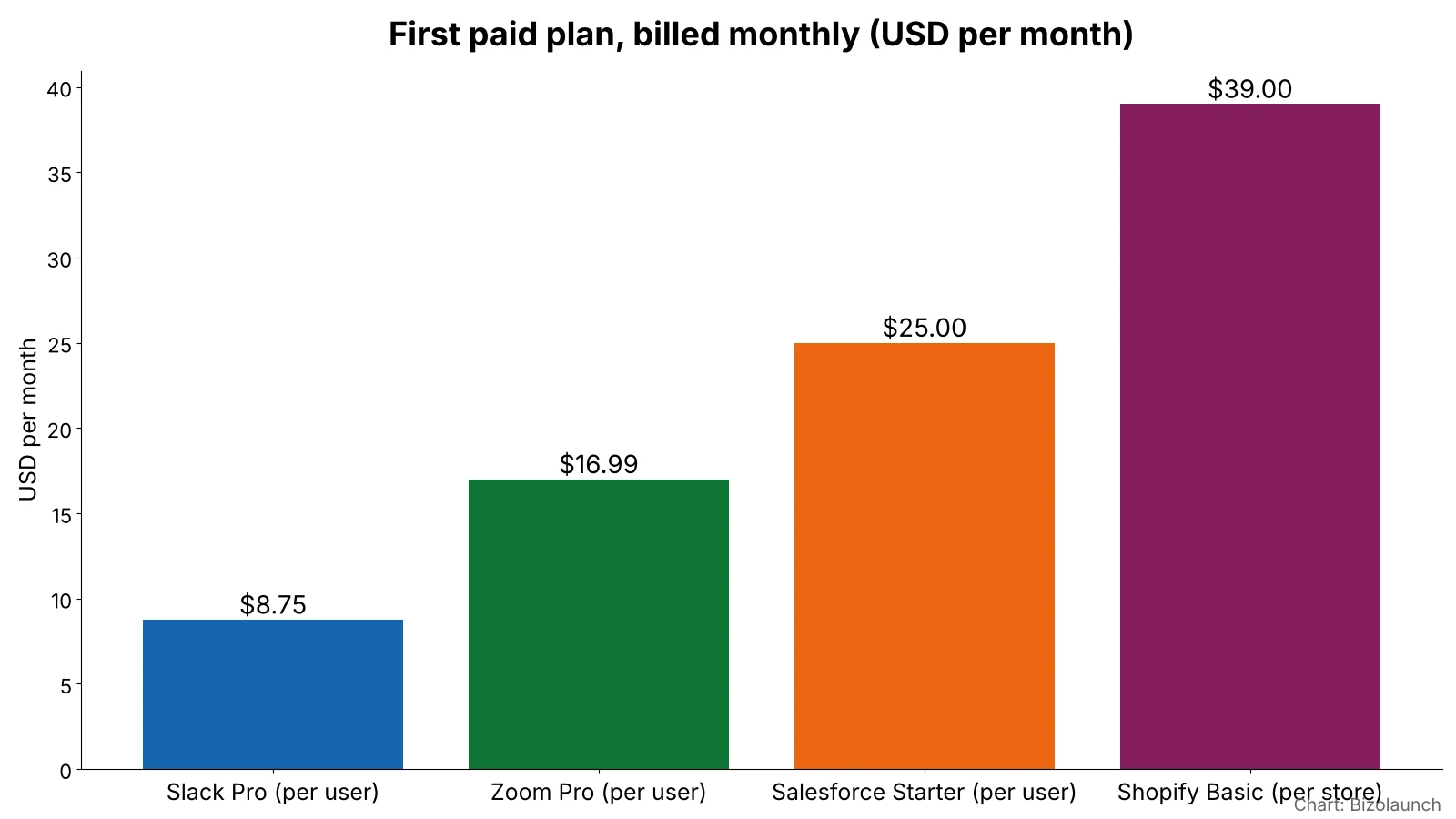
Each choice matches how the product earns trust.
Slack Limits Time, Not Features
Slack’s free plan keeps 90 days of message history. Pro extends history to 12 months, adds group huddles and removes the integration cap. Pro costs $8.75 per user per month billed monthly, or $7.25 billed yearly.
The history limit is clever. A team gets full value on day one. However, after three months of real work, older decisions and files start to vanish from view. The pain arrives just as the team depends on Slack. Slack also offers trials of paid plans. New workspaces get a 50% discount for 3 months on Pro or Business+ if they buy within 7 days.
Zoom Caps Meeting Length
Zoom’s Basic plan allows meetings of up to 40 minutes with up to 100 participants. Pro raises the limit to 30 hours per meeting. Pro costs $16.99 per user per month billed monthly, or $14.16 billed yearly.
A 40-minute cap is enough for a quick call and too short for most client workshops. So free users who run paid work hit the wall often, while casual users never pay and still spread the product to everyone they invite.
Salesforce Runs a 30-Day Trial
Salesforce offers a 30-day free trial of its CRM with no credit card required. After that, Starter Suite starts at $25 per user per month, and Pro Suite starts at $100 per user per month with an annual contract.
A CRM only shows its value once a team has loaded contacts and run deals through it. Thirty days gives a sales team time to do that. A free-forever CRM tier would also attract many tiny users who cost money to support.
Shopify Pairs a Short Trial With a $1 Bridge
Shopify gives 3 days free, with no card needed. Then it charges $1 a month for 3 months on most plans. After the offer, Basic costs $39 a month billed monthly, or $29 billed yearly.

Three days is too short to launch a store. So the $1 months work as an extended paid trial. The merchant has entered card details, built a store and maybe made sales by the time full price applies. By then, leaving costs the merchant real work, and the price so far was tiny.
Compare the Two Models Side by Side
| Factor | Free trial | Freemium |
|---|---|---|
| Time limit | Fixed, such as 3 days at Shopify or 30 at Salesforce. | None. The free tier lasts as long as the user wants. |
| Feature access | Full or near-full product. | A limited set, or capped usage. |
| Main goal | Convert a share of trial users fast. | Build a large user base, then upgrade a small share. |
| Cost to serve free users | Short-lived, so lower. | Ongoing, so higher. |
| Sales support | Easy to add calls during the trial. | Hard to give every free user attention. |
| Viral spread | Limited to the trial window. | Free users invite others for months. |
| Biggest risk | Users run out of time before they see value. | Users find the free tier good enough forever. |
Our guide to SaaS pricing models explains how each of these fits with flat, per-seat and usage-based pricing.
Choose Free Trial When These Things Are True
A trial is usually the better pick in five cases:
- Setup takes effort. Products that need data imports, integrations or training show value only after work. A deadline pushes users to do that work.
- Each user costs you money. If every account runs costly AI calls, storage or support, a forever-free tier gets expensive.
- Buyers are teams with budgets. Business buyers expect to evaluate, then pay. A trial fits that process.
- You sell with calls or demos. Sales reps can follow up during the trial window, while interest is high.
- The product has few users per account. A tool used by one finance manager will not spread by invitation.
Then decide on the credit card question. A card at sign-up adds friction, so fewer people sign up, but each one has shown intent. No card brings more sign-ups, and more of them drift away. Salesforce and Shopify both skip the card at sign-up.
If you take a card and auto-bill after the trial, follow the subscription rules in your market. Our explainer on auto-renewal laws for subscription businesses covers the notice and cancellation rules.
Read also: SaaS Pricing Models: 7 Ways Software Firms Charge
Choose Freemium When These Things Are True
Freemium works best in a different set of cases:
- The product spreads through use. Chat tools, meeting tools and shared docs pull in new users every time someone invites a colleague.
- Free users cost little. Your cost per free account must stay tiny, or the free tier eats your margin.
- A natural limit exists. Slack’s 90-day history and Zoom’s 40-minute cap hurt heavy users and leave light users happy.
- The market is large. Freemium converts a small share of a huge base. In a niche with only a few thousand buyers, that share is too small.
- You can sell up to teams. Many freemium products earn their money when a free individual becomes a paid team.
Write Free-Tier Limits That Push Upgrades
A good free limit follows usage, not features nobody needs. Ask what heavy users do that light users never do. Then cap that.
- Time-based limits cap history or storage age, like Slack’s 90 days.
- Length limits cap each session, like Zoom’s 40 minutes.
- Count limits cap seats, projects, integrations or records.
- Team limits keep admin tools, single sign-on and user management on paid plans. Slack does this too.
Avoid limits that block the first win. If a new user cannot finish one real task for free, they leave before they ever see the paid plan.
Consider the Hybrid Model Many Companies Use
Some SaaS firms combine both. A permanent free tier brings people in. Then a time-limited trial of the paid plan shows what they are missing. Slack does this: free plan users can try paid plans, and new workspaces get a launch discount.
Another hybrid is the reverse trial. New users get the top plan free for a set period, then drop to the free tier unless they pay. They taste the paid features first, so the downgrade feels like a loss. It works well when the paid features are easy to see in daily use.
Track the Metrics That Show Which Model Works
Whichever model you pick, measure the same funnel. These are the numbers we would put on one dashboard.
| Metric | How to calculate it | What it tells you |
|---|---|---|
| Sign-up to activation rate | Users who reach the first value moment ÷ all sign-ups. | How many people get far enough to see value. |
| Free-to-paid or trial-to-paid conversion | New paying accounts ÷ sign-ups in the same group. | How well the model turns users into revenue. |
| Time to convert | Days from sign-up to first payment. | How long your trial should really be. |
| Cost per free account | Hosting, support and AI costs ÷ free accounts. | If the free tier is affordable. |
| Paid churn in the first 90 days | Early cancellations ÷ new paid accounts. | If converts were pushed in too soon. |
Define the activation moment for your product first. For a CRM, it might be importing contacts and logging one deal. For a chat tool, it might be ten messages between three people.
Early churn deserves extra attention. A short, aggressive trial can lift conversion and then lose those customers a month later. Our guide to calculating SaaS churn rate shows how to measure that properly.
Work Through a Revenue Example on Real Prices
These numbers are an example, not a benchmark. Swap in your own figures. Say you sell a team tool at $20 per user per month, and teams average 5 users. Each paying team brings $100 a month.
Option A: a 14-day free trial. You get 1,000 trial sign-ups a month. Say 8% become paying teams. That is 80 new teams, or $8,000 in new monthly revenue. Support for trial users costs $2 each for two weeks, so $2,000.
Option B: freemium. Removing the time limit lifts sign-ups to 4,000 a month. However, only 2% upgrade in the first 90 days. That is 80 new teams again, or $8,000 in new monthly revenue. But free users stay. If each costs $0.50 a month and 3,920 new free users stay on every month, free costs grow by $1,960 a month, every month.
Put side by side, the example looks like this:
- Monthly sign-ups: 1,000 for the trial and 4,000 for freemium.
- Conversion: 8% for the trial and 2% for freemium.
- New paying teams: 80 in both cases.
- New monthly revenue: $8,000 in both cases.
- Cost of free users: $2,000 once per trial group, against $1,960 more every month for freemium.
In this example, the trial wins on cost. Freemium only wins if its free users invite enough new people, or upgrade later, to cover the growing free base. For instance, if each free team brings in one extra sign-up a quarter, freemium sign-ups compound and the picture changes.
So run your own version of this table before you choose. The deciding inputs are your cost per free user and how much invitation-driven growth you really see.
Map Out a 14-Day Trial Day by Day
A trial is a short sales cycle, so plan each day of it. This schedule works for most B2B tools with a 14-day trial. Stretch it for a 30-day trial.
- Day 0: sign-up. Ask for as little as possible. Then drop the user straight into the one task that shows value, such as importing contacts or creating a first project.
- Day 1: first email. Send one short tip that moves them toward activation. Link to the exact screen, not your help centre home page.
- Day 3: check activation. If the user has not hit the activation moment, send a short video or offer a 15-minute call.
- Day 7: show progress. Tell them what they have built so far, such as “You have 120 contacts and 4 open deals.”
- Day 10: name the price. Show the plan they would need and what it costs. Surprises at the paywall cause drop-off.
- Day 13: reminder. Say the trial ends tomorrow and what happens to their data.
- Day 15: grace period. Keep their data for a set time, and make it easy to come back.
For freemium, the same idea applies to usage limits. Warn users when they reach 80% of a cap, and show the paid plan at that moment. A heavy user hitting a wall is your best upgrade lead.
Read also: SaaS Onboarding Email Examples: 9 to Send, and When
Avoid the Mistakes That Sink Both Models
- A trial too short to reach value. If setup takes a week, a 7-day trial wastes most of it. Measure time to activation, then set the trial longer than that.
- A free tier too generous. If small teams never hit a limit, they never pay. Check how many free accounts use more than 80% of a cap.
- A free tier too stingy. If users cannot finish one real task, they leave before they see the product work.
- No onboarding emails. Trial users left alone often never reach the first value moment. Send help on day 1, 3 and 7. Our SaaS onboarding email examples give templates you can adapt.
- Changing the model without a test. Run the new model on a share of new sign-ups first. Compare the metrics table above after 60 to 90 days.
Questions Founders Ask About Trials and Freemium
Is freemium better than a free trial for SaaS?
Neither is better everywhere. Freemium works for products that spread through invitations and cost little per free user. Free trials work for products with real setup work, higher costs per user and buyers who expect to evaluate and pay.
How long should a SaaS free trial be?
Long enough for most users to reach the first value moment. Salesforce gives 30 days for its CRM, while Shopify gives 3 days plus 3 months at $1. Measure your own time to activation and add a margin.
Should a free trial require a credit card?
It depends on your goal. Requiring a card cuts sign-ups but usually filters for serious buyers. Skipping the card brings more sign-ups and needs better onboarding to convert them.
Can I switch from freemium to a free trial later?
Yes, but plan the change for existing free users. One option is to keep current free users on their old plan and apply the new model only to new sign-ups.