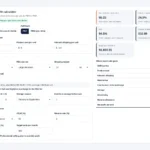
SpeedVitals is a website speed testing tool built around Core Web Vitals, the Google metrics for how fast and stable a page feels. It is one of the cheapest ways to test speed from many countries at once, with a free plan of 15 speed tests a week and paid plans from $19 a month. You can run a page speed test from up to 35 locations, check Time to First Byte (TTFB) from 40+ locations, monitor pages on a schedule and collect data from real visitors.
However, teams that need deep debugging of slow interactions may want a pricier tool. The rest of the review covers each feature, the plans, the cost per test, the strengths and limits, and who gets the most from it.
SpeedVitals Features and Free Plan in One Table
SpeedVitals offers five tools (a speed test, a TTFB test, batch tests, monitoring and real user monitoring), and the free plan includes 15 speed tests and 15 TTFB tests a week.
| Area | What SpeedVitals offers |
|---|---|
| Website speed test | Core Web Vitals lab test from up to 35 locations and 30 devices |
| TTFB test | Server response time from 40+ locations, with cache and CDN detection |
| Batch tests | Up to 50 tests on one URL with a single click |
| Monitoring | Scheduled speed and TTFB checks with email or Slack alerts |
| Real user monitoring | Core Web Vitals from your own visitors |
| Free plan | 15 speed tests and 15 TTFB tests a week |
SpeedVitals Features for Speed Testing
The SpeedVitals features for speed testing are the website speed test, the TTFB test, batch testing, monitoring with alerts, and real user and CrUX data.
Website Speed Test
The SpeedVitals speed test loads your page from the location and device you pick, then measures Core Web Vitals. Each report has a waterfall, a resource summary, unused resources and a domain map.
- Many devices: Paid plans offer 30 devices, from older phones to desktops. So you see how a page behaves on the slow phones many visitors use.
- Fix list: Each report gives tips to speed up the page, so you know which file to fix first.
TTFB Test
The TTFB test measures how fast your server sends the first byte of a page, and SpeedVitals checks it from 40+ locations at once.
- Global view in one run: You see where your server is slow, for instance fast in New York but slow in Sydney.
- Cache and CDN detection: The test shows if a page was served from a CDN cache. A slow uncached result usually means your caching rules need work.
Batch Testing
Batch tests run the same URL from up to 35 locations with one click. Because lab scores shift from run to run, many runs give you a more reliable average.
- Faster comparisons: You can test a page before and after a change across all regions in minutes.
- Higher limits on bigger plans: Concurrent batch tests grow from 10 on the free plan to 50 on Ultimate.
Monitoring and Alerts
SpeedVitals monitoring repeats speed and TTFB tests on a schedule and alerts you when a score drops. If a score falls under the threshold you set, the alert comes by email, or by Slack on Growth plans and up.
- Weekly digest: You get a summary of all your sites’ performance over the last week.
- Long history: Data is kept for 1 month on Free and up to 2 years on Ultimate, which helps you spot slow drifts.
Real User Monitoring and CrUX Data
Real user monitoring (RUM) records Core Web Vitals from real visitors to your site. In addition, SpeedVitals shows 12 months of Google’s real-world data, and its Core Web Vitals checker lets you look up any competitor’s scores.
- Real phones and networks: You see what visitors actually get, which lab tests can miss.
- Competitor checks: You can compare your field data with other sites in your niche.
Read also: Periodic Labs Review: AI and Robots That Run Tests
SpeedVitals Pricing
SpeedVitals pricing runs from a free plan to four paid plans at $19, $49, $99 and $399 a month, and yearly billing cuts about 16% from each price.
| Plan | Monthly price | Yearly price per month | Speed tests a week | RUM page views a month | Websites |
|---|---|---|---|---|---|
| Free | $0 | $0 | 15 | None | Tests only |
| Starter | $19 | $16 | 300 | 5,000 | 1 |
| Growth | $49 | $41 | 750 | 20,000 | 3 |
| Pro | $99 | $83 | 1,500 | 200,000 | 10 |
| Ultimate | $399 | $333 | 3,500 | More | More |
Each paid plan pairs its speed test count with the same number of TTFB tests. On top of that, Growth adds 3 team members, Slack alerts and Pro test locations, while Pro adds webhook alerts and API access.
What a SpeedVitals Test Costs
A SpeedVitals speed test costs about $0.015, or a cent and a half, on the Starter, Growth and Pro plans. For example, a month holds about 4.3 weeks, so Starter’s 300 weekly tests come to about 1,290 a month for $19. TTFB tests come on top of that.
| Plan | Price per month | Speed tests a month | Cost per test |
|---|---|---|---|
| Starter | $19 | About 1,290 | About $0.015 |
| Growth | $49 | About 3,225 | About $0.015 |
| Pro | $99 | About 6,450 | About $0.015 |
Since the cost per test stays nearly flat, you pick a plan by sites, team size and RUM volume instead of by test count. By contrast, DebugBear’s Startup plan works out to about $0.03 a lab test, so SpeedVitals costs roughly half as much per test. Our DebugBear review explains what the extra money buys.
SpeedVitals Strengths and Limits
SpeedVitals is at its best on price, test locations and TTFB checks, while its limits are the free plan’s caps, the cost of team features and less depth on slow interactions.
Pros
- Free plan you can use: 15 speed tests and 15 TTFB tests a week cover a small site’s checks without paying.
- Wide location choice: Testing from 35 locations shows how a page loads for visitors far from your server.
- Low cost per test: Paid plans cost about a cent and a half per speed test.
- TTFB focus: The global TTFB test with cache detection helps you fix server and CDN problems quickly.
Cons
- Free plan limits: The free plan uses 10 devices and 10 locations, and keeps reports for only a month.
- Slack and team seats cost more: Slack alerts and team members start on the $49 Growth plan.
- Less depth on slow interactions: Teams debugging complex INP problems may need more detailed traces than SpeedVitals gives.
Who Gets the Most From SpeedVitals
SpeedVitals gives the most value to site owners with global visitors, WordPress freelancers and small teams on a budget:
- Site owners with global visitors: Testing from many regions shows where a CDN or server location is letting people down.
- WordPress freelancers: Low prices and batch tests make before-and-after checks on client sites cheap.
- Small teams on a budget: RUM from $19 a month brings real user data within reach.
For a site-wide view of failing pages, pair it with Search Console. Also, our list of Ahrefs alternatives without a subscription covers more low-cost checks, and our notes on website maintenance packages, choosing a CMS for React and Keysearch alternatives may help too.
Read also: GPT-6.1 Terra: OpenAI’s Cheap Model That Clicks and Types
Is SpeedVitals Worth It?
Yes, SpeedVitals is worth it for most small sites, because the free plan covers weekly checks and the $19 Starter plan adds 300 speed tests a week plus real user data for one site. If you need Slack alerts or team seats, the $49 Growth plan is the next step. However, if your main problem is a slow INP score on a complex app, a tool with deeper traces will serve you better.