Cosine now sells credit-based plans from $19 a month, with Team at $199 and Enterprise at $999, and it still offers private and air-gapped installs for big firms. Its credits do not roll over, and the agent stops when the shared pool runs dry.
For teams already on GitHub, Copilot’s cloud agent is the cheapest swap, at $10 a month on Copilot Pro. Devin works most like Cosine, taking a task and running on its own in the cloud, and Google Jules gives 15 free tasks a day. Claude Code, OpenAI Codex, Cursor, Augment Code and Kiro also take a task, work through the code and hand back a pull request.
Most of these tools bill in credits or usage pools, so two plans at the same price can buy very different amounts of work. Augment Code’s $100 Business plan covers up to 50 seats, about half the price of Cosine’s $199 Team plan.
Where Cosine Genie Stands
Cosine is now sold as an AI software engineering agent on three self-serve plans: Starter from $19 a month, Team at $199 and Enterprise at $999. Starter gives 4 million credits a month, Team gives 47 million and Enterprise gives 240 million. Extra credits cost $6.50, $5.00 or $4.50 per million, so the rate drops as the plan grows.
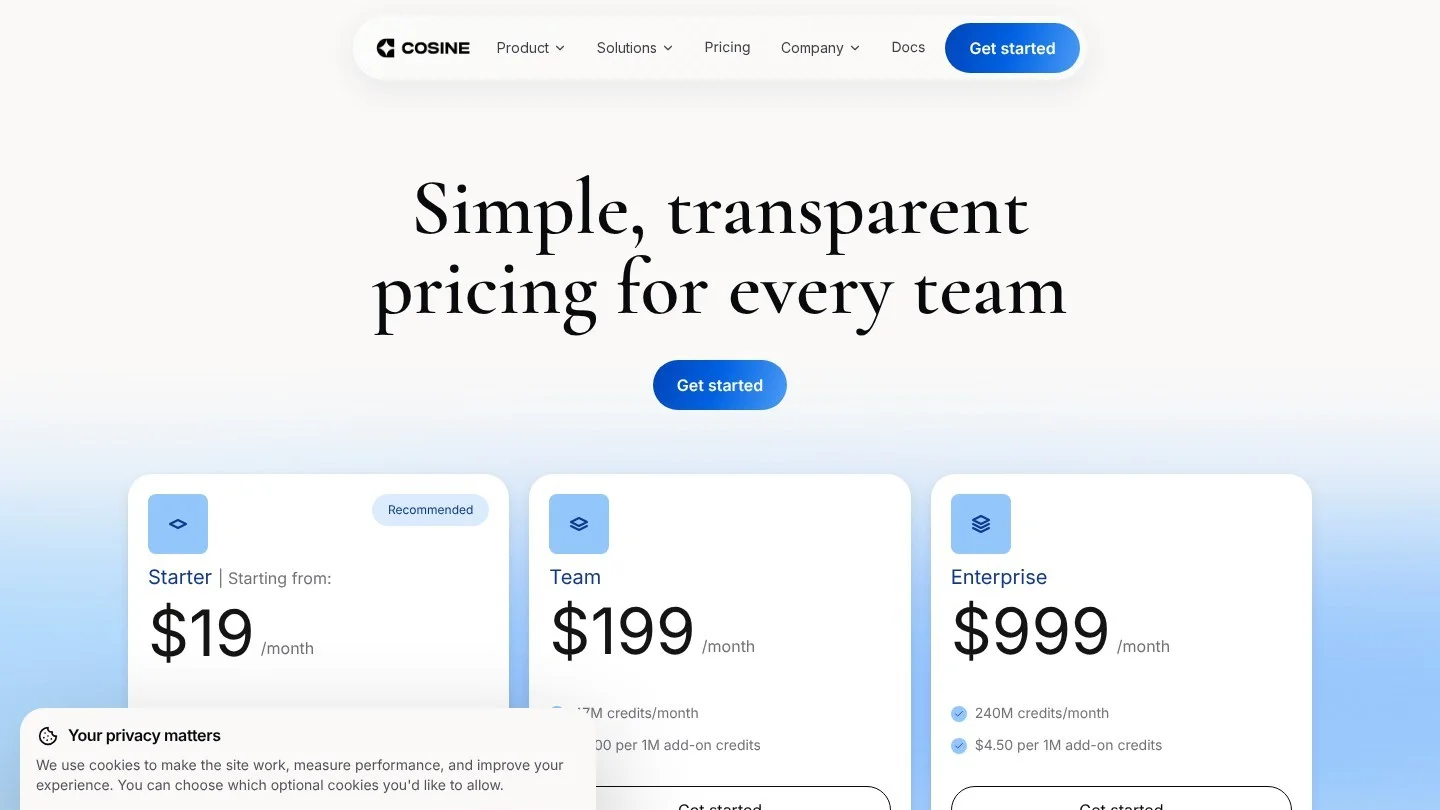
Credits pay for agent work, model calls and cloud run time, and the whole team shares one pool. However, unused credits do not roll over, and the agent stops when the pool runs dry until you top up or the month resets. For big firms, Cosine runs in its own cloud, in your private cloud or fully on-prem, including air-gapped setups with no internet link.
Cosine has also moved away from time-limited trials. In August of last year it gave new sign-ups 80 free tasks with no card needed. Today you can run it from a command line tool, a desktop app or the cloud, and it links to GitHub.
The 8 Top Cosine Genie Alternatives
The top Cosine Genie alternatives are GitHub Copilot’s cloud agent, Devin, Claude Code, OpenAI Codex, Cursor, Google Jules, Augment Code and Kiro.
1. GitHub Copilot Cloud Agent
For $10 a month, Copilot Pro gives you GitHub’s cloud agent plus 1,500 AI credits, made up of 1,000 base credits and 500 flex credits. That makes it the cheapest paid way of the eight to hand a task to an agent and get a pull request back. Above Pro, Pro+ costs $39 with 7,000 credits and the new Max plan costs $100 with 20,000.

Teams pay $19 a seat for Copilot Business, which adds 1,900 credits per user to a shared pool, or $39 for Enterprise with 3,900. Past the pool, extra use costs $0.01 per credit. The agent works inside GitHub itself, so a team whose code sits on GitLab or Bitbucket gets nothing from it.
2. Devin
Devin is the closest match to how Cosine works, because you give it a task and it runs on its own in the cloud. Its self-serve plans are Free, Pro at $20 a month, Max at $200 and Teams at $80 a month, which goes into a shared credit pool. Teams members also get up to 2 Free-mode cloud sessions at once, and admins can set up to 3 usage tiers.

The catch is that Devin does not print how much work Pro or Max actually includes, only that Pro has daily and weekly limits and Max has a weekly limit with no daily cap. That makes Devin hard to budget for any team that needs a known amount of work for a fixed fee. Big firms are billed in Agent Compute Units at a rate set in their contract.
3. Claude Code
If your team already pays for Claude, Claude Code is the easy add, because it comes bundled with every paid Claude plan. Pro costs $20 a month, or $17 a month billed yearly, while Max costs $100 and Ultra costs $200. The free Claude plan does not include it.

For teams of 2 to 150, a Standard seat costs $25 a month, or $20 on a yearly plan, and a Premium seat costs $125, or $100 yearly. Premium seats get 5 times the usage of Standard ones. A 5-person team on Standard seats pays $125 a month. Uptake has been quick, as the Claude Code adoption statistics show.
4. OpenAI Codex
ChatGPT users already have Codex, since it comes with every ChatGPT plan from Plus up. Plus costs $20 a month, Pro starts at $100 (with $200 and $500 levels) and Business costs $20 per user a month billed yearly, or $25 billed monthly. Free and Go users can also try it in the desktop app as it rolls out.
On Plus, heavy users will hit the five-hour limits fast, since the top model allows roughly 5 to 50 local messages in each five-hour window. Pro plans had no five-hour limit, and extra use can be bought with ChatGPT credits. Plenty of developers already lean on it, going by the ChatGPT usage for coding statistics.
5. Cursor
Cursor is an AI code editor first, but its Cloud Agents can take tasks and work in the background much like Cosine. The catch is the plan: the $8 Plus tier leaves Cloud Agents out, so you need Premium at $30 a month, Super at $100 or Ultra at $200. Premium gives 4 times the usage of Plus, Super 15 times and Ultra 50 times.

Team seats come in the same three levels at $30, $100 or $200 each, while Enterprise has pooled, custom usage. Yearly billing saves you two months, so Premium costs $300 a year instead of $360. You get an agent and an editor in one app, and the cost of that is leaving VS Code or JetBrains behind.
6. Google Jules
With 15 tasks a day at no extra cost, Jules is the easiest place to try an async coding agent without paying. Its base tier allows 15 tasks in a rolling 24 hours and 3 at once, Jules in Pro allows 100 a day and 15 at once, and Jules in Ultra allows 300 a day and 60 at once.

The two higher tiers come with Google AI Pro and Google AI Ultra plans rather than a separate Jules bill. In addition, Pro and Ultra users get first access to newer Gemini models. Jules has no team plan of its own and rides on Google’s personal AI plans, which leaves it best for solo developers and side projects rather than firms that need a contract.
7. Augment Code
Compared with Cosine’s $199 Team plan, Augment Code’s $100 Business plan covers up to 50 seats for about half the price. Standard costs a flat $20 a month and Business costs a flat $100, and each includes usage equal to its price. Both plans allow 50 sessions at once and carry SOC 2 Type II.
Enterprise has custom pricing with no user cap, plus SSO, SCIM, customer-managed keys and ISO 42001 for AI systems. That paperwork makes Augment the pick for large companies with strict security reviews. Smaller teams on Standard and Business get only community support and ticket help, with no named contact on call.
8. Kiro
Kiro has the clearest credit math of the eight. Pro costs $20 for 1,000 credits, Pro+ costs $40 for 2,000, Pro Max costs $100 for 5,000 and Power costs $200 for 10,000, and extra credits cost $0.04 each on every plan. The free plan gives 50 credits.

Teams pay $20 a seat with a 2-seat minimum and get 500 pooled credits per seat. Each paid plan works out to $0.02 per included credit, the same rate at every level, so a team that burns through its credits each month pays double for every top-up.
Read also: 7 Keysearch Alternatives to Find Words for Niche Sites
Pricing and Plan Limits at a Glance
GitHub Copilot Pro at $10 is the cheapest paid entry point, and Cosine Starter at $19 sits near the middle.
| Tool | First Paid Plan | Team Price | What You Get | Skip If |
|---|---|---|---|---|
| Cosine | $19 a month | $199 a month, shared pool | 4 million credits on Starter | You need credits to roll over |
| GitHub Copilot | $10 a month | $19 a seat | 1,500 AI credits on Pro | Your code is not on GitHub |
| Devin | $20 a month | $80 a month, shared pool | Daily and weekly limits, no set amount | You need a fixed budget |
| Claude Code | $20 a month | $25 a seat ($20 yearly) | Bundled with Claude Pro | You only use the free Claude plan |
| OpenAI Codex | $20 a month (Plus) | $25 a user ($20 yearly) | Roughly 5 to 50 top-model messages per 5 hours | You are a heavy user on Plus |
| Cursor | $30 a month for Cloud Agents | $30, $100 or $200 a seat | 4 times Plus usage on Premium | You will not switch editors |
| Google Jules | Base tier at no extra cost | No team plan listed | 15 tasks a day | You need a business contract |
| Augment Code | $20 a month | $100 a month, up to 50 seats | $20 of usage on Standard | You want live support on low plans |
| Kiro | $20 a month | $20 a seat, 2-seat minimum | 1,000 credits on Pro | You often need top-ups |
Seat prices can fool you, so do the sum for your own team size. For example, 5 developers cost $95 a month on Copilot Business and $125 on Claude Team Standard seats, while Cosine Team stays at $199 and Devin Teams starts at $80 in pooled credit.
Winners by Team Size and Need
The overall winner is GitHub Copilot’s cloud agent, because it costs the least and fits where most code already lives.
- Solo developer on a budget: Google Jules, with 15 free tasks a day, or Copilot Pro at $10.
- Closest swap for Cosine’s hands-off style: Devin, starting at $20 a month.
- Teams that already pay for Claude: Claude Code, from $20 a month or $17 billed yearly.
- Teams that already pay for ChatGPT: OpenAI Codex, since it comes with Plus and Business.
- Teams that want an agent inside a new editor: Cursor Premium at $30.
- Large firms with strict security reviews: Augment Code Enterprise, or stay on Cosine if you need air-gapped on-prem.
- Teams that want simple credit math: Kiro, at $0.02 per included credit on every plan.
One case still favours Cosine. If your code can never leave your own servers, Cosine’s on-prem and air-gapped install is the reason to stay. The same trade-off between hosted and self-run agents applies to Agency Swarm alternatives, where open-source frameworks give full control at the cost of more setup.
Moving Your Work Off Cosine
Moving off Cosine goes best when you run both tools side by side on real work first. Because Cosine credits do not roll over, plan the switch near the end of a billing month so you use what you have already paid for.
- Pick 10 real tickets that Cosine handled well last month, such as small bugs and test fixes.
- Give the same tickets to your top two alternatives and compare the pull requests they open.
- Check how many review rounds each pull request needed before it could merge.
- Add up the credits or messages each tool used, then match that to the plan you would need.
- Move your repo links, Slack or Jira hooks and access rules to the winner before you cancel Cosine.
New money keeps coming into AI coding agents, as the Hoplite AI coding agents funding for one of the newer players shows. Outside of code, sales and support teams face a similar choice among Microsoft Copilot Studio alternatives, Salesforce Agentforce alternatives and Freshdesk Freddy AI alternatives.
Read also: The Best Reply.io Alternatives to Try This Year
Cosine Genie Alternatives FAQs
What Is the Best Free Alternative to Cosine Genie?
Google Jules is the best free alternative, with 15 tasks a day and 3 at once on its base tier. Devin, Cursor and Kiro also have free plans, though Kiro’s, for example, gives just 50 credits.
How Much Does Cosine Cost Now?
Cosine costs from $19 a month for Starter, $199 for Team and $999 for Enterprise, with 4 million, 47 million and 240 million credits a month. Custom private installs are priced by sales.
Is Devin Better Than Cosine?
In style, Devin is the closest match, and its $80 Teams plan costs less than Cosine’s $199 Team plan. However, Cosine shows exact credit amounts and offers on-prem installs, while Devin does not list its usage amounts.
Which Cosine Alternative Works Best for Enterprise Security?
Augment Code Enterprise is our pick, with SSO, SCIM, customer-managed keys and ISO 42001. If your code must stay fully offline, though, Cosine’s air-gapped install is still the better choice.