Twenty-five minutes. That is all one Pomodoro asks of you. Set a timer, work on one task until it rings, take a 3 to 5 minute break, and repeat. After four rounds, take a longer break of 15 to 30 minutes. For remote workers, the method does something extra: it puts walls around your time when your office has none.
At home, nobody sees you are busy. Chat pings, family, deliveries and the fridge all compete for the same hour. This guide goes back to Francesco Cirillo’s original rules for the technique, adapts them for home offices, chat tools and video-call days, and gives you three sample schedules to copy.
Follow Cirillo’s Original Rules First
Cirillo came up with the idea in the late 1980s, during his first years at university. He defined the technique in 1992, began teaching it to individuals in 1998 and to teams in 1999. His paper lays out the basic process in plain steps.
- Choose the task you will work on.
- Set the timer for 25 minutes.
- Work on that task until the timer rings.
- Take a short break of 3 to 5 minutes.
- After every four Pomodoros, take a long break of 15 to 30 minutes.
Two rules carry most of the weight. The first is that a Pomodoro is indivisible. Cirillo writes that it “can’t be interrupted; it marks 25 minutes of pure work.” If you abandon one halfway, it does not count. You start a fresh one. The second rule is short: “Once a Pomodoro Begins, It Has to Ring.”
Cirillo also set five goals. He wants you to tackle them in order.
| Order | Goal | What it means for a remote worker |
|---|---|---|
| 1 | Find out how much effort an activity needs. | Count how many Pomodoros your usual tasks take. |
| 2 | Cut down on interruptions. | Track every ping and knock, then reduce them. |
| 3 | Estimate the effort for activities. | Plan your day in Pomodoros, then compare. |
| 4 | Make the Pomodoro more effective. | Get more out of each round, for example with a short review at the start. |
| 5 | Set up a timetable. | Fix the hours you work and stop on time. |
Most people jump straight to goal 5. However, the order matters. Without a few weeks of counting, your estimates will be guesses.
Adapt the Pomodoro Length to Your Work
The 25-minute default is a starting point. The best Pomodoro runs 20 to 35 minutes, and 40 at most. Teams that Cirillo worked with tried hour-long, two-hour, 45-minute and 10-minute Pomodoros before settling on 30 minutes.
So test lengths for a week each. Remote work makes experiments painless, because nobody else depends on your timer. Use these as guides:
- 25 minutes for email, admin and tasks you tend to avoid. Short rounds make a start feel small.
- 30 to 35 minutes for writing, coding and design. Deep tasks need a few minutes to warm up.
- Keep breaks proportional. A 35-minute round still needs a short break. Cirillo adds that breaks between sets should not regularly exceed 30 minutes.
Whatever length you choose, keep it the same for a full week. Changing it every day makes your counts useless.
Handle Remote Interruptions the Cirillo Way
Remote workers face two kinds of interruption, and Cirillo treats them differently.
Write Down Internal Interruptions and Keep Going
An internal interruption comes from you: the urge to check chat, order something, or look up a fact. Cirillo’s fix is to mark an apostrophe (‘) on your sheet for each one. If the new task is urgent today, add it to an “Unplanned and Urgent” list. If it can wait, add it to your activity list. Then return to the task until the timer rings.
At home, this rule does most of the work. The thought is captured, so your brain lets it go. At the end of the day, count the apostrophes. That count is your baseline for goal 2.
Use Inform, Negotiate, Call Back for Other People
External interruptions come from other people. Think of a manager on chat, a client call or a family member at the door. Cirillo marks each one with a dash (-) and uses a three-step strategy:
- Inform the person that you are in the middle of something.
- Negotiate a time to deal with it, such as “in 20 minutes.”
- Call back at the agreed time.
For remote teams, turn this into a status habit. Set your chat status to “Focusing until 10:25” during each Pomodoro. Then reply in your break. Most messages can wait 25 minutes, and the sender already knows when you will answer.
If an interruption truly cannot wait, Cirillo’s rule is simple. Void the Pomodoro, mark it, take a short break and start a new one. Do not pretend the round still counts.

Read also: Remote Employee Onboarding Checklist: Day One to Day 90
Agree on Pomodoro Rules With Your Team
A Pomodoro works best when your team knows about it. Otherwise, a 25-minute silence can look like you have gone missing. Before you start, agree on a few rules with your manager:
- Response times. Chat replies within 30 minutes during work hours, unless something is marked urgent.
- An urgent channel. Agree on one way to reach you instantly, such as a phone call, for true emergencies.
- Visible status. Show focus blocks in your calendar or chat status.
- Meeting-free blocks. Protect at least one two-hour morning block for two full sets.
Teams that share a timetable can even run Pomodoros together. Cirillo’s paper notes that he taught the technique to teams from 1999, so it was never meant only for solo work. New remote hires can get these rules in their first week. Our remote employee onboarding checklist has a place for team working norms.
Copy One of Three Sample Remote Schedules
These three schedules use Cirillo’s timings. Each uses 25-minute rounds, 5-minute short breaks and a long break after every fourth round. Pick the one closest to your week, then adjust it.

Schedule 1: The Meeting-Light Day
This day has three full sets and 12 Pomodoros, or 300 minutes of focus.
| Time | Block |
|---|---|
| 9:00 to 10:55 | Set 1. Four Pomodoros on your main task. |
| 10:55 to 11:20 | Long break. Walk, stretch or make coffee. |
| 11:20 to 13:15 | Set 2. Four Pomodoros, same task or the next one. |
| 13:15 to 14:00 | Lunch away from the screen. |
| 14:00 to 15:55 | Set 3. Four Pomodoros on smaller tasks. |
| 15:55 to 16:15 | Long break. |
| 16:15 to 17:00 | Email, chat replies and tomorrow’s plan. |
Schedule 2: The Meeting-Heavy Day
Meetings run from 10:00 to 12:00 and from 14:00 to 15:30. Pomodoros fill the gaps, giving 8 rounds, or 200 minutes of focus.
| Time | Block |
|---|---|
| 9:00 to 9:55 | Two Pomodoros to prepare for the morning meetings. |
| 10:00 to 12:00 | Meetings. Keep a notes file for follow-up tasks. |
| 12:00 to 13:00 | Lunch. |
| 13:00 to 13:55 | Two Pomodoros on meeting follow-ups. |
| 14:00 to 15:30 | Meetings. |
| 15:30 to 15:45 | Break to reset after calls. |
| 15:45 to 17:40 | One full set of four Pomodoros. |
Meetings eat focus time fast. If you want to show your manager the cost, our meeting cost calculator puts a money figure on each hour.
Schedule 3: The Split-Shift Day
This one is for parents, carers and anyone working across time zones. It gives 10 Pomodoros, or 250 minutes of focus.
| Time | Block |
|---|---|
| 7:00 to 8:55 | Set 1 before the house wakes up. |
| 9:00 to 13:00 | Family time, errands or a time-zone gap. |
| 13:00 to 14:55 | Set 2. |
| 15:00 to 20:00 | Off, or calls with colleagues in other regions. |
| 20:00 to 20:55 | Two Pomodoros to close loops for the next day. |
Track Your Pomodoros on Paper or in an App
Cirillo used three paper sheets, and they still work at a home desk.
- To Do Today: Today’s tasks in priority order, plus an “Unplanned and Urgent” section at the bottom.
- Activity Inventory: A running list of every task that comes up, each with a Pomodoro estimate.
- Records: Date, task, estimated and actual Pomodoros, and notes. This is where you learn how long things really take.
Paper has one big benefit at home. You do not open a screen full of notifications just to start your timer. Even so, many remote workers want digital tracking, especially if they bill clients by the hour.
Compare Pomodoro Tools and What They Cost
| Tool | Pomodoro use | Price |
|---|---|---|
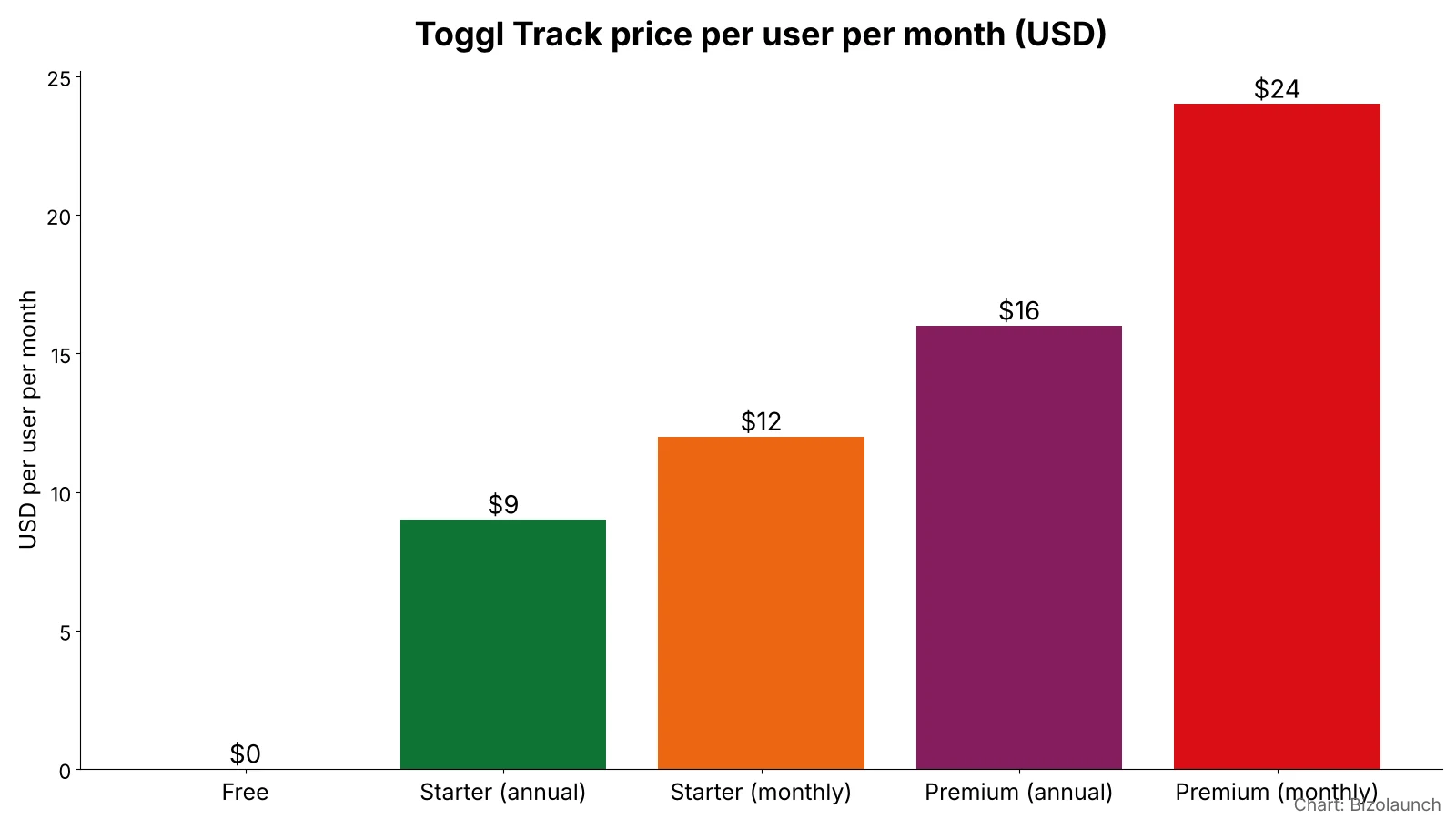
| Toggl Track | It adds a Pomodoro mode to the browser extension and apps. Each session is logged against a project. | Free plan for up to 3 users. Starter is $9 per user per month billed yearly, or $12 monthly. |
| Focusmate | Video co-working with another person for a set session, which adds outside accountability. | Basic allows 3 sessions a week. Turbo allows unlimited bookings, charged monthly. |
| Paper sheets and a kitchen timer | Cirillo’s original setup, with no screen at all. | The cost of a timer and a notebook. |

Toggl’s desktop app defaults to 25 minutes of work and a 5-minute break, and you can set custom lengths in the desktop and mobile apps. On mobile, you can also let the next round start by itself. Premium costs $16 per user per month billed yearly, or $24 monthly, and comes with a 30-day free trial.
Focusmate works differently. You book a session and work alongside another person on video. That fills the gap a remote worker feels most, which is having nobody around who notices if you drift.
If you mostly need notes during meetings and Pomodoro gaps, our list of note-taking apps for teams covers tools that sync across devices.
Measure Your First Two Weeks on the Records Sheet
Cirillo’s first goal is to find out how much effort your tasks really take. So for two weeks, do not try to work faster. Just count.
At the end of each day, copy each task into your Records sheet. Note three numbers: the Pomodoros you estimated, the Pomodoros it took and the interruptions you marked. A remote worker’s Tuesday might look like this.
| Task | Estimate | Actual | Interruptions |
|---|---|---|---|
| Client proposal draft | 4 | 6 | 5 internal, 2 external. |
| Weekly report | 2 | 2 | 1 internal. |
| Inbox and chat replies | 1 | 3 | Mostly internal. |
| Bug fix | 3 | 2 | None. |
Two patterns jump out of a sheet like this. First, the tasks with the most interruptions overran the most. Second, inbox time was badly underestimated, because chat kept pulling the worker back. Neither shows up on a normal to-do list.
After two weeks, add up the totals. If you estimated 50 Pomodoros and used 65, plan 30% more time for similar work. Then move to goal 2 and work on the interruption count. Our team meeting agenda template can also trim the meeting time that eats into your rounds.
Set Up Your Home Desk for Pomodoro Work
The method fails fast in a bad setup. A few changes help:
- Put the phone out of reach. Use a separate timer, or keep the phone face down across the room.
- Close everything except the task. One window per Pomodoro is a good rule.
- Make breaks physical. Stand up, refill water, look out of a window. Do not spend breaks on social media, or the next round starts tired.
- Signal to the household. A closed door, headphones or a small sign tells family you are mid-round.
- End the day with your Records sheet. Five minutes of review shows where time went and sets tomorrow’s first task.
Read also: 25 Remote Jobs Without Experience and What They Pay
Fix the Common Pomodoro Mistakes Remote Workers Make
- Skipping breaks when in flow. It feels productive, but the long afternoon pays for it. Cirillo built breaks into the method for a reason.
- Counting half-finished rounds. A voided Pomodoro does not count. Honest records make your estimates better.
- Using breaks for chat catch-up only. Some replies are fine. However, a break spent reading 40 messages is not a break.
- Planning more Pomodoros than you have. Most remote days have fewer free hours than you think. Count meetings first, then plan.
- Giving up after two days. The first week mostly teaches you how often you are interrupted. That is the point of goal 2.
If you want to work fewer days in the long run, focused hours make that easier to argue for. Our list of jobs with four-day work weeks covers roles where that is already common.
Remote Workers’ Questions About the Pomodoro Technique
Does the Pomodoro Technique work for remote jobs with lots of meetings?
Yes, if you plan Pomodoros around the meetings. On a meeting-heavy day, aim for two-round blocks in the gaps and one full set when the calls end. The sample meeting-heavy schedule still finds 200 minutes of focus.
Can I change the 25-minute length?
Yes. Cirillo’s own paper says a Pomodoro works best at 20 to 35 minutes, with 40 as the upper limit. Test one length for a full week before you change it.
What do I do if my manager messages during a Pomodoro?
Use inform, negotiate, call back. Reply in your break, or set your status to show when you will answer. If it is a real emergency, void the round and deal with it.
How many Pomodoros a day is realistic at home?
Our three sample schedules land between 8 and 12 rounds, or 200 to 300 minutes of focused work. That leaves room for meetings, chat and admin. If your Records sheet shows fewer than 6 rounds on most days, look at interruptions before you add hours.
Is a Pomodoro app better than a kitchen timer?
Neither is better for everyone. An app like Toggl Track logs your sessions against projects, which helps if you bill clients. A kitchen timer keeps you away from the screen, which helps if notifications are your main problem.