Appointment software for tattoo artists books your sessions, takes deposits and keeps consent forms in one place. The best appointment software for most tattoo artists is Porter, a tattoo-built tool that takes deposits at booking and sends reminders. On its $65 Artist Pro plan, it also handles digital waivers with ID upload. If you want to pay nothing, Square Appointments Free has prepayments and reminders. And if you want an app to send you new clients, compare Fresha, Booksy and Vagaro.
Tattoo bookings also work differently from salon bookings. A session often follows weeks of messages about size, placement and reference images. It can last most of a day, so an empty chair costs hours of income you cannot win back. That is why the nine tools here are compared on deposits, waiver forms, design references and no-show fees. All prices are in US dollars for October 2026. After the tool reviews, you get a cost example for a solo artist and advice for solo artists and studios.
Best Tattoo Booking Software by Need and Price
- Porter is the best tattoo-built pick. It starts at $35 a month, and automated waivers come on the $65 plan.
- Square Appointments Free is the best free option, since it costs $0 and still has prepayments and reminders.
- In the solo-artist cost example, Fresha is cheapest at about $257 a month, just ahead of Square Free at $266.
- Waivers often cost extra, so check the tier. GlossGenius, for example, adds them from its Gold plan.
- Marketplace fees add up too. Booksy takes 30% of a new client’s first visit when that client books through Boost.
Tattoo Booking Software Compared on Deposits, Waivers and Price
All nine tools take deposits, but only Porter, Venue Ink and Bookedin were built for tattoo work. Three of them can also be used free: Square, Bookedin and Venue Ink. The table gives each entry price per month in October 2026, how deposits work and the tattoo features that matter.
| Tool | Entry price | Deposits | Tattoo features | Typical user |
|---|---|---|---|---|
| Porter | $35 (Artist Essentials) | Collected at booking | Digital consent and waivers with ID upload; automated waivers on Artist Pro ($65) | Artists who want a tattoo-built system |
| Venue Ink | Free for independent artists (clients pay a 10% fee); Solo Pro $50 | Deposit-first booking through Stripe | Custom forms for size, placement and reference images; flash uploads | Artists who sell flash |
| Bookedin | Free up to 20 bookings a month; paid from $20 | Booking confirmed only after deposit | Reference images, placement and deposit history in client profiles | Solo artists on a tight budget |
| Square Appointments | $0 (Free); $29 (Plus) | Prepayments on all plans | Contract sending on all plans; cancellation fees on Plus and Premium | Artists who want free software |
| Fresha | $19.95, plus $14.95 per extra team member | Deposits per artist or service | Signed waivers, ID photos and client reference uploads | Studios that want marketplace bookings |
| Booksy | $29.99, plus $20 per extra staff member | Deposits and cards on file | Custom digital forms and liability waivers in the base plan | Artists who want a client marketplace |
| Vagaro | $23.99 for six months, then $30 | Built-in deposits | Extra staff at $10 a month each, up to seven | Shops that also offer piercing or beauty services |
| GlossGenius | $24 billed yearly or $28 monthly (Standard) | Deposits and card-on-file rules | Forms and Waivers from the Gold plan ($48 billed yearly) | Artists who want a polished booking site |
| Acuity Scheduling | $16 billed yearly (Emerging) | Through Stripe, Square, PayPal or Venmo | Intake forms | Artists who want a simple scheduler |
The 9 Best Appointment Software Options for Tattoo Artists
The nine best options are Porter, Venue Ink, Bookedin, Square Appointments, Fresha, Booksy, Vagaro, GlossGenius and Acuity, in that order. The first three were made for tattoo shops. The rest are general booking tools that also take deposits.
1. Porter: Best Tattoo-Specific Booking Platform
Porter is the best tattoo-specific booking tool, and its plans grow the way a tattoo career does. Artist Essentials costs $35 a month. It covers calendars, deposits, payments, reminders, follow-ups after each session, chat and reports. Then Artist Pro, at $65 a month, adds automated waivers and Porter Marketing. It also gives you 100 free texts and 250 free marketing emails a month.
For shops, Studio Pro costs $250 a month. It adds multi-artist tools, commission splits, sales tax and a custom shop website. Every paid plan comes with a 30-day free trial. Clients also fill in consent forms on their phones before they arrive, with an ID upload, so nobody needs a clipboard at the front desk.
Porter users report 68% fewer no-shows and late cancellations. However, automated waivers start on the $65 plan. So on the $35 plan, you still send waivers by hand.
2. Venue Ink: Best for Artists Who Sell Flash

For artists who sell flash, Venue Ink is the best pick, because clients cannot hold a slot until they pay. Venue Ink uses deposit-first bookings with custom forms. Clients pay through Stripe, Apple Pay or Google Pay. In addition, flash uploads let you list designs at set prices.
Independent artists can use Venue Ink free, while clients pay a 10% fee on deposits and card payments. By contrast, Solo Pro costs $50 a month and adds an optional card terminal and monthly reports. Studio Pro costs $150 a month with five monthly residents or guests. Custom forms also collect tattoo size, placement and reference images. That 10% client fee is easy to miss at first, but clients will notice it on a large deposit.
3. Bookedin: Best Low-Cost Tool for Solo Artists
At $0 for up to 20 bookings a month, Bookedin is the best low-cost tool for solo artists. Its tattoo booking software has paid plans from $20 a month. The 14-day trial needs no credit card. Clients pay a deposit when they book, and the slot is held only after the payment goes through.
Each client profile holds reference images, placement details, past visits and deposits. So the design talk stays in one place. Texts and emails then go out on their own for confirmations, reminders, prep tips and aftercare. Each artist gets a separate calendar and booking link, while the owner sees every booking on one screen. A full-time artist will outgrow the 20-booking cap within a few weeks, though.
4. Square Appointments: Best Free Booking Software

With no monthly fee at all, Square Appointments is the best free booking software for tattoo artists. It makes the most sense if you already use a Square reader. Square Appointments pricing has a Free plan at $0 for one location with no staff limit. Plus costs $29 a month per location, and Premium costs $69.
Prepayments, reminders and contract sending come with every plan, so you can send a basic consent form even on Free. However, no-show fees need Plus or Premium. Custom contract fields are Premium only. On the Free plan, in-person payments cost 2.6% plus 15 cents. Online payments cost 2.9% plus 30 cents, and keyed-in payments cost 3.5% plus 15 cents.
5. Fresha: Best for Studios That Want Marketplace Bookings

Studios that want new clients from a booking app get the most from Fresha. It runs a consumer app next to its studio tools. With Fresha for tattoo and piercing, you can set deposits for each artist or service and charge cancellation fees. It also stores signed waivers and ID photos, and clients can upload references when they book. Fresha bills each bookable team member monthly with no contract, and it has a seven-day free trial.
An independent artist pays $19.95 a month, and each extra team member adds $14.95. Card fees then cost 2.29% plus 20 cents in person and 2.79% plus 20 cents online. Because the price is per member, the bill grows with every artist you add.
6. Booksy: Best for Building a Client Base Through a Marketplace

Booksy is the best tool for building a client base through a marketplace, since clients search its app for artists near them. In July 2026, the Booksy single-user plan cost $29.99 a month plus tax. Each extra active staff member added $20 a month. The base plan also has custom digital forms and liability waivers. Its no-show tools let you set a cancellation policy, take deposits online and keep cards on file.
Card fees are 2.49% plus 10 cents on the Booksy reader and 2.49% plus 20 cents with Tap to Pay. Mobile or keyed payments cost 2.69% plus 30 cents. Turning on Boost, the Booksy marketplace promotion, is free. But Booksy then takes a one-time 30% cut of the first visit of each new client it sends you. On a $400 first session, for example, that cut is $120.
7. Vagaro: Best for Shops That Also Offer Piercing or Beauty Services
Shops that also do piercing or beauty work do best with Vagaro. It is a salon and spa booking tool that many mixed studios already know. Vagaro costs $23.99 a month for the first six months and $30 a month after that. Each extra staff member adds $10 a month, up to seven. Deposits run through Vagaro Merchant Services, its own payment system. So a studio that books piercings on Vagaro can add tattoo work with no new card setup. Just plan for the jump to $30 once the six-month deal ends.
8. GlossGenius: Best for a Polished Booking Website

For a polished booking website, GlossGenius is the best choice. It is best known in beauty, but its booking site and payments work for any artist who books by appointment. With GlossGenius pricing, Standard costs $28 a month, or $24 billed yearly. That gets you a custom booking website and unlimited client messages. Gold costs $56 a month, or $48 billed yearly, for up to nine staff. Platinum costs $168 a month, or $148 billed yearly, for teams of 10 or more.
Forms and Waivers start on Gold. So a solo artist who needs digital consent forms should budget for Gold, not Standard. GlossGenius also offers no-show rules, card-on-file rules and deposits. In-person card fees are 2.4% plus 15 cents, and online invoices cost 2.9% plus 30 cents.
9. Acuity Scheduling: Best Simple Scheduler With Intake Forms

Last, Acuity Scheduling is the best simple scheduler with intake forms. It works best if you already have a card processor. Acuity costs $16 a month on the Emerging plan billed yearly. Growing costs $27 a month, and Powerhouse costs $49. Since it has no card processing of its own, deposits run through Stripe, Square, PayPal or Venmo. You then pay that processor’s fees on top of the plan.
Read also: Best Digital Twin Software for Buildings: 7 Top Picks
What Tattoo Booking Software Costs a Solo Artist
A solo artist who takes $10,000 a month in card payments pays about $257 to $283 a month in total. Fresha is the cheapest at $256.95. The example uses 40 sessions a month at $250 each. Monthly cost is the plan price plus in-person card fees. Those fees are the percentage rate times $10,000, plus the per-payment fee times 40. Only tools with a published in-person rate appear. Hardware, tax, add-ons and marketplace cuts are left out.
| Tool and plan | Software per month | Card processing | Total per month |
|---|---|---|---|
| Fresha (independent) | $19.95 | $237.00 | $256.95 |
| Square Appointments Free | $0.00 | $266.00 | $266.00 |
| GlossGenius Standard (billed yearly) | $24.00 | $246.00 | $270.00 |
| Booksy (single user, card reader) | $29.99 | $253.00 | $282.99 |
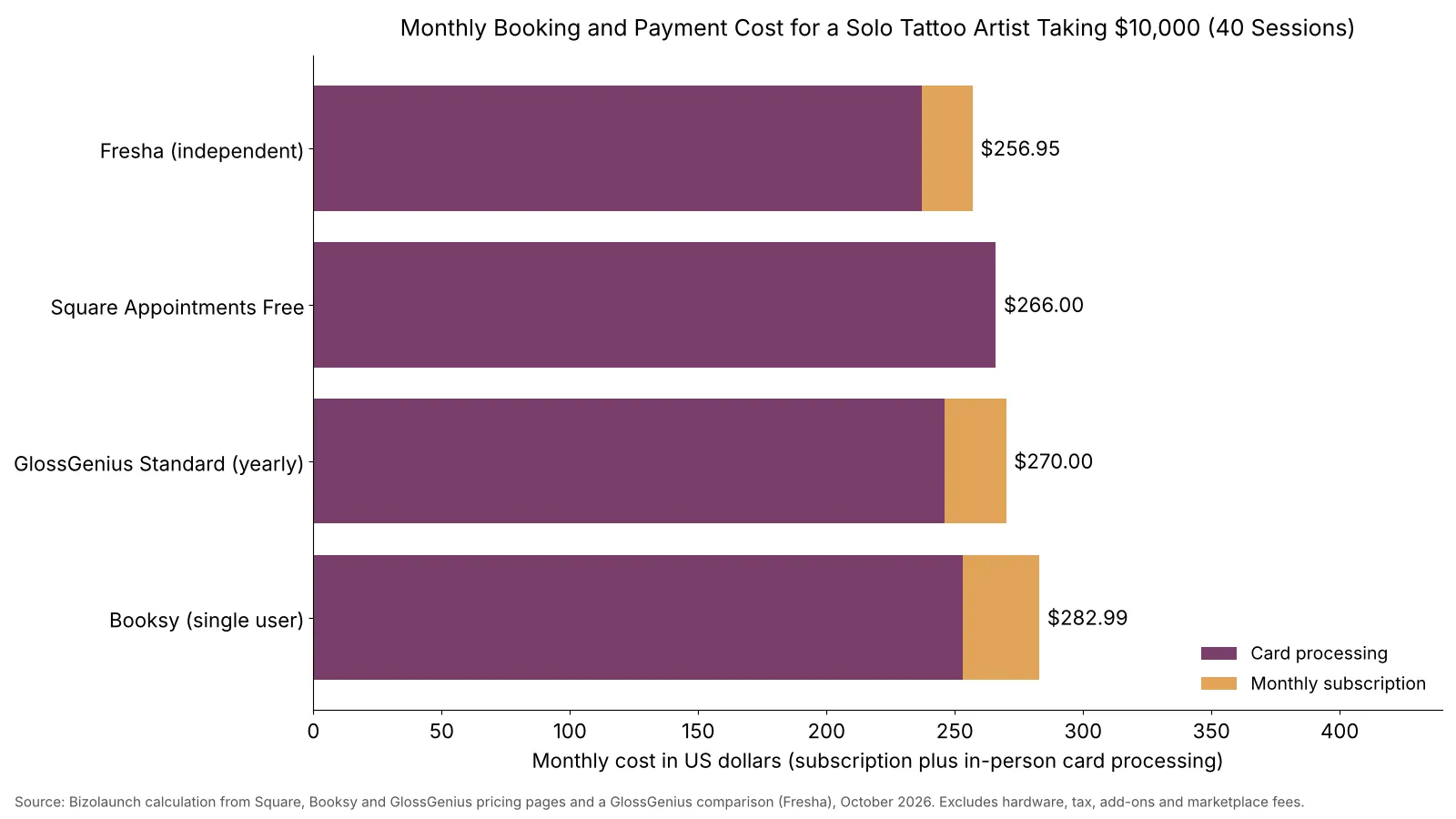
The gap from cheapest to dearest is only about $26 a month. That is small next to the cost of one missed session. So for most solo artists, the best pick is the tool with the best deposit, waiver and reminder setup, not the lowest card rate. Also keep in mind that GlossGenius waivers need the Gold plan at $48 billed yearly, which raises its total to $294.
How Deposits and No-Show Fees Protect a Tattoo Calendar
Deposits and no-show fees protect a tattoo calendar because clients pay before a slot is held. If they miss it, a saved card gets charged. For example, Bookedin holds a slot only after the deposit is paid, and Porter takes it at booking. Venue Ink will not let a client book at all without paying first. Keep in mind that card fees apply to deposits as well as final payments, so set your deposit with that cost in mind.
Suppose an artist books 40 sessions a month at $250 and two clients fail to show. Without deposits, the artist loses $500 of booked work. With a $100 deposit that is not refunded, however, the artist keeps $200 of that lost income.
No-show fees add a second layer, because the tool keeps a card on file and charges it under a written policy. Square has no-show fees only on Plus and Premium. Booksy and GlossGenius, on the other hand, include card-on-file and no-show tools. Whichever tool you choose, write the policy in plain words on the booking page. That way clients agree to it before they pay.
Consent Forms, Waivers and Reference Images by Tool

Porter, Fresha and Booksy handle consent forms and waivers best. Porter collects waivers with an ID upload before the session. Fresha stores signed waivers and ID photos in the client record, and Booksy puts digital forms and liability waivers in its base plan. Square, by contrast, sends contracts on every plan but adds custom fields only on Premium. Paper forms, meanwhile, are easy to lose and hard to find when a client returns two years later.
For reference images, Fresha lets clients upload them while booking. Venue Ink collects them through custom forms, and Bookedin keeps them in the client profile next to placement details. Before you commit, book a test session as a client. Upload two reference photos and sign the form on your phone, since that is how most clients will do it. If you send signed forms outside your booking tool, see our list of DocuSign alternatives for small business for cheaper e-signature tools.
Choosing Software for a Solo Artist or a Multi-Artist Studio
A solo artist should pick Square Appointments Free, Bookedin or Porter Artist Essentials. A multi-artist studio should pick Porter Studio Pro, Venue Ink Studio Pro or Bookedin. On your own, you need a calendar, deposits, reminders and a consent form, and little else. So Porter Artist Pro at $65 only makes sense if you want automated waivers. Also print a QR code that links to your booking page. Put it at your station, on aftercare cards and in your Instagram highlights.
A studio has a harder job, because it must split commissions, manage guest artists and see every chair at once. For that, Porter’s $250 Studio Pro plan adds commission splits and sales tax. Venue Ink’s $150 Studio Pro plan includes five monthly residents or guests. Bookedin, in turn, gives each artist a separate calendar under one owner view. To bill walk-in clients or flash days outside your booking tool, our free invoice generator makes a PDF invoice in a few clicks. You can find more software reviews in our technology section.
Read also: Tattoo Shop Name Ideas: 200 Names for Street Shops and Private Studios
Questions About Tattoo Booking Software
What App Do Most Tattoo Artists Use for Booking?
Most tattoo artists use either a tattoo-built app like Porter, Venue Ink or Bookedin, or a general app like Square, Fresha, Booksy or Vagaro. The tattoo-built apps focus on deposits, waivers and design references. The general ones, by contrast, add card readers and client marketplaces.
How Do I Take Tattoo Deposits Online?
To take tattoo deposits online, use booking software that asks for payment when the client books. Then set a deposit amount for each service or artist. For instance, Bookedin holds the slot only after the deposit is paid, and Square includes prepayments on its Free plan.
Is There Free Booking Software for Tattoo Artists?
Yes, there is free booking software for tattoo artists. Square Appointments Free costs $0 and has prepayments and reminders, and the Bookedin free plan covers up to 20 bookings a month. Venue Ink is also free for independent artists, but clients pay a 10% fee on deposits and card payments.
Which Tattoo Booking Software Includes Consent Forms?
Porter, Booksy, Fresha and GlossGenius all include consent forms. Porter adds automated waivers on its $65 Artist Pro plan, and Booksy puts liability waivers in its base plan. Fresha stores signed waivers and ID photos, while GlossGenius adds Forms and Waivers from its Gold plan.
How Can Tattoo Artists Reduce No-Shows?
Tattoo artists can reduce no-shows by taking a deposit at booking and keeping a card on file. Write the policy down, too. Automated text and email reminders help too. As a result, Porter users report 68% fewer no-shows and late cancellations. Bookedin users report a drop of more than 80%.